




Here's how it works

01. Edit your city of hugo permits online
Type text, add images, blackout confidential details, add comments, highlights and more.

02. Sign it in a few clicks
Draw your signature, type it, upload its image, or use your mobile device as a signature pad.

03. Share your form with others
Send it via email, link, or fax. You can also download it, export it or print it out.
How to use or fill out electrical city hugo with our platform

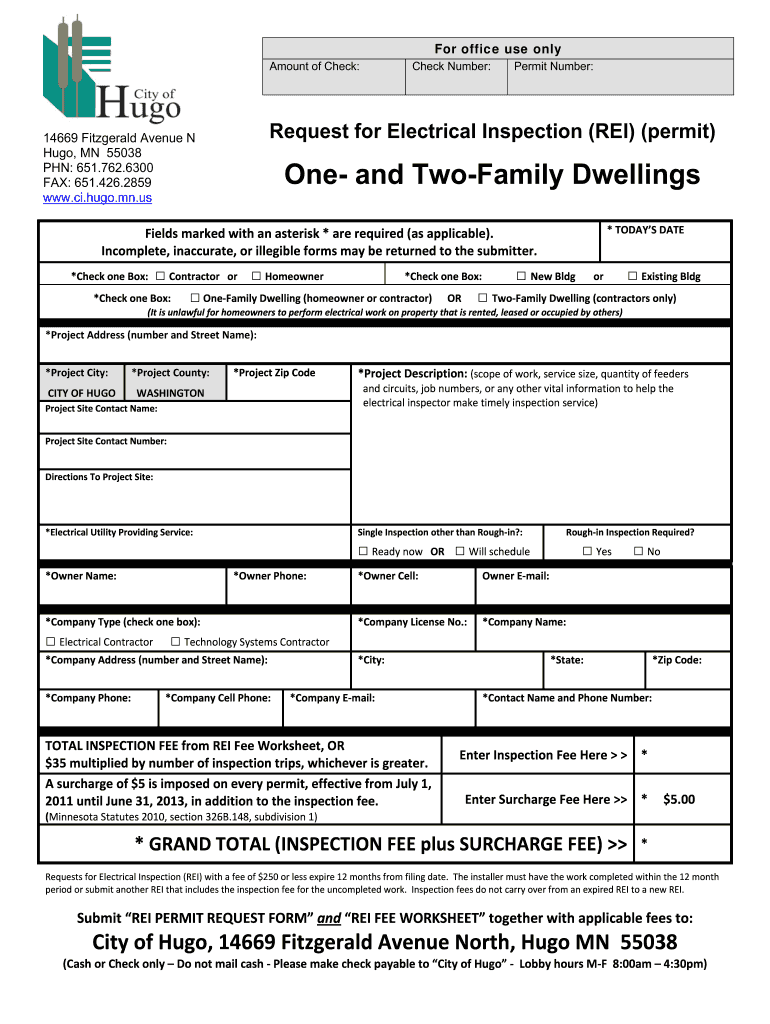
- Click ‘Get Form’ to open the electrical city hugo in the editor.
- Begin by entering today’s date in the designated field. This is crucial for processing your request.
- Select whether you are a contractor or homeowner by checking the appropriate box.
- Indicate if this is for a new building or an existing building by checking one of the boxes provided.
- Specify if it’s a one-family dwelling or two-family dwelling, ensuring compliance with regulations regarding electrical work.
- Fill in the project address, city, county, and zip code accurately to avoid delays.
- Provide a detailed project description, including scope of work and any vital information that will assist the inspector.
- Complete all required fields marked with an asterisk (*) to ensure your form is valid and accepted.
Start using our platform today to streamline your document editing and submission process for free!
Fill out electrical city hugo online
It's free
It's free
Security and compliance
At DocHub, your data security is our priority. We follow HIPAA, SOC2, GDPR, and other standards, so you can work on your documents with confidence.
Learn more




