Type text, add images, blackout confidential details, add comments, highlights and more.
02. Sign it in a few clicks
Draw your signature, type it, upload its image, or use your mobile device as a signature pad.
03. Share your form with others
Send it via email, link, or fax. You can also download it, export it or print it out.
How to use or fill out Hawaii Form APO with our platform
Ease of Setup
DocHub User Ratings on G2
Ease of Use
DocHub User Ratings on G2
Click ‘Get Form’ to open it in the editor.
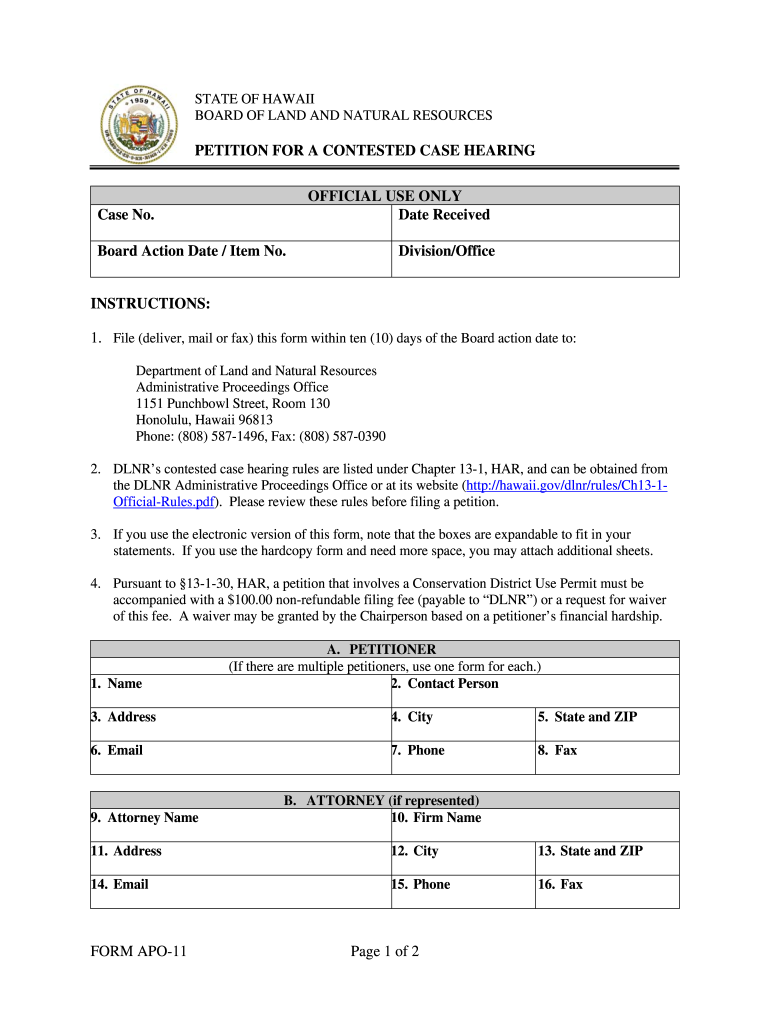
Begin by filling out the Petitioner section. Enter your name, contact person, address, city, state, ZIP code, email, phone number, and fax number as required.
If you are represented by an attorney, complete the Attorney section with their name, firm name, address, city, state, ZIP code, email, phone number, and fax number.
In the Subject Matter section, provide details about the Board action being contested including the action date and item number. Clearly articulate your interest that may be affected by this action.
Describe any disagreements you have with applications before the Board and specify any relief you seek. Additionally, explain how your participation serves public interest.
If applicable, check the boxes for submitting supporting documents now or later. Finally, print your name and sign the form before submitting it.
Start using our platform today to easily fill out Hawaii Form APO for free!
Hawaii form apo instructionsHawaii form apo pdfHawaii form apo onlineHawaii form apo downloadHawaii durable power of attorney formPower of attorney form Hawaii pdfHawaii form apo 2022Power of attorney Hawaii
Security and compliance
At DocHub, your data security is our priority. We follow HIPAA, SOC2, GDPR, and other standards, so you can work on your documents with confidence.
To apply as a freshman, transfer, international student or looking to obtain your 2nd bachelorsvisit the Undergraduate Admissions Applications pageRead more
Cookie consent notice
This site uses cookies to enhance site navigation and personalize your experience.
By using this site you agree to our use of cookies as described in our Privacy Notice.
You can modify your selections by visiting our Cookie and Advertising Notice.