Type text, add images, blackout confidential details, add comments, highlights and more.
02. Sign it in a few clicks
Draw your signature, type it, upload its image, or use your mobile device as a signature pad.
03. Share your form with others
Send tattoo liability waiver via email, link, or fax. You can also download it, export it or print it out.
How to use or fill out tattoo waiver with our platform
Ease of Setup
DocHub User Ratings on G2
Ease of Use
DocHub User Ratings on G2
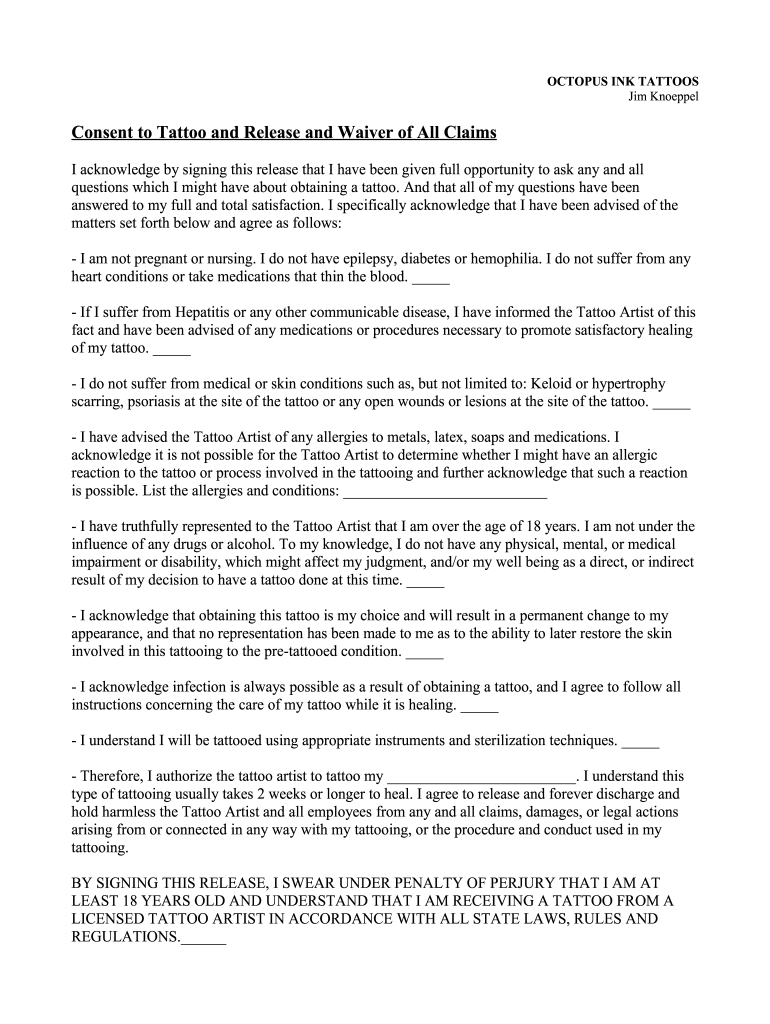
Click ‘Get Form’ to open the tattoo waiver in the editor.
Begin by filling in your personal information at the top of the form, including your name, phone number, date of birth, and address.
Carefully read through each statement regarding your health conditions. Check the boxes next to each statement that applies to you, ensuring you are honest about your medical history.
In the section for allergies and conditions, list any known allergies or medical conditions that may affect your tattooing process.
Sign and date the waiver at the bottom of the form. This confirms that you understand all terms and conditions related to receiving a tattoo.
Start using our platform today to easily complete your tattoo waiver online for free!
Dec 21, 2000 Authorization required for services listed below. Pre-Service Review is required for elective services. Only covered services will be paid.Read more
Release or waiver is a must for adults and minors. Most tattoo artists will often decline to tattoo an individual without the form. A tattoo and body piercingRead more
Cookie consent notice
This site uses cookies to enhance site navigation and personalize your experience.
By using this site you agree to our use of cookies as described in our Privacy Notice.
You can modify your selections by visiting our Cookie and Advertising Notice.