Type text, add images, blackout confidential details, add comments, highlights and more.
02. Sign it in a few clicks
Draw your signature, type it, upload its image, or use your mobile device as a signature pad.
03. Share your form with others
Send it via email, link, or fax. You can also download it, export it or print it out.
How to use or fill out franciscan steubenville transcript request with our platform
Ease of Setup
DocHub User Ratings on G2
Ease of Use
DocHub User Ratings on G2
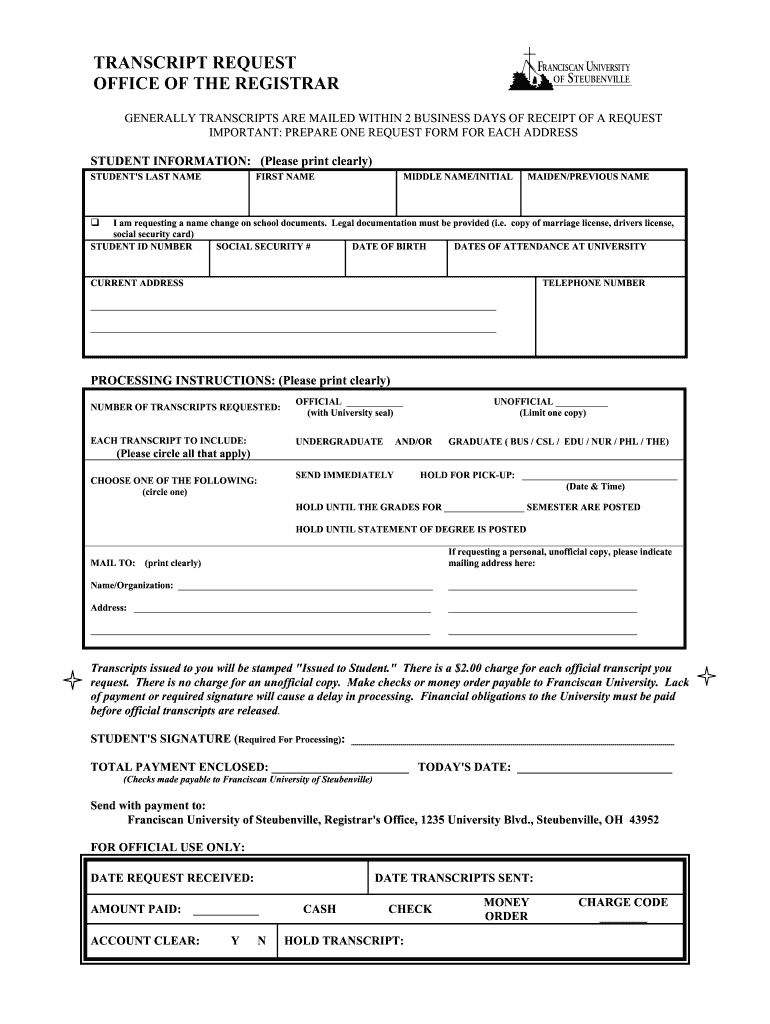
Click ‘Get Form’ to open the franciscan steubenville transcript request in the editor.
Begin by filling out the 'STUDENT INFORMATION' section. Clearly print your last name, first name, middle name/initial, and maiden/previous name if applicable. If you are requesting a name change, check the box and provide legal documentation.
Enter your student ID number, social security number, date of birth, and dates of attendance at the university. Ensure all information is accurate for processing.
In the 'PROCESSING INSTRUCTIONS' section, specify the number of transcripts requested and whether they should be official or unofficial. Circle any relevant options for undergraduate or graduate transcripts.
Choose how you would like to receive your transcripts: immediately, hold for pick-up, or hold until grades are posted. Provide a mailing address if necessary.
Complete the payment section if requesting official transcripts. Include your signature and today's date before submitting your request.
Start using our platform today to easily fill out your transcript request form for free!
Fill out franciscan steubenville transcript request online It's free
Ordering Your Transcript Visit Transcripts from Parchment Create an account if you do not already have one. Follow the instructions to complete your order.Read more
Franciscan University of Steubenville | MN Office of Higher
Request a Transcript American Indian Student Resources File a Complaint Apply With FAFSA. Apply for financial aid MN Dream Act. For students notRead more
Cookie consent notice
This site uses cookies to enhance site navigation and personalize your experience.
By using this site you agree to our use of cookies as described in our Privacy Notice.
You can modify your selections by visiting our Cookie and Advertising Notice.