LS59s-HC-Final.docx - fordham 2026

Get Form
LS59s-HC-Final.docx - fordham Preview on Page 1

Here's how it works

01. Edit your form online
Type text, add images, blackout confidential details, add comments, highlights and more.
02. Sign it in a few clicks
Draw your signature, type it, upload its image, or use your mobile device as a signature pad.
03. Share your form with others
Send it via email, link, or fax. You can also download it, export it or print it out.

How to use or fill out LS59s-HC-Final.docx - fordham with our platform

Form edit decoration
9.5
Ease of Setup
DocHub User Ratings on G2
9.0
Ease of Use
DocHub User Ratings on G2
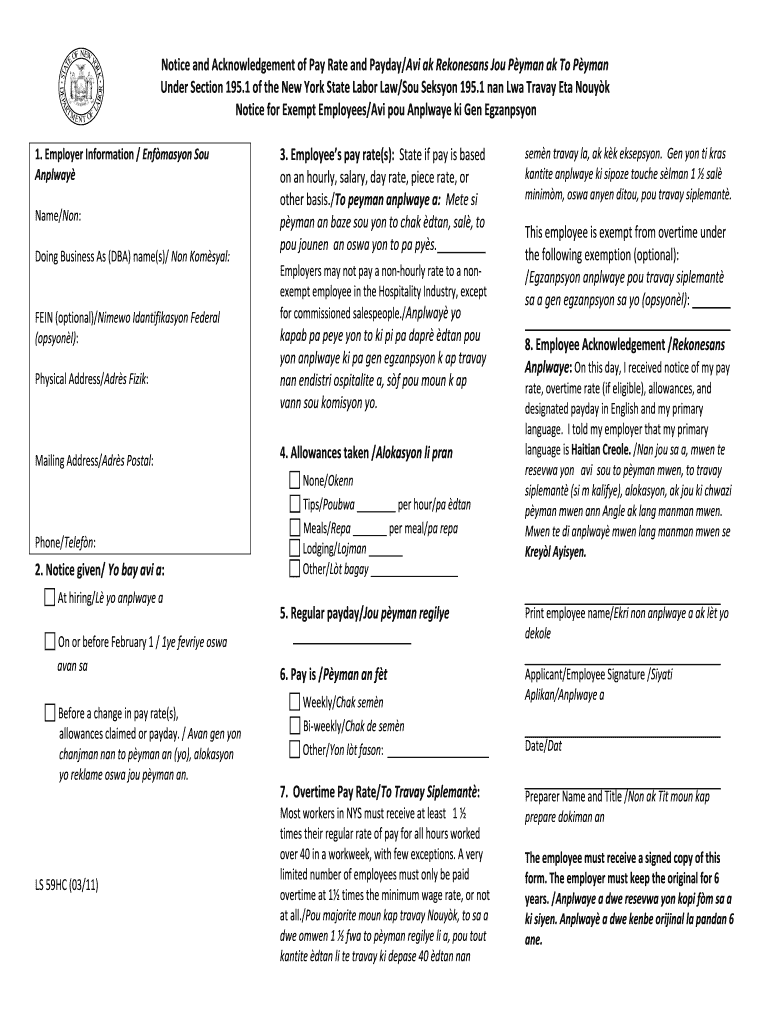
  1. Click ‘Get Form’ to open LS59s-HC-Final.docx in the editor.
  2. Begin by filling out the Employer Information section. Enter the employer's name, DBA name, FEIN (if applicable), physical address, mailing address, and phone number.
  3. In the Notice Given section, indicate whether the notice was provided at hiring or on or before February 1. Also, specify if it was given before any changes in pay rate or allowances.
  4. For Employee’s Pay Rate(s), state whether the pay is hourly, salary, day rate, piece rate, or another basis. Ensure compliance with regulations regarding non-exempt employees.
  5. Complete the Allowances Taken section by indicating any tips, meals, lodging, or other allowances applicable to the employee.
  6. In the Employee Acknowledgement section, have the employee print their name and sign to confirm receipt of their pay information in both English and their primary language.
  7. Specify the Regular Payday frequency (weekly, bi-weekly, or other) and fill in the Overtime Pay Rate as required by New York State law.
  8. Finally, ensure that both parties sign and date the document. The employee should receive a signed copy while you retain the original for your records.

Start using our platform today to streamline your document editing and form completion process for free!

be ready to get more

Complete this form in 5 minutes or less

Get form

Got questions?

We have answers to the most popular questions from our customers. If you can't find an answer to your question, please contact us.
Contact us

Many software applications are available out there for document editing and signing. DocHub is one of the most widely used online solutions that comply with all data protection and compliance standards and ensures your eSigned paperwork is legally enforceable. All you need to try it out is to sign up for an account, upload your LS59s-HC-Final.docx - fordham, fill out the requested details, and click Sign. Create your eSignature by typing, drawing it, uploading its image to your document, or scanning a unique QR code.

If you are looking for a state-specific LS59s-HC-Final.docx - fordham sample, you will find it in our DocHub Forms & Templates catalog. Use the search field, enter your form’s name, and search through the results for your state. You can also filter out irrelevant results while browsing our catalog by groups.

Security and compliance

At DocHub, your data security is our priority. We follow HIPAA, SOC2, GDPR, and other standards, so you can work on your documents with confidence.

Learn more
ccpa2
pci-dss
gdpr-compliance
hipaa
soc-compliance
be ready to get more

Complete this form in 5 minutes or less

Get form