




Here's how it works



How to use or fill out mica study abroad with our platform

- Click ‘Get Form’ to open the mica study abroad confirmation form in the editor.
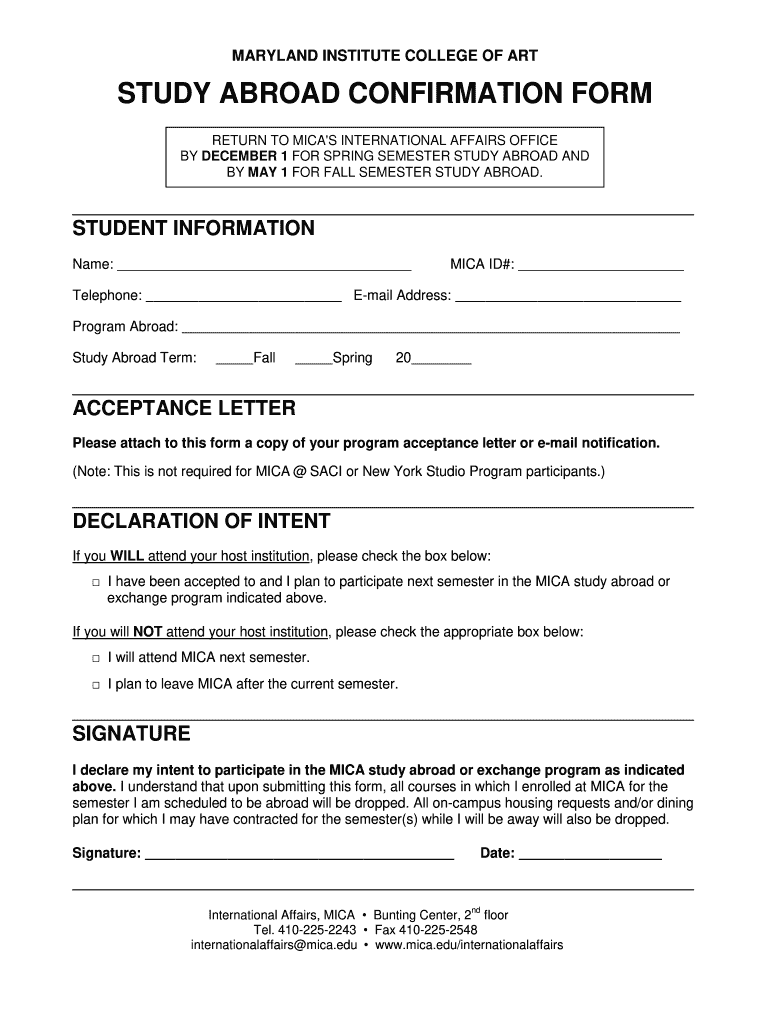
- Begin by filling out your student information. Enter your name, MICA ID#, telephone number, and email address in the designated fields.
- Specify your program abroad and select the study abroad term by checking either 'Fall' or 'Spring' and entering the year.
- Attach a copy of your acceptance letter or email notification if required. Use the upload feature in our platform to easily add this document.
- In the Declaration of Intent section, check the appropriate box indicating whether you will attend your host institution or remain at MICA next semester.
- Finally, sign and date the form to declare your intent to participate in the program. Ensure all information is accurate before submission.
Start using our platform today for free to complete your mica study abroad form effortlessly!
It's free
Got questions?
What do I need to sign my mica study abroad electronically?
Electronic document signing requires a software solution that works in compliance with data protection and eSignature regulations. DocHub is a great tool for that, because it meets all the previously mentioned requirements. Whatever method you prefer to sign your mica study abroad in DocHub, your electronic signature will be legally binding and court-admissible.
How do you edit mica study abroad on iOS?
You can easily edit and complete your mica study abroad on any iOS device. Open an internet browser of your choice, go to the DocHub site, authorize or create a new account, upload your file for editing, and make your required alterations. Our service is mobile-friendly, so utilizing its features on your smartphone will be a no-brainer, even on the first try.
Security and compliance
At DocHub, your data security is our priority. We follow HIPAA, SOC2, GDPR, and other standards, so you can work on your documents with confidence.
Learn more




