Type text, add images, blackout confidential details, add comments, highlights and more.
02. Sign it in a few clicks
Draw your signature, type it, upload its image, or use your mobile device as a signature pad.
03. Share your form with others
Send cg2015 form via email, link, or fax. You can also download it, export it or print it out.
How to use or fill out cg2015 with our platform
Ease of Setup
DocHub User Ratings on G2
Ease of Use
DocHub User Ratings on G2
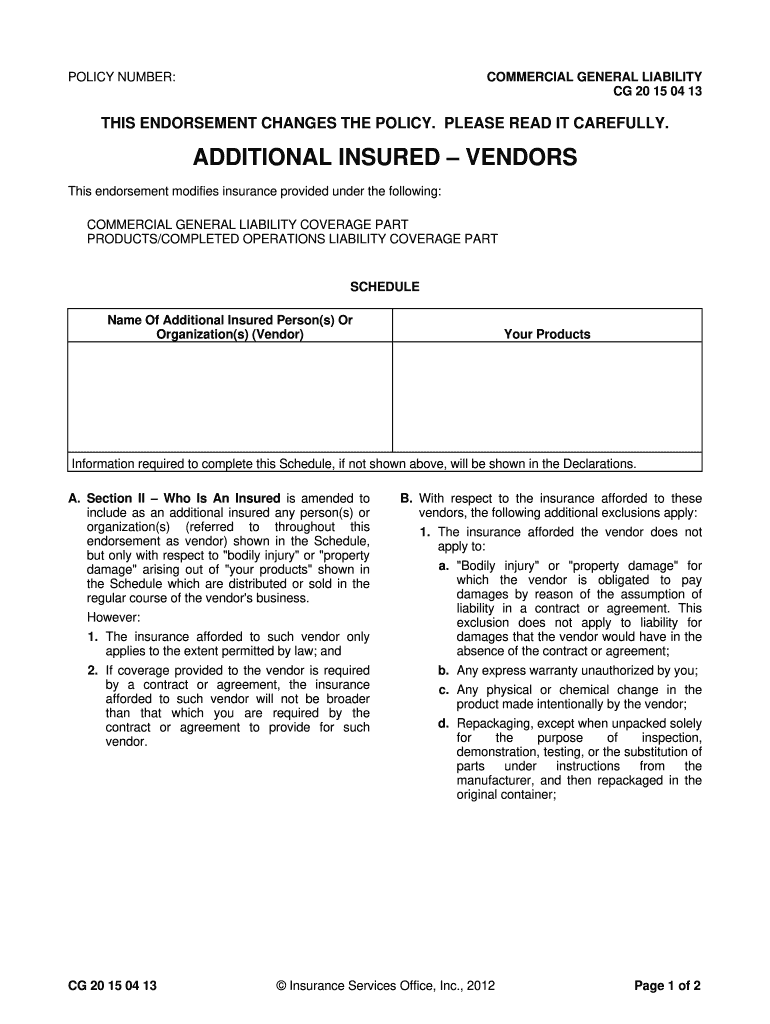
Click ‘Get Form’ to open the cg2015 endorsement in the editor.
Locate the 'Schedule' section where you will enter the name of the additional insured person(s) or organization(s). Ensure that you accurately list all vendors as this is crucial for coverage.
Review Section A, which outlines who qualifies as an insured. Familiarize yourself with the conditions under which coverage applies to vendors regarding bodily injury or property damage related to your products.
Pay close attention to Section B, which details exclusions. Make sure you understand what liabilities are not covered, especially those arising from vendor negligence or contractual obligations.
Finally, check Section C for limits of insurance. Confirm that the coverage aligns with any contracts or agreements you have in place, ensuring compliance and adequate protection.
Start using our platform today to streamline your form completion process for free!
CG -2015 (Rev. 02-10). Name (Last, First. Ml). Permanent Unit. EMPLID. CG ACADEMY. Purpose: Use this form to indicate where you want your net pay to beRead more
Cookie consent notice
This site uses cookies to enhance site navigation and personalize your experience.
By using this site you agree to our use of cookies as described in our Privacy Notice.
You can modify your selections by visiting our Cookie and Advertising Notice.