Readiness information sheet 2026

Get Form
readiness information sheet Preview on Page 1

Here's how it works

01. Edit your form online
Type text, add images, blackout confidential details, add comments, highlights and more.

02. Sign it in a few clicks
Draw your signature, type it, upload its image, or use your mobile device as a signature pad.

03. Share your form with others
Send it via email, link, or fax. You can also download it, export it or print it out.

How to use or fill out readiness information sheet with our platform

Form edit decoration
9.5
Ease of Setup
DocHub User Ratings on G2
9.0
Ease of Use
DocHub User Ratings on G2
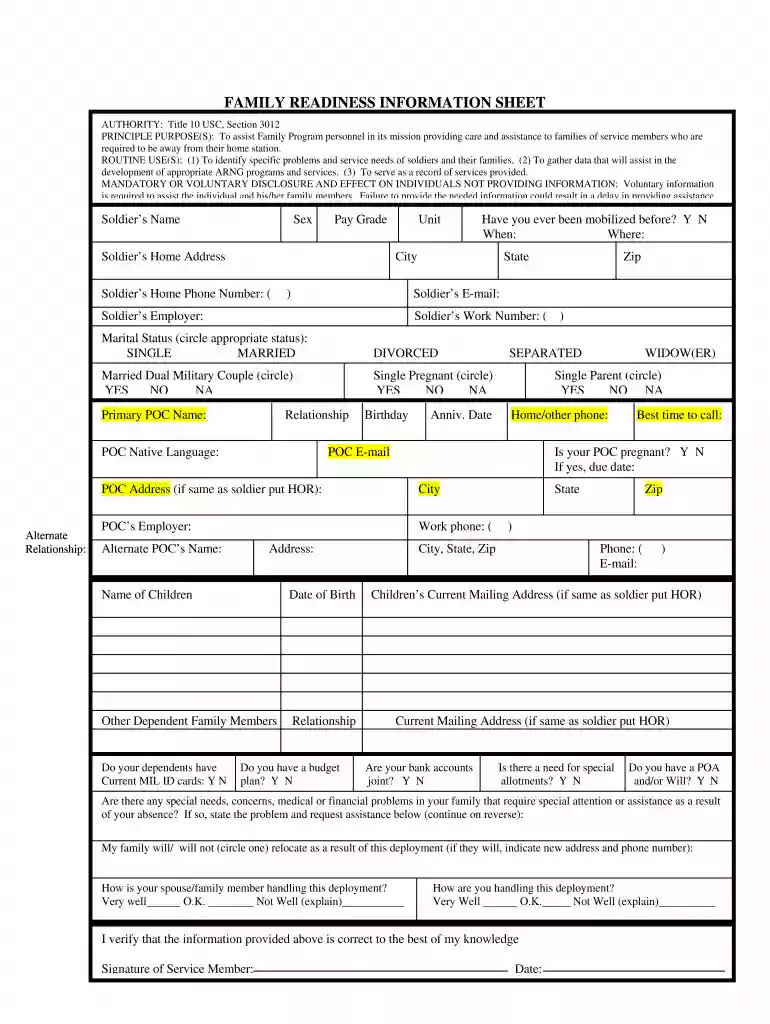
  1. Click ‘Get Form’ to open the readiness information sheet in the editor.
  2. Begin by entering the Soldier’s Name, Sex, and Pay Grade in the designated fields. Ensure accuracy as this information is crucial for identification.
  3. Fill in the Soldier’s Home Address, including City, State, and Zip Code. This helps in establishing a point of contact for assistance.
  4. Provide the Soldier’s Home Phone Number and Work Number. These numbers are essential for communication regarding family support.
  5. Indicate Marital Status by circling the appropriate option. If applicable, also circle if you are part of a Married Dual Military Couple or Single Pregnant.
  6. Complete the Primary Point of Contact (POC) section with their name, relationship, native language, and contact details. This ensures that support can be directed appropriately.
  7. Continue filling out details about dependents, including names and dates of birth. This information is vital for understanding family needs.
  8. Address any special needs or concerns in the provided section to ensure that necessary assistance can be arranged during deployment.
  9. Finally, verify all entered information is correct before signing and dating at the bottom of the form to confirm accuracy.

Start using our platform today to easily fill out your readiness information sheet for free!

be ready to get more

Complete this form in 5 minutes or less

Get form

Got questions?

We have answers to the most popular questions from our customers. If you can't find an answer to your question, please contact us.
Contact us

With DocHub, you can quickly approve your readiness information sheet or any other paperwork on iOS, even without setting up extra applications. You can access your DocHub account from any internet-connected browser and fill out and sign your form in any preferred method with just a couple of clicks.

You may complete and sign your readiness information sheet on the internet, even on a tight deadline. All you need to access high quality editing instruments on any device is a DocHub account, that you can register in just a few moments. Once you sign up, add your document or find what you are searching for in our catalog, complete it using the editing instruments you want, and put your electronic signature on it at the end.

A construction site preparation checklist is a list of tasks that need to be completed before a construction project can begin. Typically used by managers, this checklist includes items like testing soil, checking the groundwater level, and more, to ensure that the construction site is safe for employees.
Readiness Checklists can help standardize requirements across your Service Catalog, promoting Service maturity and resiliency. An example use case is ensuring certain Services have assigned Owning and Responding teams, have monitoring configured, and have linked on-call schedules or escalation policies, etc.
This site readiness checklist helps ensure that the site is ready to proceed with the installation of RTPPM, AMU, or CWC. All items in this checklist should be completed once the site preparation phase of the project is complete.

Security and compliance

At DocHub, your data security is our priority. We follow HIPAA, SOC2, GDPR, and other standards, so you can work on your documents with confidence.

Learn more
ccpa2
pci-dss
gdpr-compliance
hipaa
soc-compliance
be ready to get more

Complete this form in 5 minutes or less

Get form

People also ask

The Project Readiness Checklist is a tool used to assess the status of a project prior to beginning work. It helps to ensure that all necessary steps have been taken and that project goals are achievable.
At the kindergarten screening, your childs ability to communicate, comprehend, and follow instructions will be assessed. For example, the teachers will check to see if your child can: Be understood by an adult who does not talk with the child every day. Speak in complete sentences of at least five words.
Site Readiness means that all buildings/structures, within/whereupon GRADE shall work and/or equipment, shall be completed to a safe and satisfactory level, with all necessary primary supports in place and no restrictions or blockages to impede GRADE staff from progressing installation works in a timely manner.

Related links