Type text, add images, blackout confidential details, add comments, highlights and more.
02. Sign it in a few clicks
Draw your signature, type it, upload its image, or use your mobile device as a signature pad.
03. Share your form with others
Send it via email, link, or fax. You can also download it, export it or print it out.
How to use or fill out form 62 0687 with our platform
Ease of Setup
DocHub User Ratings on G2
Ease of Use
DocHub User Ratings on G2
Click ‘Get Form’ to open form 62 0687 in the editor.
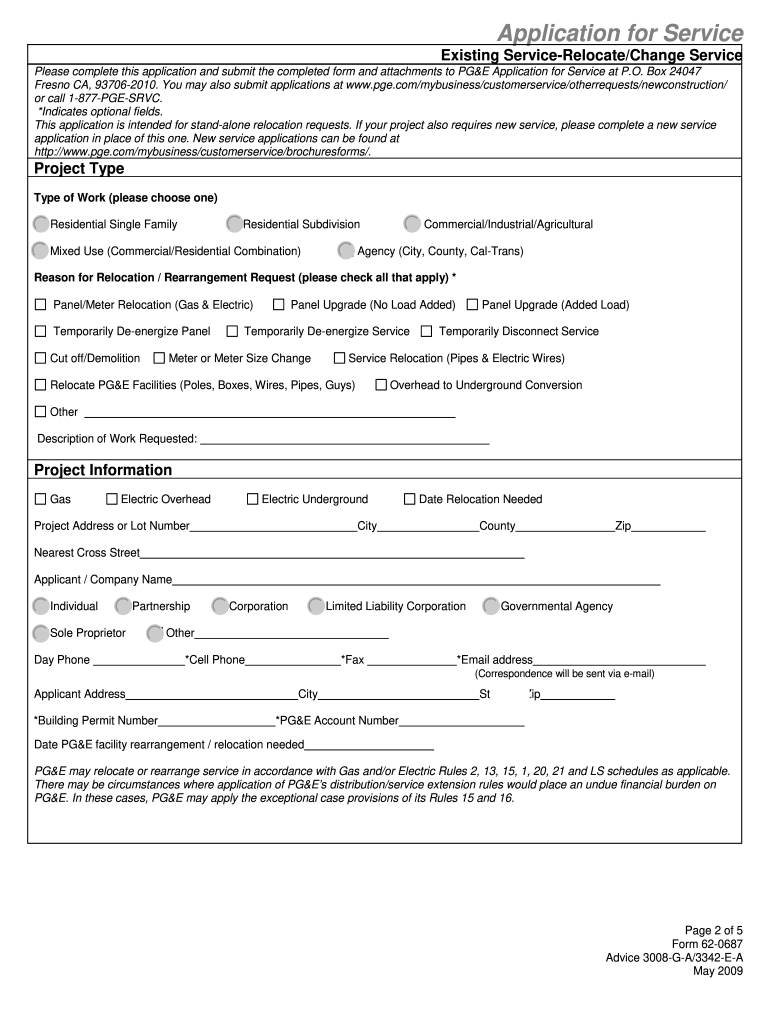
Begin by selecting the 'Project Type' that best describes your work, such as Residential Single Family or Commercial/Industrial.
In the 'Reason for Relocation/Rearrangement Request' section, check all applicable reasons for your request, like Panel/Meter Relocation or Service Relocation.
Fill in the 'Project Information' fields, including Project Address, Date Needed, and Applicant/Company Name. Ensure all required fields are completed.
Complete the 'Contract Information' section with the legal name and contact details of the individual or company responsible for the contract.
Provide detailed information in the 'Load Information' section regarding electric and gas loads, including main switch size and number of meters.
Attach any required documents as specified in the attachment section before submitting your application.
Review all entered information for accuracy and completeness before finalizing your submission.
Start using our platform today to streamline your form completion process for free!
Business Medium-High Use (B19)* is a voluntary rate plan for large and medium businesses with moderate to high energy demand consistently under 500 kW. This rate features lower energy rates but a higher Demand Charge than the B10 Rate Plan.
How to reactivate an electric meter?
If you have a traditional electricity meter To get your power back once youve topped up, put your payment key into the meter. Your power will come back on automatically. If it doesnt, or theres a message on your meter, please call us right away on 0330 175 9669.
How to activate an electric meter?
You will need to contact your electricity supplier. Theyll be able to get you reconnected but only if you have an installation certificate (I-cert) thats dated within the past year. If you dont have a certificate, or your I-cert is more than 12 months old, you can get one from an NICEIC-qualified electrician.
How to reconnect an electric meter?
Sorry that didnt work, please reset your meter Hold down the power button at the back of the display until it switches off completely. Wait for one minute. Turn your display back on; it will try to reconnect to your smart meter(s)
How to reboot an electric meter?
Generally it means the building is not drawing power. The reasons for that may include there is no power to draw. Could also be some sod has gone around and unplugged/disconnected everything. Or something went terribly wrong and popped the main breaker.
Related Searches
Form 62 0687 templateForm 62 0687 printableForm 62 0687 instructionsForm 62 0687 pdf
Security and compliance
At DocHub, your data security is our priority. We follow HIPAA, SOC2, GDPR, and other standards, so you can work on your documents with confidence.
Form, syllabus, and course related information will be available via Canvas 62. Biology. 42. Building Inspection Technology. 44. Business/Management. 45.Read more
Employer identification number. 62-0123940. Note: See the instructions to find out if the corporation is a small corporation exempt from the alternative minimumRead more
Cookie consent notice
This site uses cookies to enhance site navigation and personalize your experience.
By using this site you agree to our use of cookies as described in our Privacy Notice.
You can modify your selections by visiting our Cookie and Advertising Notice.