Abe peggy levy application 2026

Get Form
abe peggy levy application Preview on Page 1

Here's how it works

01. Edit your form online
Type text, add images, blackout confidential details, add comments, highlights and more.
02. Sign it in a few clicks
Draw your signature, type it, upload its image, or use your mobile device as a signature pad.
03. Share your form with others
Send it via email, link, or fax. You can also download it, export it or print it out.

How to use or fill out abe peggy levy application with our platform

Form edit decoration
9.5
Ease of Setup
DocHub User Ratings on G2
9.0
Ease of Use
DocHub User Ratings on G2
  1. Click ‘Get Form’ to open the abe peggy levy application in the editor.
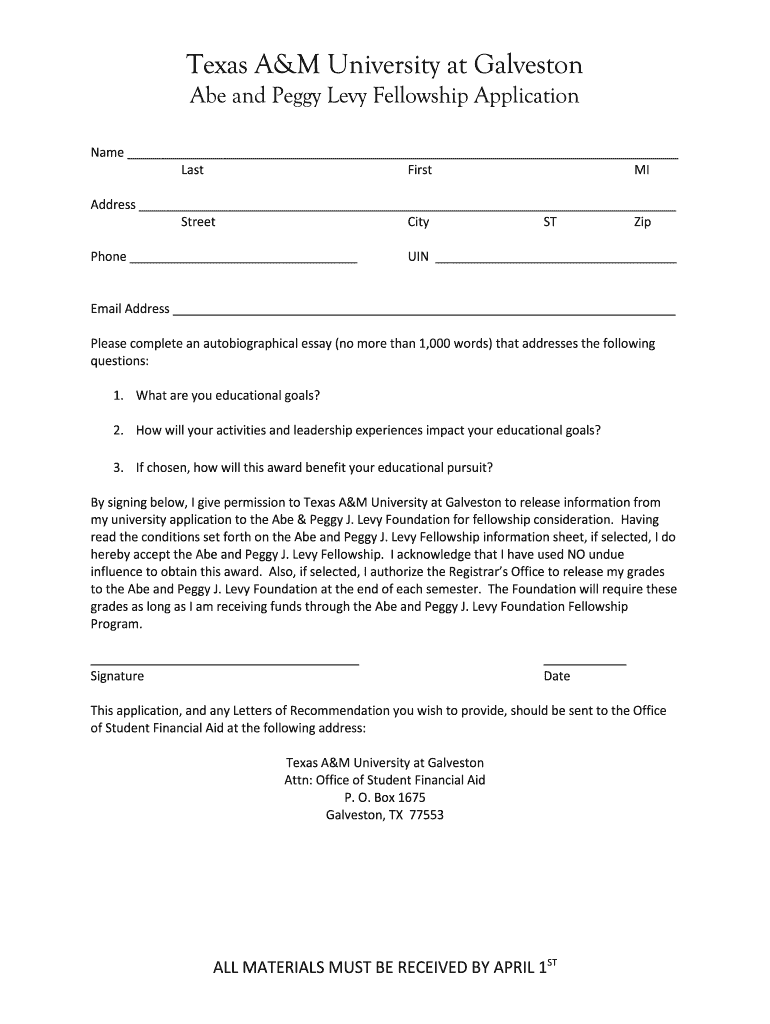
  2. Begin by entering your name in the designated fields: Last, First, and Middle Initial. Ensure accuracy for identification purposes.
  3. Fill in your address details, including Street, City, State (ST), and Zip code. This information is crucial for correspondence.
  4. Provide your phone number and University Identification Number (UIN) in the respective fields to facilitate communication.
  5. Enter your email address clearly to receive updates regarding your application status.
  6. Compose an autobiographical essay addressing the specified questions about your educational goals and experiences. Limit it to 1,000 words.
  7. Sign and date the application at the bottom to confirm your understanding of the fellowship conditions and permissions.
  8. Finally, ensure all materials are compiled and ready for submission to the Office of Student Financial Aid by April 1st.

Start filling out your abe peggy levy application today using our platform for free!

be ready to get more

Complete this form in 5 minutes or less

Get form

Got questions?

We have answers to the most popular questions from our customers. If you can't find an answer to your question, please contact us.
Contact us

Upload your abe peggy levy application to DocHub (once you’ve set up an account for this). If you need to fill out fields in it, use proper tools from the upper pane. For example, add Signature Fields, assign each to a particular person, and click on Sign → Request signatures from others. Customize your message for your recipients and click Send Request. You can also send your paperwork by fax or as a Signing link instead of using email (you’ll locate these options by navigating to the Menu → Send)

In addition to a comprehensive toolset for editing PDFs on mobile devices, DocHub allows you to sign your abe peggy levy application along the way. Open our editor in your browser, make changes using DocHub’s toolset, and complete your editing by eSigning the completed form.

Security and compliance

At DocHub, your data security is our priority. We follow HIPAA, SOC2, GDPR, and other standards, so you can work on your documents with confidence.

Learn more
ccpa2
pci-dss
gdpr-compliance
hipaa
soc-compliance