Student tanscriptsrecords request pbsd form 2026

Get Form
student tanscriptsrecords request pbsd form Preview on Page 1

Here's how it works

01. Edit your form online
Type text, add images, blackout confidential details, add comments, highlights and more.
02. Sign it in a few clicks
Draw your signature, type it, upload its image, or use your mobile device as a signature pad.
03. Share your form with others
Send it via email, link, or fax. You can also download it, export it or print it out.

How to use or fill out student transcripts/records request pbsd form with our platform

Form edit decoration
9.5
Ease of Setup
DocHub User Ratings on G2
9.0
Ease of Use
DocHub User Ratings on G2
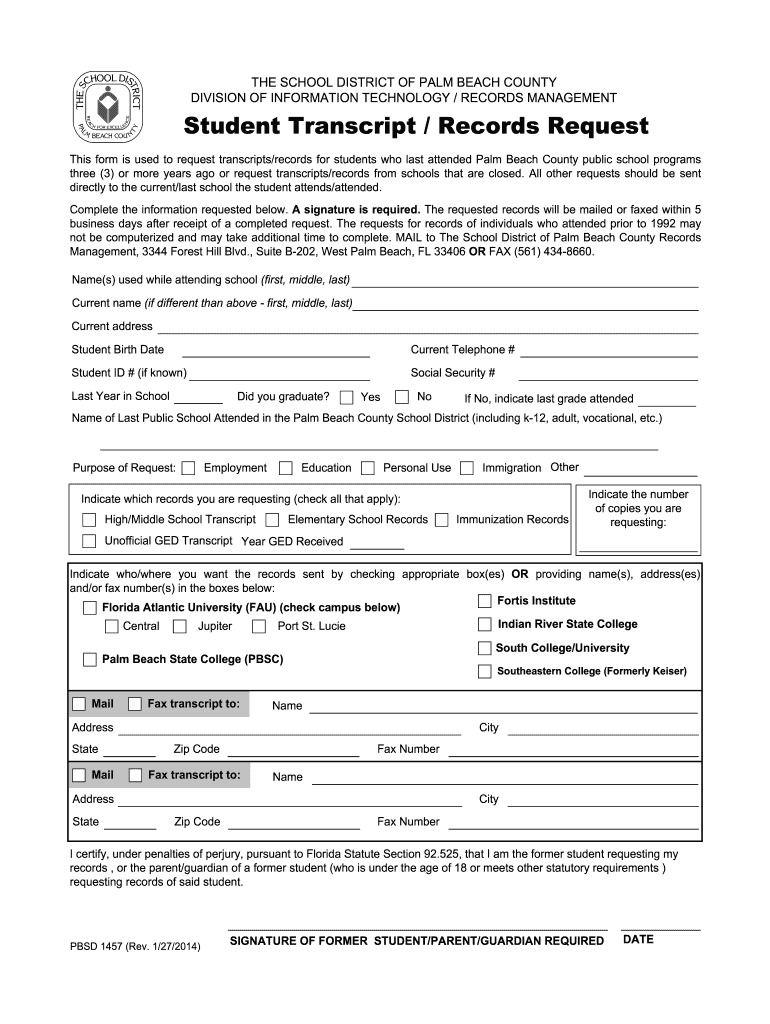
  1. Click ‘Get Form’ to open the student transcripts/records request pbsd form in the editor.
  2. Begin by entering your name(s) used while attending school in the designated field. If your current name differs, provide that information as well.
  3. Fill in your current address and telephone number to ensure accurate communication regarding your request.
  4. Input your Student ID number if known, along with your Social Security number for identification purposes.
  5. Indicate the last year you attended school and whether you graduated. If not, specify the last grade completed.
  6. Select the purpose of your request from options such as Employment, Education, Personal Use, Immigration, or Other.
  7. Check all records you are requesting, including High/Middle School Transcripts or Immunization Records.
  8. Provide details on where you want the records sent by checking appropriate boxes or entering names and addresses.
  9. Finally, certify your request by signing and dating the form before submission.

Start using our platform today to easily complete your student transcripts/records request!

be ready to get more

Complete this form in 5 minutes or less

Get form

Got questions?

We have answers to the most popular questions from our customers. If you can't find an answer to your question, please contact us.
Contact us
The main types of transcription are verbatim, intelligent verbatim, edited, and phonetic transcription. Verbatim captures every word and sound, intelligent verbatim removes unnecessary fillers, and phonetic records the sounds of the words spoken.
Request Online To order a high school transcript electronically, visit Parchment. First, create an account, then place the order. Online tracking is available 24/7. A credit card is needed for the eTranscript fee, which is $6.40.
Use Form 4506-T to request any of the transcripts: tax return, tax account, wage and income, record of account and verification of non-filling. The transcript format better protects taxpayer data by partially masking personally identifiable information.
A transcript request form is used to obtain official or unofficial academic records from a school, college, or university. Whether youre applying for jobs, transferring schools, or continuing your education, having access to your transcripts is essential.
Your transcripts provide proof of past academic work and achievements, which can come in very handy when transferring. While requesting your transcripts is a simple process, there are a few important things to know before you begin.

Security and compliance

At DocHub, your data security is our priority. We follow HIPAA, SOC2, GDPR, and other standards, so you can work on your documents with confidence.

Learn more
ccpa2
pci-dss
gdpr-compliance
hipaa
soc-compliance
be ready to get more

Complete this form in 5 minutes or less

Get form

People also ask

Purpose of form. Use Form 4506-T to request tax return information. Taxpayers using a tax year beginning in one calendar year and ending in the following year (fiscal tax year) must file Form 4506-T to request a return transcript.
More info about School District of Palm Beach County 3300 Forest Hill Blvd. West Palm Beach, FL 33406. Directions. (561) 434-8000. Other Amenities. Does School District of Palm Beach County have free WiFi? Yes, School District of Palm Beach County has free WiFi.

Related links