Type text, add images, blackout confidential details, add comments, highlights and more.

02. Sign it in a few clicks
Draw your signature, type it, upload its image, or use your mobile device as a signature pad.

03. Share your form with others
Send ics 202 form example via email, link, or fax. You can also download it, export it or print it out.

How to use or fill out ics 202 fillable form with our platform
Ease of Setup
DocHub User Ratings on G2
Ease of Use
DocHub User Ratings on G2
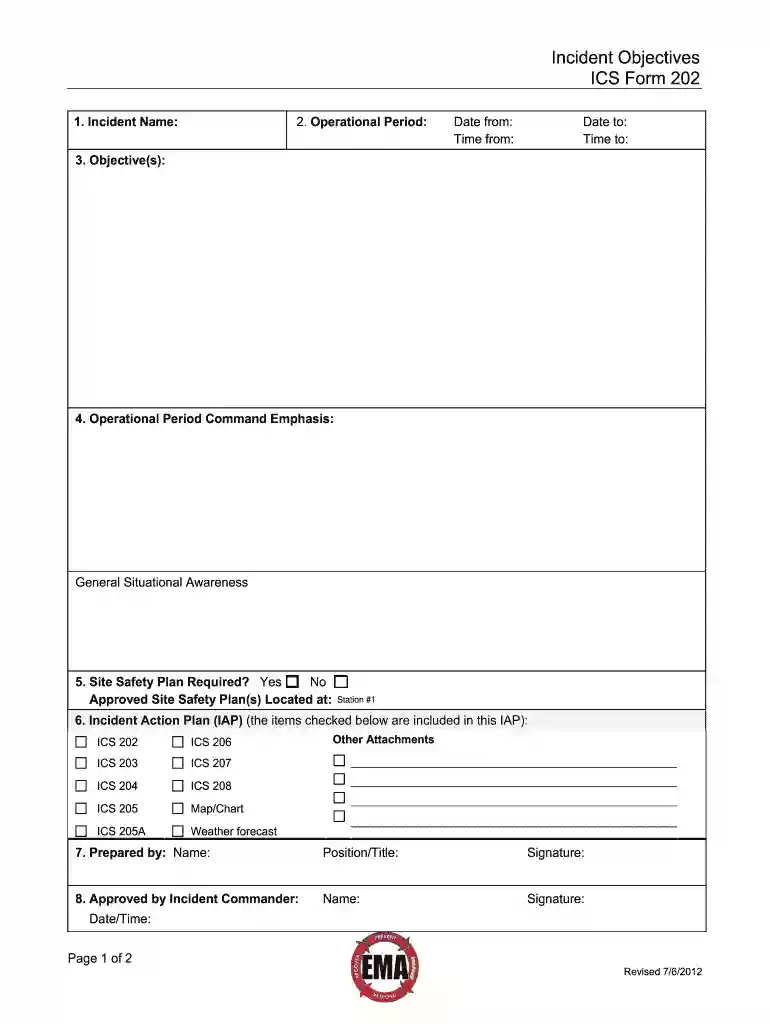
Click ‘Get Form’ to open the ICS 202 fillable form in the editor.
Begin by entering the 'Incident Name' at the top of the form. This should be the name assigned to the incident.
In the 'Operational Period' section, input the start and end dates and times for this operational period using a 24-hour clock format.
For 'Objective(s)', provide clear and concise statements outlining your objectives for managing the response. Ensure these are prioritized and adhere to SMART criteria.
In 'Operational Command Emphasis', detail any tactical priorities or general safety messages relevant to this operational period.
Indicate whether a Site Safety Plan is required by selecting 'Yes' or 'No', and specify where approved plans can be found.
Check off any IAP items included in your plan, ensuring all relevant documents are listed.
Complete the 'Prepared by' section with your name and position, followed by obtaining approval from the Incident Commander in the designated area.
Start filling out your ICS 202 form online for free today!
Catalog pages in PDF format view, print or save to your computer. Instruction manuals in PDF format view, print or save to your computer. ProductRead more
The Incident Objectives (ICS 202) describes the basic incident strategy, incident objectives, command emphasis/priorities, and safety considerations for useRead more
Cookie consent notice
This site uses cookies to enhance site navigation and personalize your experience.
By using this site you agree to our use of cookies as described in our Privacy Notice.
You can modify your selections by visiting our Cookie and Advertising Notice.