Type text, add images, blackout confidential details, add comments, highlights and more.
02. Sign it in a few clicks
Draw your signature, type it, upload its image, or use your mobile device as a signature pad.
03. Share your form with others
Send it via email, link, or fax. You can also download it, export it or print it out.
How to use or fill out pa eh 40 form with our platform
Ease of Setup
DocHub User Ratings on G2
Ease of Use
DocHub User Ratings on G2
Click ‘Get Form’ to open the pa eh 40 form in the editor.
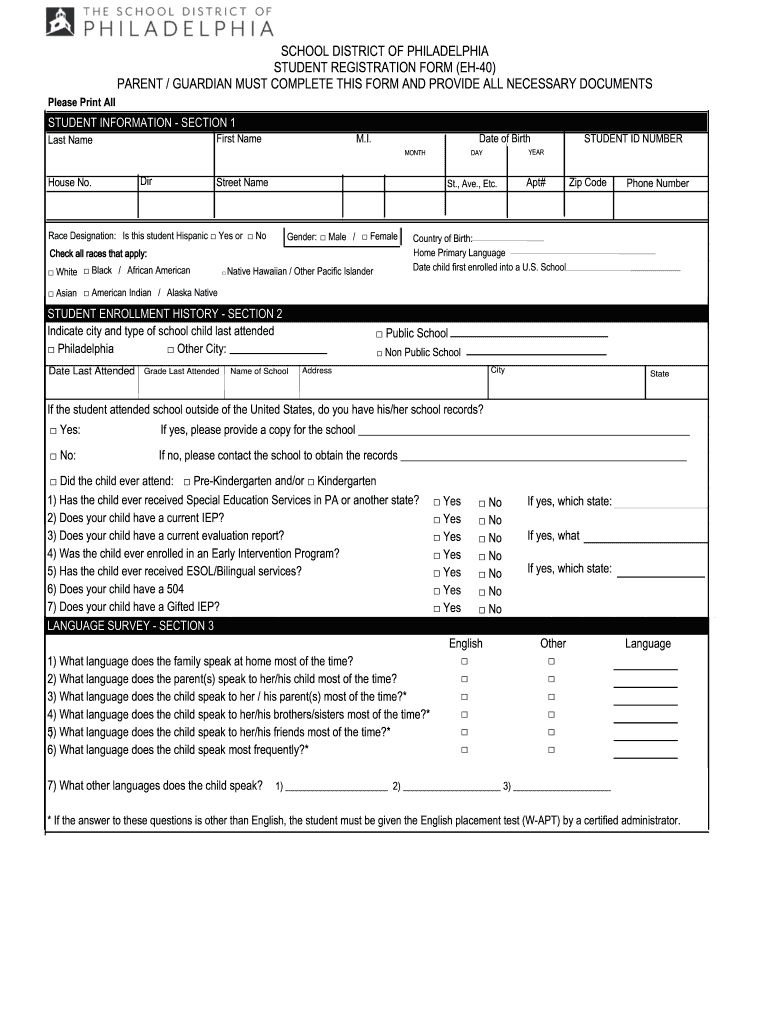
Begin with Section 1, 'STUDENT INFORMATION'. Fill in the student's first name, last name, date of birth, and middle initial. Ensure you check the appropriate boxes for race designation and gender.
In Section 2, 'STUDENT ENROLLMENT HISTORY', indicate the city and type of school previously attended. Provide details such as the name of the school and grade last attended.
Proceed to Section 3, 'LANGUAGE SURVEY'. Answer questions regarding the languages spoken at home and by the child. This information is crucial for proper placement.
Complete Section 4, 'HOUSEHOLD INFORMATION', by detailing who the student resides with and providing contact information for parents or guardians.
Fill out Sections 5 and 6 for sibling information and emergency contacts. Make sure to provide accurate phone numbers.
Finally, review all entries for accuracy before signing at the bottom of the form to certify that all information is true.
Start filling out your pa eh 40 form online for free today!
Apr 23, 2025 ISCR refers to the category of in situ groundwater remediation technologies where treatment occurs primarily by chemical reduction of contaminants.Read more
1) Proof of childs age 2) Immunization Record 3) Proof of Address 4) Parent Registration Statement (Included in the EH40 Student Registration Form providedRead more
Instructions: This report is to be used to capture the COVID-19 patient and payor data, revenue received, costs and lost revenue as a result of the PublicRead more
Cookie consent notice
This site uses cookies to enhance site navigation and personalize your experience.
By using this site you agree to our use of cookies as described in our Privacy Notice.
You can modify your selections by visiting our Cookie and Advertising Notice.