Eidap form 2026

Get Form
eidap Preview on Page 1

Here's how it works

01. Edit your eidap online
Type text, add images, blackout confidential details, add comments, highlights and more.

02. Sign it in a few clicks
Draw your signature, type it, upload its image, or use your mobile device as a signature pad.

03. Share your form with others
Send eidap login via email, link, or fax. You can also download it, export it or print it out.

How to use or fill out eidap form with our platform

Form edit decoration
9.5
Ease of Setup
DocHub User Ratings on G2
9.0
Ease of Use
DocHub User Ratings on G2
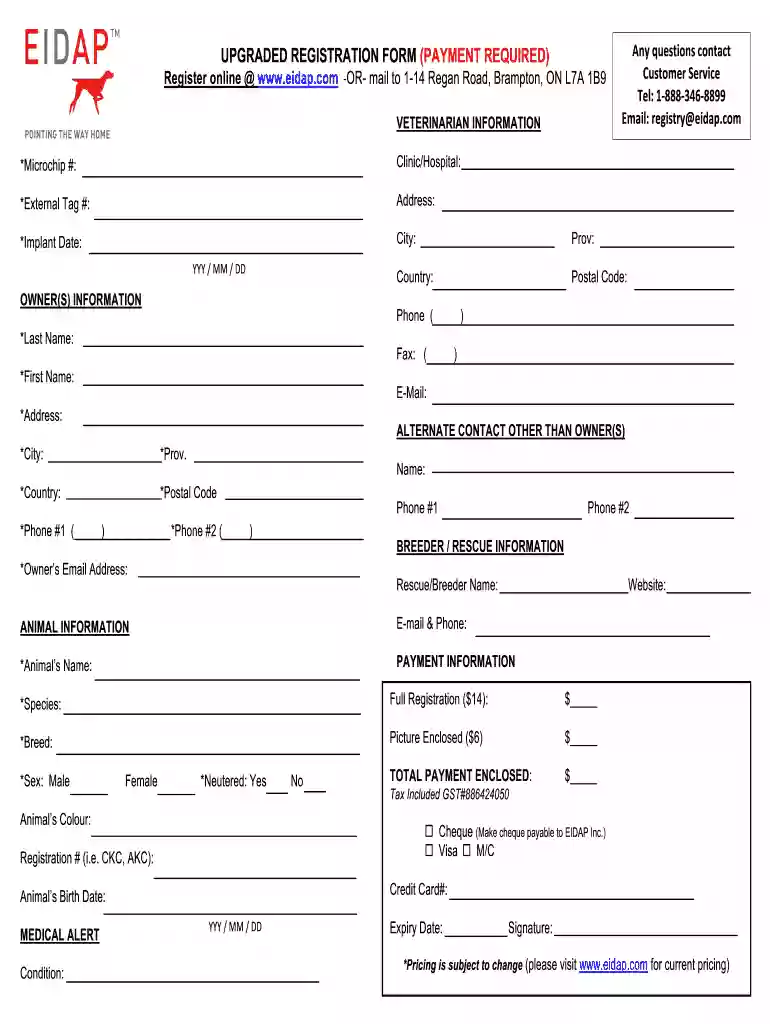
  1. Click ‘Get Form’ to open the eidap form in the editor.
  2. Begin by filling out the Veterinarian Information section. Enter the Microchip number, Clinic/Hospital name, External Tag number, and Address. Ensure you include the Implant Date in the specified format (YYYY/MM/DD).
  3. Next, complete the Owner(s) Information section. Fill in your Last Name, First Name, Email, and Address. Don’t forget to provide a contact phone number.
  4. In the Alternate Contact section, enter details for another person who can be reached if necessary. Include their name and two phone numbers.
  5. Proceed to the Breeder/Rescue Information section. Provide the Rescue/Breeder Name and Website if applicable.
  6. Fill out the Animal Information section by entering your Animal’s Name, Species, Breed, Sex, Neutered status, Colour, and Birth Date.
  7. Finally, complete the Payment Information section. Indicate your payment method and total amount enclosed before signing at the bottom of the form.

Start using our platform today to easily fill out your eidap form online for free!

be ready to get more

Complete this form in 5 minutes or less

Get form

Got questions?

We have answers to the most popular questions from our customers. If you can't find an answer to your question, please contact us.
Contact us
Once you know the name of the microchip registry, youll be able to create an online account with that company for your pets microchip number and input data like your pets name, breed, gender, color, age, medical issues, and other notes, as well as your name, phone number, email address, home address, contact
How do I transfer the microchip registration to my name? The person listed on the file as owner can authorize the transfer to you at no charge.
Any veterinary clinic, animal control or shelter can scan your pet for free and provide you with the number. Pro tip -- use your phone to take a picture of the microchip number on the scanner. No room for error with what someone writes down. NEED YOUR PET MICROCHIPPED?
Remember that having the microchip placed is only the first step, and the microchip must be registered in order to give you the best chances of getting your pet back. If that information is missing or incorrect, your chances of getting your pet back are dramatically reduced.

Security and compliance

At DocHub, your data security is our priority. We follow HIPAA, SOC2, GDPR, and other standards, so you can work on your documents with confidence.

Learn more
ccpa2
pci-dss
gdpr-compliance
hipaa
soc-compliance
be ready to get more

Complete this form in 5 minutes or less

Get form