Virtu Bean-to-Cup Rental & Rebate Agreement - Parks Coffee 2026

Get Form
rebate agreement template Preview on Page 1

Here's how it works

01. Edit your rebate agreement template online
Type text, add images, blackout confidential details, add comments, highlights and more.

02. Sign it in a few clicks
Draw your signature, type it, upload its image, or use your mobile device as a signature pad.

03. Share your form with others
Send volume rebate agreement template via email, link, or fax. You can also download it, export it or print it out.

How to use or fill out Virtu Bean-to-Cup Rental & Rebate Agreement - Parks Coffee with our platform

Form edit decoration
9.5
Ease of Setup
DocHub User Ratings on G2
9.0
Ease of Use
DocHub User Ratings on G2
  1. Click ‘Get Form’ to open the Virtu Bean-to-Cup Rental & Rebate Agreement in the editor.
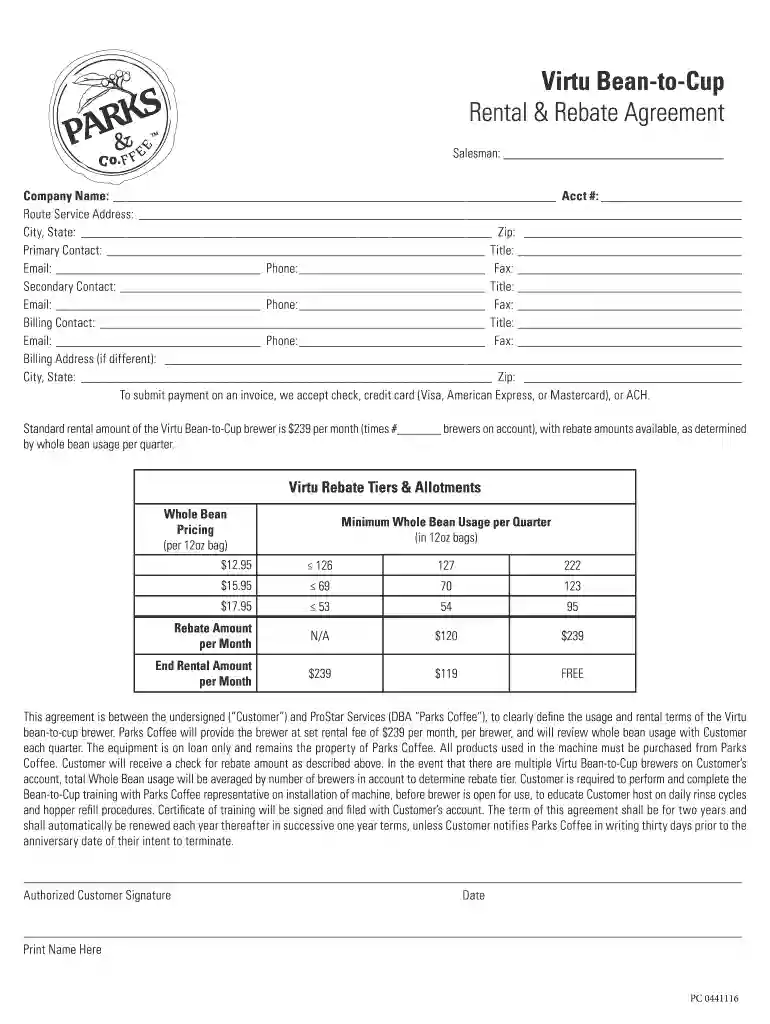
  2. Begin by filling in the 'Salesman' field with the name of the representative assisting you. Next, enter your 'Company Name' and 'Account Number' for identification.
  3. Complete the 'Route Service Address', including city, state, and zip code. This information is crucial for service delivery.
  4. Provide details for your primary contact, including their title, email, phone number, and fax number. Repeat this process for a secondary contact and billing contact if applicable.
  5. If your billing address differs from the service address, fill in that section as well. Ensure all contact information is accurate to avoid any issues.
  6. Review the rental terms outlined in the agreement regarding monthly fees and rebate tiers based on whole bean usage. Make sure you understand these before signing.
  7. Finally, sign and date the document at the bottom to authorize the agreement. Print your name clearly beneath your signature.

Start using our platform today to easily complete your Virtu Bean-to-Cup Rental & Rebate Agreement online for free!

be ready to get more

Complete this form in 5 minutes or less

Get form

Got questions?

We have answers to the most popular questions from our customers. If you can't find an answer to your question, please contact us.
Contact us

Managing your forms with DocHub this way is extremely straightforward once you have downloaded its extension for Google Chrome. Navigate to the Chrome Web Store and install DocHub - Sign PDF from Gmail to obtain it. Give our tool access to your Google account, and then open an email with the rebate agreement template word attached and point to the file with your cursor - the DocHub extension key will automatically show up there. Click on it to open your form in our editor. Make any required adjustments, fill out the blanks, and click Sign to create your legally-binding electronic signature.

If you store your files in Google Drive, there is no need to download your rebate agreement example on the computer and upload it back to our editor. A much easier way is to set up a browser extension developed by DocHub to streamline this flow. The extension allows editing PDFs in your web browser. Alternatively, you may integrate your DocHub and Gmail accounts for more efficient modifying.

What is a Bean to Cup Machine? Bean to cup coffee machines have the capacity to grind whole coffee beans and can automatically prepare a freshly made espresso, macchiato, a flat white and more in less than 20-25 seconds.
There are many benefits to be drawn from these machines over, say, coffee pod machines. For a start, the quality of the coffee is almost unparalleled in terms of at-home brewing, as the beans are ground for each cup, meaning the taste is as aromatic and fresh as it gets.
A proper bean to cup coffee machine is as the name would suggest a coffee machine that is capable of handling the whole process from whole coffee bean to the final drink in the cup. To put this is simple terms is they are an automatic espresso machine that has an integrated grinder.

Security and compliance

At DocHub, your data security is our priority. We follow HIPAA, SOC2, GDPR, and other standards, so you can work on your documents with confidence.

Learn more
ccpa2
pci-dss
gdpr-compliance
hipaa
soc-compliance

People also ask

There are many benefits to be drawn from these machines over, say, coffee pod machines. For a start, the quality of the coffee is almost unparalleled in terms of at-home brewing, as the beans are ground for each cup, meaning the taste is as aromatic and fresh as it gets.
10 Best Office Coffee Machines [In 2023] Our Top Picks. The Best Coffee Machines For Offices. Jura GIGA 6 Aluminum Automatic Coffee Machine. Nespresso Vertuo Next Deluxe Coffee and Espresso Machine. Calphalon BVCLECMP1 Temp iQ Espresso Machine. Jura S8 Automatic Coffee Machine. SYBO 12-Cup Commercial Drip Coffee Maker.
All fully automatic bean-to-cup machines can deliver a basic espresso, cappuccino, and latte. Still, if youre looking for more niche coffee shop favorites like a cortado or macchiato, youll need to check what drink options come on the standard menu.
Understanding Espresso ing to the Specialty Coffee Association (SCA), espresso is a 2535 ml beverage prepared from 79 grams of coffee through which clean water of 90.5-96.1C has been forced at 910 atmospheres of pressure, and where the grind of the coffee is such that the brew time is 2030 seconds.
Pod machines are your best bet for a quick and easy coffee in the morning. They make single-serve drinks from ground beans that are sealed inside pods or capsules. A pod is placed in a designated slot, then the lid of the machine is shut causing the capsule to be pierced.

rentals invoices