




Here's how it works



How to use or fill out Caregiver Stress Quiz with DocHub

- Click ‘Get Form’ to open the Caregiver Stress Quiz in our editor.
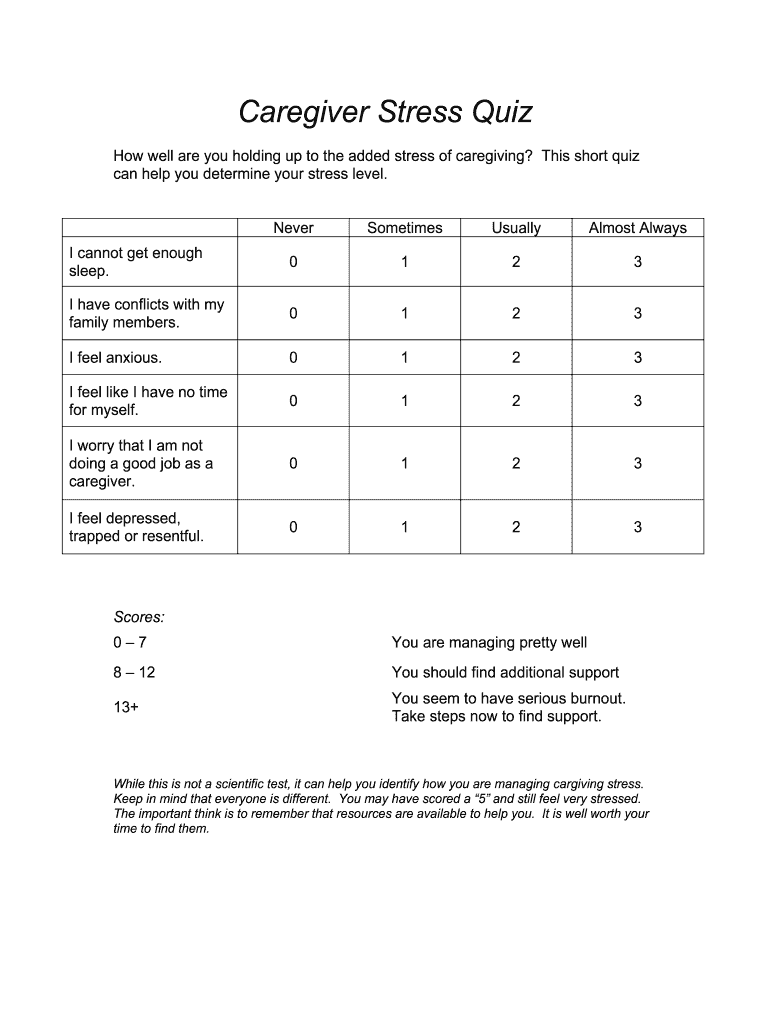
- Begin by reviewing each question carefully. For each statement, select the response that best reflects your experience: 'Never', 'Sometimes', 'Usually', or 'Almost Always'.
- For each question, assign a score based on your selected response: 0 for 'Never', 1 for 'Sometimes', 2 for 'Usually', and 3 for 'Almost Always'.
- Once you have completed all questions, sum your scores to determine your overall stress level.
- Refer to the scoring guide provided at the end of the quiz to understand your results and consider seeking additional support if necessary.
Start using our platform today to easily complete your Caregiver Stress Quiz online for free!
It's free
Got questions?
Is it safe to sign my caregiver stress test electronically?
You need to use only trusted software solutions with strong security compliance to sign your paperwork electronically. DocHub is just the type of software you need! It stores data on Amazon Web Servers and complies with all necessary security standards and eSignature laws, so it’s a trusted way to eSign your caregiver stress test or other documents with this tool.
What browser do I need to edit Caregiver Stress Quiz online?
If you want to edit your Caregiver Stress Quiz online easily, it does not matter what browser you use. DocHub’s simple editing instruments are accessible using any internet browser. Just open the appropriate tab in the editor, add your file, and fill it out without stress.
Security and compliance
At DocHub, your data security is our priority. We follow HIPAA, SOC2, GDPR, and other standards, so you can work on your documents with confidence.
Learn more




