




Here's how it works



How to use or fill out cwin referral form with our platform

- Click ‘Get Form’ to open the cwin referral form in the editor.
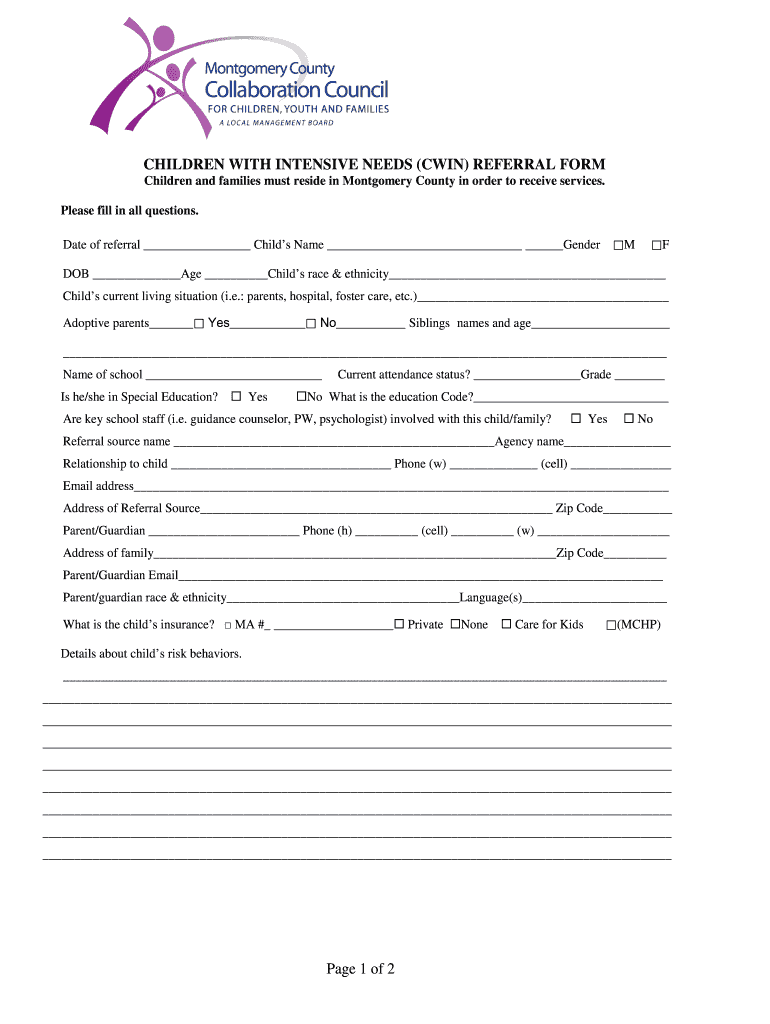
- Begin by entering the date of referral and the child's name. Ensure you select the correct gender and fill in the date of birth and age.
- Provide details about the child's race and ethnicity, current living situation, and whether they have adoptive parents. Include siblings' names and ages if applicable.
- Fill in the school information, including whether the child is in special education, their current attendance status, and grade level.
- Complete sections regarding key school staff involvement, referral source details, parent/guardian contact information, and insurance coverage.
- Detail any risk behaviors exhibited by the child and specify types of services requested.
- Answer questions related to psychiatric hospitalization history, current therapy details, medication usage, and any major physical issues.
- Conclude by providing insights into caregiver needs, strengths of both caregiver and child, potential risks for out-of-home placement, and any additional information that may assist in processing the referral.
Start filling out your cwin referral form online for free today!
It's free
Got questions?
What do I need to sign my cwin referral form electronically?
Electronic document signing demands a software solution that works in compliance with data security and eSignature regulations. DocHub is a perfect tool for that, since it meets all the previously mentioned requirements. Whatever method you like to sign your cwin referral form in DocHub, your electronic signature will be legally binding and court-admissible.
How do you get cwin referral form?
You can find the latest and most relevant version of the cwin referral form in our DocHub forms collection. Search it by categories or use the search field to locate the exact template that fits your case. You may open this form for editing after you find it.
Security and compliance
At DocHub, your data security is our priority. We follow HIPAA, SOC2, GDPR, and other standards, so you can work on your documents with confidence.
Learn more




