01. Edit your 10 team double elimination bracket online
Type text, add images, blackout confidential details, add comments, highlights and more.
02. Sign it in a few clicks
Draw your signature, type it, upload its image, or use your mobile device as a signature pad.
03. Share your form with others
Send 10 team bracket double elimination via email, link, or fax. You can also download it, export it or print it out.
How to use or fill out the TEN TEAM DOUBLE ELIMINATION BRACKET
Ease of Setup
DocHub User Ratings on G2
Ease of Use
DocHub User Ratings on G2
Click ‘Get Form’ to open it in the editor.
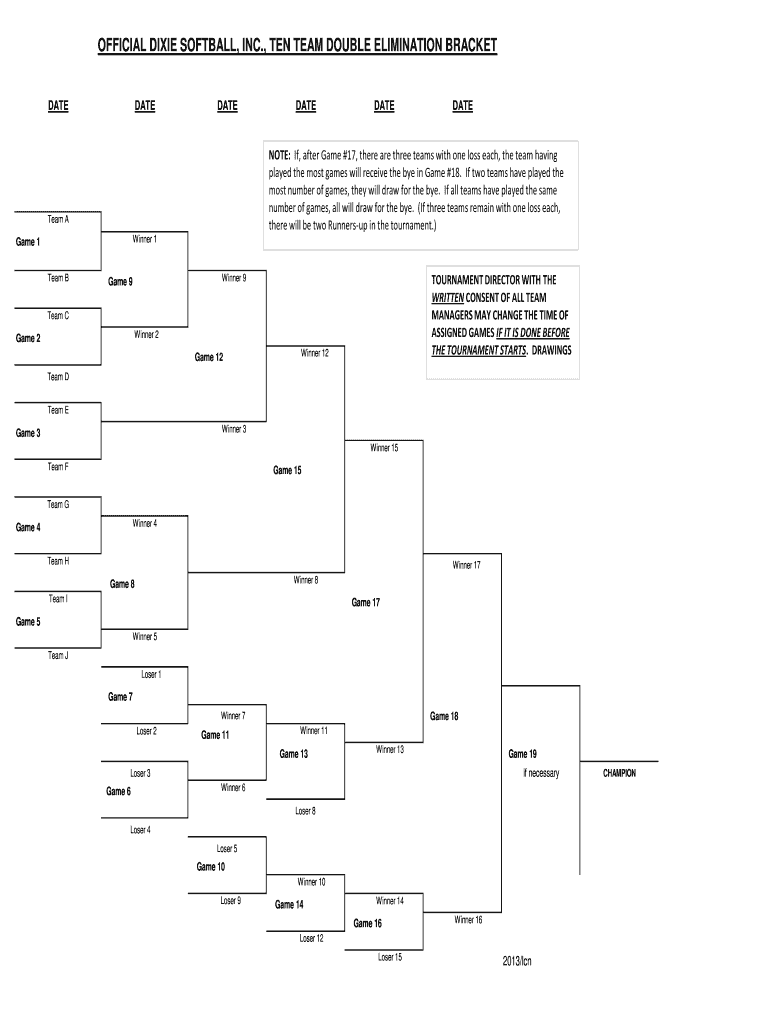
Begin by entering the date of the tournament at the top of the bracket. This ensures all participants are aware of the schedule.
Fill in the team names in their respective slots, starting with Team A and proceeding through Team J. Make sure to accurately place each team according to your tournament structure.
As games are played, record the winners in the designated 'Winner' fields after each game. This will help track progress through the bracket.
Pay attention to notes regarding byes and potential scenarios involving teams with one loss. Ensure that any changes made are documented clearly for all participants.
Once completed, review all entries for accuracy before finalizing your bracket. This will help avoid confusion during the tournament.
Start using our platform today to streamline your tournament management for free!
Fill out , TEN TEAM DOUBLE ELIMINATION BRACKET online It's free
10 team double Elimination Bracket SeededTen team double elimination bracket template11 team double elimination bracket12 team double Elimination bracket9 Team double elimination bracketTen team double elimination bracket pdf10 team single elimination bracketTen team double elimination bracket excel
Security and compliance
At DocHub, your data security is our priority. We follow HIPAA, SOC2, GDPR, and other standards, so you can work on your documents with confidence.
The second and third teams in each pool play a four-team losers bracket; i.e., a semis and a final. This takes two rounds. The winner of this bracket, then,Read more
Cookie consent notice
This site uses cookies to enhance site navigation and personalize your experience.
By using this site you agree to our use of cookies as described in our Privacy Notice.
You can modify your selections by visiting our Cookie and Advertising Notice.