Bbbee affidavit word template 2026

Get Form
bee sworn affidavit word template download Preview on Page 1

Here's how it works

01. Edit your bee sworn affidavit word template download online
Type text, add images, blackout confidential details, add comments, highlights and more.
02. Sign it in a few clicks
Draw your signature, type it, upload its image, or use your mobile device as a signature pad.
03. Share your form with others
Send sworn bee affidavit word via email, link, or fax. You can also download it, export it or print it out.

How to use or fill out bbbee affidavit word template with DocHub

Form edit decoration
9.5
Ease of Setup
DocHub User Ratings on G2
9.0
Ease of Use
DocHub User Ratings on G2
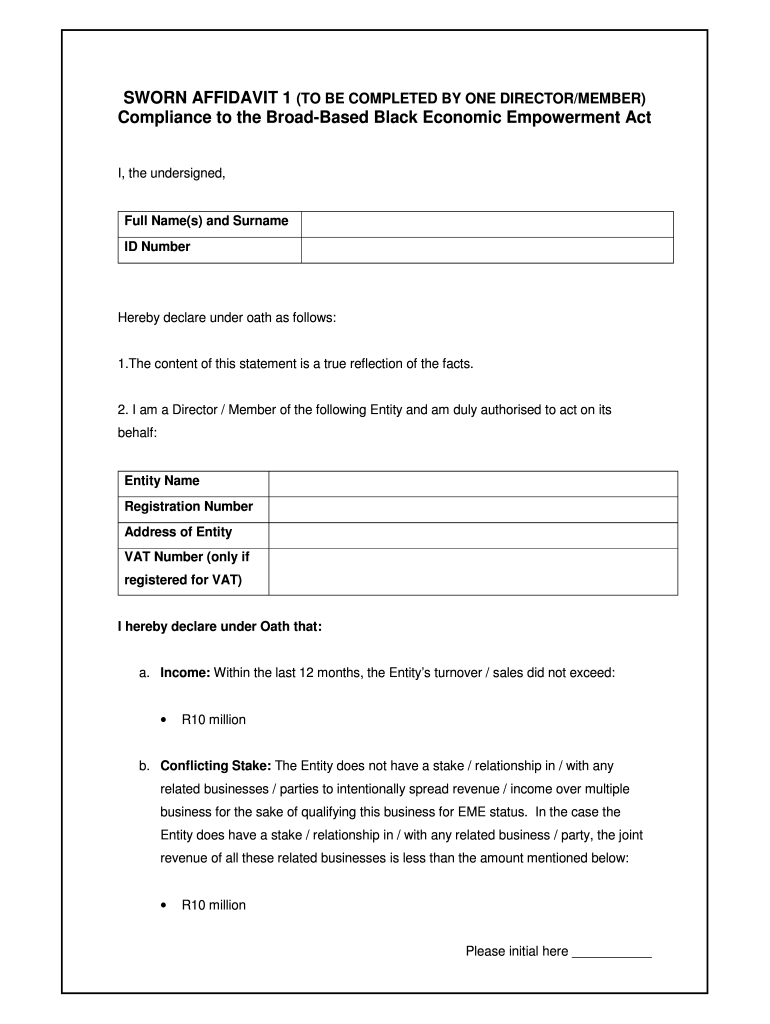
  1. Click ‘Get Form’ to open the bbbee affidavit word template in our platform's editor.
  2. Begin by entering your full name and ID number in the designated fields. This information is crucial for identification purposes.
  3. In the section regarding your role, specify whether you are a Director or Member of the entity. Then, provide the entity's name, registration number, address, and VAT number if applicable.
  4. For income declaration, indicate whether the entity’s turnover exceeded R10 million in the last 12 months by checking the appropriate box.
  5. If there are any conflicting stakes with related businesses, disclose this information clearly. If applicable, ensure that the joint revenue is less than R10 million.
  6. If your entity is a Start-Up Enterprise, confirm that business operations have been active for less than 12 months and list relevant documentation such as tax returns or contracts.
  7. Finally, review all entries for accuracy before signing. Ensure both your signature and date are included at the bottom of the document along with a Commissioner of Oaths signature and stamp.

Start using our platform today to fill out your bbbee affidavit word template easily and for free!

be ready to get more

Complete this form in 5 minutes or less

Get form

Got questions?

We have answers to the most popular questions from our customers. If you can't find an answer to your question, please contact us.
Contact us

If you often work with documents stored in your Google Drive, DocHub is a perfect option for you to easily and quickly fill out, adjust, and approve them. This editor integrates well with Google apps, so you can export your sworn affidavit bee word from your Google Drive to the editor without downloading and re-uploading it. Right-click on your file, choose Open With → DocHub PDF Sign and Edit. In our editor, add and assign Signature Fields for all people involved, then click on the Menu option above → Send → decide on how you want to share your form.

When you edit your bbbee affidavit word with DocHub, you merely require a stable internet connection and virtually any web browser installed on your device. No need to set up any third-party applications or research tutorials. Simply open a tab with DocHub, drag and drop your file, and modify it immediately.

Customers can complete an affidavit, signed by a commissioner of oaths. Once an affidavit has been stamped by a commissioner of oaths, the affidavit serves as a B-BBEE certificate, as no other verification is required for Exempted Micro Enterprises.
An affidavit is a written statement made under oath. This means that the person who is making the statement has sworn that the document contains the truth and is aware that they will be prosecuted if it is found that the contents of the affidavit (or parts thereof) are untrue.
Below is the basic six-step process you'll need to take to complete your affidavit. Title the affidavit. First, you'll need to title your affidavit. ... Craft a statement of identity. ... Write a statement of truth. ... State the facts. ... Reiterate your statement of truth. ... Sign and notarize.

Security and compliance

At DocHub, your data security is our priority. We follow HIPAA, SOC2, GDPR, and other standards, so you can work on your documents with confidence.

Learn more
ccpa2
pci-dss
gdpr-compliance
hipaa
soc-compliance

People also ask

Professional accountants or accounting officers may issue these certificates, but they must be sure that the enterprises qualify before doing so, to avoid falling foul of the codes and being seen as undermining the spirit of the BBBEE Act.
Can I Write My Own Affidavit In South Africa? Documents can be drafted by anyone, so they are not limited by law. To be valid, the affidavit must be signed, witnessed, and notarized.
Who can use a B-BBEE Sworn Affidavit? Any company that is exempt from B-BBEE compliance because their turnover is less than R10 million per annum. Typically start-ups and Exempt Micro Enterprises (EMEs) and Qualifying Small Enterprises (QSEs).
How to write an affidavit Write the heading \u201cAFFIDAVIT\u201d. State your name and personal details (i.e. ID number, gender, address, contact details, etc.). State that you are making a declaration under oath (i.e. \u201cI, the undersigned, declare the following under oath\u201d). Write the facts in a numbered list.
Customers can apply for a B-BBEE certificate on the eservices website , Bizportal anytime or at the CIPC Self Service Terminals when registering a business, or when filing annual returns. For a business with a turnover of less than R10 million, a B-BBEE certificate is not required.

affidavit template south africa word