Type text, add images, blackout confidential details, add comments, highlights and more.
02. Sign it in a few clicks
Draw your signature, type it, upload its image, or use your mobile device as a signature pad.
03. Share your form with others
Send da form 7801 via email, link, or fax. You can also download it, export it or print it out.
How to use or fill out DA Form 3595-R PDF Fillable with Our Platform
Ease of Setup
DocHub User Ratings on G2
Ease of Use
DocHub User Ratings on G2
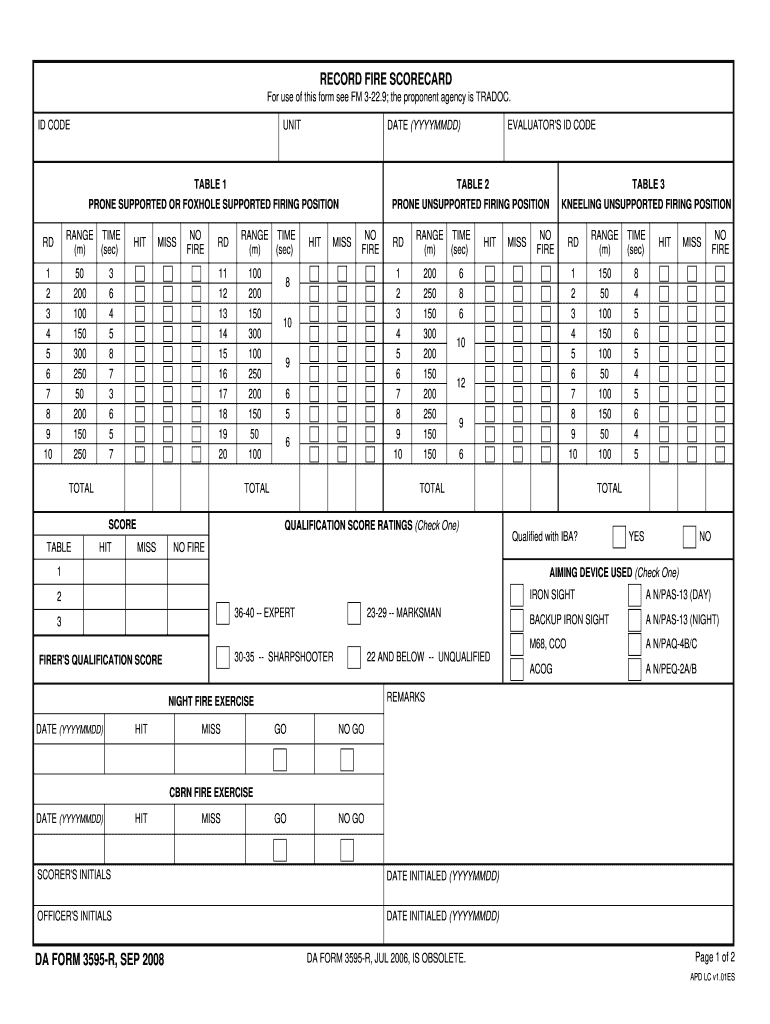
Click ‘Get Form’ to open the DA Form 3595-R in the editor.
Begin by entering your ID Code and Unit information at the top of the form. This identifies you and your unit for record-keeping.
Proceed to Table 1, where you will input range times and scores for the prone supported firing position. Ensure accuracy as this data is crucial for qualification.
Move on to Table 2, filling in details for the prone unsupported firing position. Again, record range times and hits accurately.
Complete Table 3 by documenting scores for the kneeling unsupported firing position. Make sure to check each box correctly based on performance.
Fill out additional sections such as evaluator's ID code, date, aiming device used, and qualification score ratings at the bottom of the form.
Start using our platform today to fill out your DA Form 3595-R easily and efficiently!
Fill out da form 3595 r pdf fillable online It's free
Da form 3595 r pdf fillable pdf downloadDa form 3595 r pdf fillable freeDa form 3595 r pdf fillable downloadDA Form 5790DA Form 7801Da 3595 r Army pubsDa 705iPERMS
Security and compliance
At DocHub, your data security is our priority. We follow HIPAA, SOC2, GDPR, and other standards, so you can work on your documents with confidence.
Jun 26, 2017 Submit MFDRs by using the fillable forms available on the Army Publishing Directorates Web site, The stock control section will transfer theRead more
Cookie consent notice
This site uses cookies to enhance site navigation and personalize your experience.
By using this site you agree to our use of cookies as described in our Privacy Notice.
You can modify your selections by visiting our Cookie and Advertising Notice.