01. Edit your el dorado county salary schedule online
Type text, add images, blackout confidential details, add comments, highlights and more.
02. Sign it in a few clicks
Draw your signature, type it, upload its image, or use your mobile device as a signature pad.
03. Share your form with others
Send it via email, link, or fax. You can also download it, export it or print it out.
How to use or fill out Human Resources - El Dorado County with our platform
Ease of Setup
DocHub User Ratings on G2
Ease of Use
DocHub User Ratings on G2
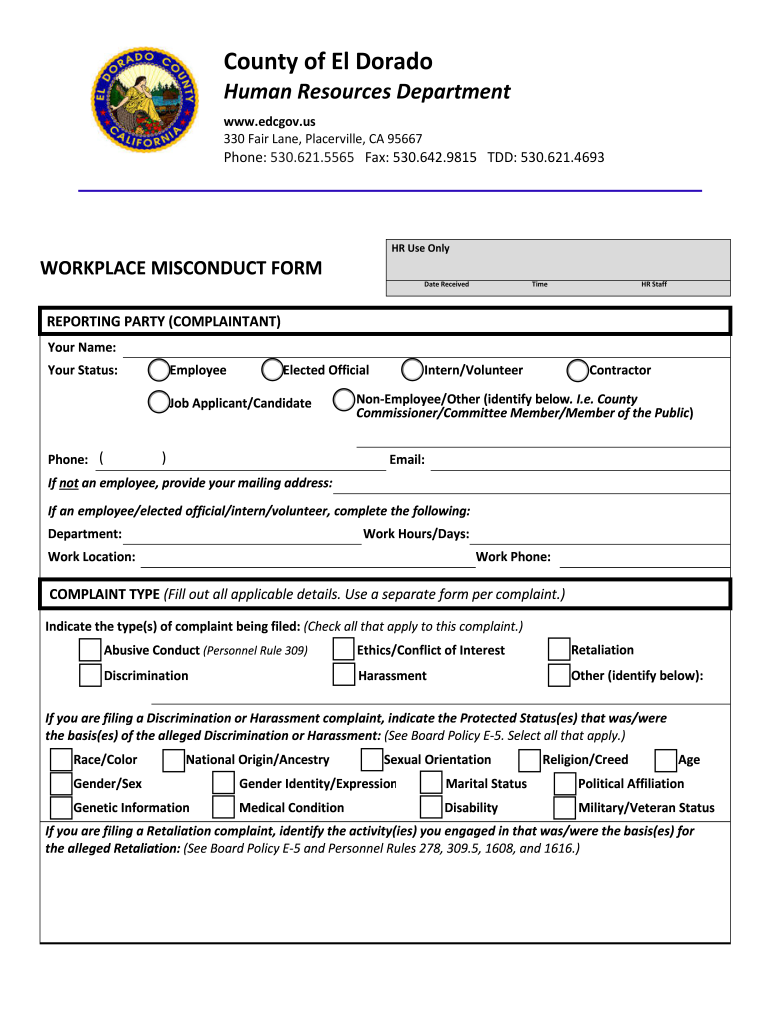
Click ‘Get Form’ to open the Workplace Misconduct Form in the editor.
Begin by filling out the 'Reporting Party' section. Enter your name, status (Employee, Elected Official, etc.), phone number, and email. If you are not an employee, provide your mailing address.
In the 'Complaint Type' section, check all applicable boxes that relate to your complaint. Be thorough in selecting types such as Abusive Conduct or Discrimination.
Detail the incident in the 'Incident Details' section. Include names of individuals involved, dates, times, and a comprehensive description of what occurred.
List any witnesses who observed the incident along with their contact information in the designated area.
Complete the certification at the end of the form by printing your name, signing it, and dating it to confirm accuracy.
Start using our platform today for free to streamline your form completion process!
Fill out Human Resources - El Dorado County online It's free
Human resources el dorado county phone numberHuman resources el dorado county jobsHuman resources el dorado county addressHuman resources el dorado county numberEl Dorado County Health and Human ServicesEl dorado county employment verificationEl Dorado County job DescriptionsEl Dorado County staff directory
Security and compliance
At DocHub, your data security is our priority. We follow HIPAA, SOC2, GDPR, and other standards, so you can work on your documents with confidence.
Please email humanresources@ltcc.edu with questions about activating/opening HSA, 403(b) or 457 plan(s). Steps 1 and 2 above need to be completed by Friday,Read more
Human Resources - Contact Us, El Dorado County, 330 Fair Lane Placerville, CA 95667, View On Map, Department Phone Numbers, General Comments Questions.Read more
Cookie consent notice
This site uses cookies to enhance site navigation and personalize your experience.
By using this site you agree to our use of cookies as described in our Privacy Notice.
You can modify your selections by visiting our Cookie and Advertising Notice.