Child care contract template 2026

Get Form
free babysitting contract agreement pdf Preview on Page 1

Here's how it works

01. Edit your free babysitting contract agreement pdf online
Type text, add images, blackout confidential details, add comments, highlights and more.

02. Sign it in a few clicks
Draw your signature, type it, upload its image, or use your mobile device as a signature pad.

03. Share your form with others
Send babysitter application form pdf via email, link, or fax. You can also download it, export it or print it out.

How to use or fill out child care contract template with our platform

Form edit decoration
9.5
Ease of Setup
DocHub User Ratings on G2
9.0
Ease of Use
DocHub User Ratings on G2
  1. Click ‘Get Form’ to open the child care contract template in the editor.
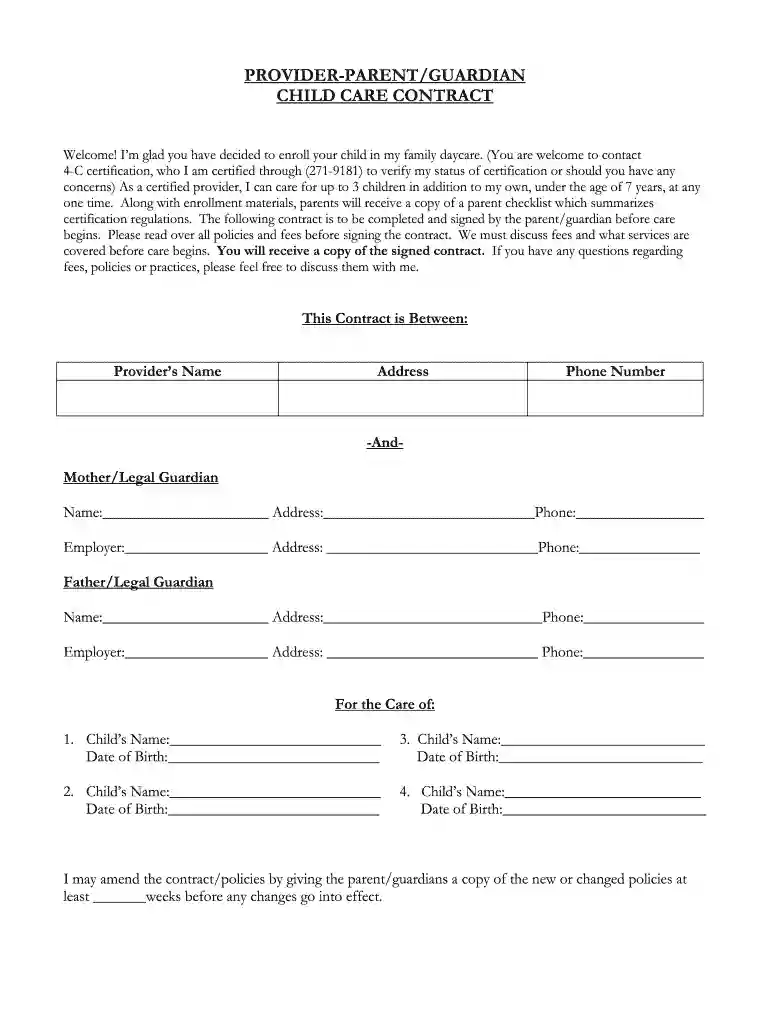
  2. Begin by filling in the provider's name, address, and phone number at the top of the form. This establishes who is providing care.
  3. Next, enter the details for each parent or legal guardian, including names, addresses, and phone numbers. Ensure all information is accurate for effective communication.
  4. List each child's name and date of birth in the designated sections. This helps clarify which children are enrolled under this contract.
  5. Proceed to the 'Payment and Fees' section. Specify hours of care needed by filling in drop-off and pick-up times for each day of the week.
  6. Indicate payment amounts for each child based on your agreed rates per week, day, or hour. Be sure to check any additional fees that may apply.
  7. Review all policies regarding holidays, absences, and termination carefully before signing. Make any necessary amendments directly in the editor.
  8. Finally, both parties should sign and date the contract to finalize it. Ensure you save a copy for your records.

Start using our platform today to easily fill out your child care contract template online for free!

be ready to get more

Complete this form in 5 minutes or less

Get form

Got questions?

We have answers to the most popular questions from our customers. If you can't find an answer to your question, please contact us.
Contact us

Most eSignature services require users to have a paid subscription. With DocHub, there are two ways for you to add an electronic signature to your babysitting papers without being charged:

  • You can do it during a 7-day trial period;
  • You can subscribe to a free plan.

The second option, however, has limitations on the number of signatures, sign requests, emails, and documents for editing available per month. You can check for full information here.

If you use Chrome, there are two simple methods to modify your babysitting contract template free online. First, go to the DocHub website, add your file, and modify it utilizing our toolbar. You can also install our Chrome extension and modify any document by dragging and dropping it in your web browser tab.

These contracts should include: Names and ages of child(ren) that will be enrolled in child care. Parent/guardian contact information. Payment information, including: Payment rate and schedule. ... Termination procedures, including: Provider's right to end arrangement for any reason with a specified period of notice.
How to Write a Babysitting Contract 1 \u2013 Obtain Then Open The Agreement To Set Up A Contract For Babysitting Services. ... 2 \u2013 Discuss The Effective Date Of The Agreement Between These Parties. ... 3 \u2013 Identify Each Child And The Babysitter's Compensation. ... 4 \u2013 Document The Child Care Schedule And Responsibilities.
It is never an easy decision to make, but you can make the process easier by writing a clear and concise termination letter. This letter should include the reasons for your decision, as well as any information about your child's care that you want the daycare provider to know.

Security and compliance

At DocHub, your data security is our priority. We follow HIPAA, SOC2, GDPR, and other standards, so you can work on your documents with confidence.

Learn more
ccpa2
pci-dss
gdpr-compliance
hipaa
soc-compliance