Rhode island hipaa form 2026

Get Form
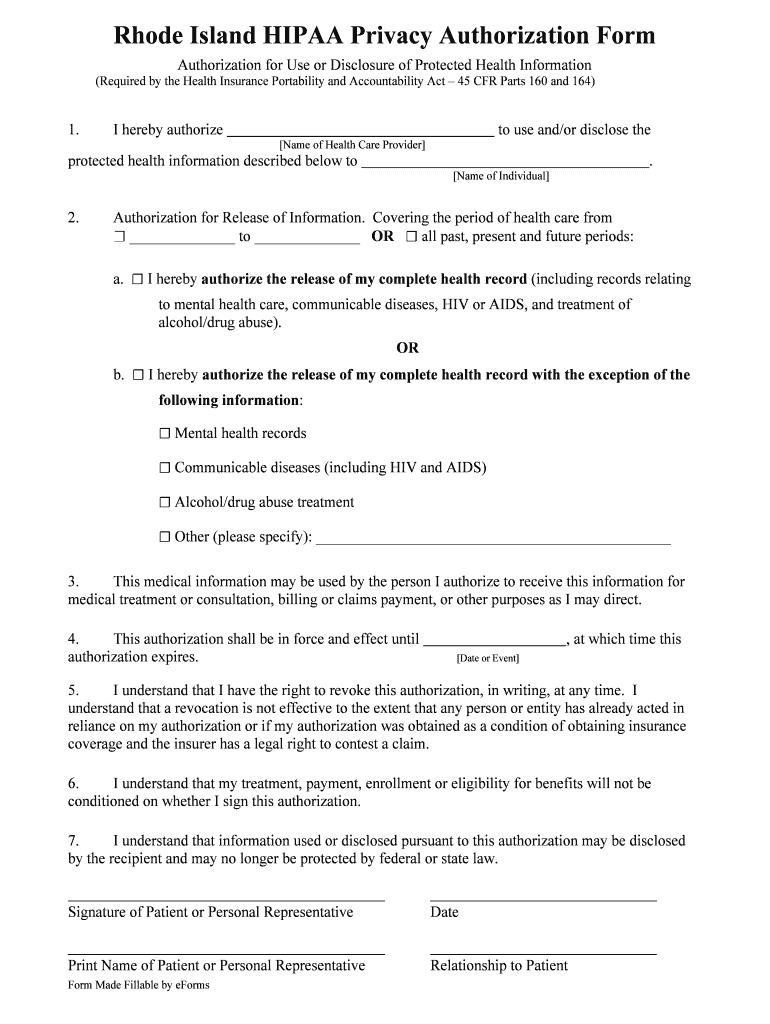
rhode island hipaa form Preview on Page 1

Here's how it works

01. Edit your form online
Type text, add images, blackout confidential details, add comments, highlights and more.
02. Sign it in a few clicks
Draw your signature, type it, upload its image, or use your mobile device as a signature pad.
03. Share your form with others
Send it via email, link, or fax. You can also download it, export it or print it out.

How to use or fill out Rhode Island HIPAA Form with DocHub

Form edit decoration
9.5
Ease of Setup
DocHub User Ratings on G2
9.0
Ease of Use
DocHub User Ratings on G2
  1. Click ‘Get Form’ to open the Rhode Island HIPAA Privacy Authorization Form in our platform.
  2. In the first section, enter the name of the health care provider authorized to use or disclose your protected health information.
  3. Next, specify the individual who will receive this information by filling in their name in the designated field.
  4. Indicate the period for which you authorize the release of information by selecting either a specific date range or opting for all past, present, and future periods.
  5. Choose whether to authorize the release of your complete health record or specify any exceptions, such as mental health records or treatment for substance abuse.
  6. Fill in the expiration date or event for this authorization to remain effective.
  7. Finally, sign and date the form, and print your name along with your relationship to the patient if applicable.

Start using our platform today to easily fill out and manage your Rhode Island HIPAA form online for free!

be ready to get more

Complete this form in 5 minutes or less

Get form

Got questions?

We have answers to the most popular questions from our customers. If you can't find an answer to your question, please contact us.
Contact us
How to create effective HIPAA compliant authorization forms Using a HIPAA compliant forms builder. Collect HIPAA compliant electronic signatures. Collecting all patient information in digital patient intake forms online. Restricting form field entry. Making form fields required. Using conditional logic in forms.
A HIPAA release form is a document that when signed allows healthcare providers to share a patients protected health information (PHI) with specified individuals or organizations, according to the details stipulated in the form.
How to create a HIPAA compliant medical records release form Provide instructions. Name the patient and individual authorized to use or disclose their PHI. Describe the information. Specify recipients. Specify the purpose of disclosure. Specify the time period. Detail their revocation rights. Obtain the patients signature.
FormDr gives your business everything needed to easily send and receive HIPAA compliant forms online. Send patients your forms to fill out on their phone, tablet, or computer. Patients easily sign and submit completed forms securely online.
Authorization. A covered entity must obtain the individuals written authorization for any use or disclosure of protected health information that is not for treatment, payment or health care operations or otherwise permitted or required by the Privacy Rule.

Security and compliance

At DocHub, your data security is our priority. We follow HIPAA, SOC2, GDPR, and other standards, so you can work on your documents with confidence.

Learn more
ccpa2
pci-dss
gdpr-compliance
hipaa
soc-compliance
be ready to get more

Complete this form in 5 minutes or less

Get form

People also ask

HIPAA sets strict standards for managing, transmitting, and storing protected health information. HIPAA applies to healthcare providers, insurers, and other organizations handling patient data, mandating safeguards to prevent unauthorized access or misuse of sensitive information.

Related links