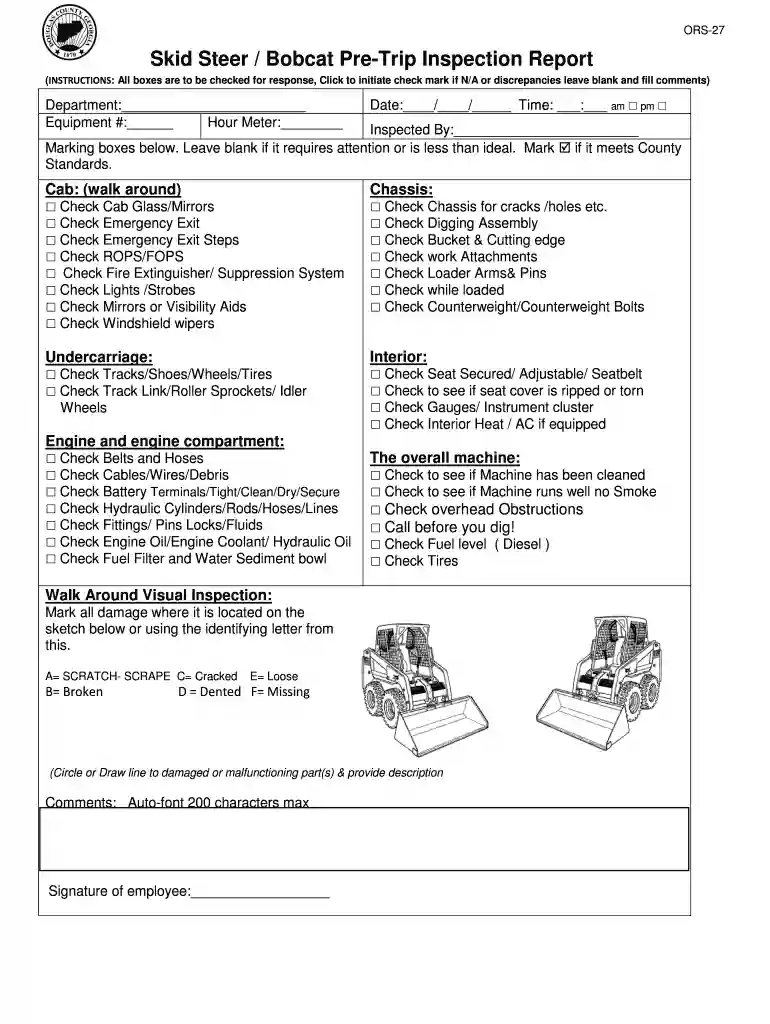
Pre inspection report form 2026

Get Form
pre inspection report format Preview on Page 1

Here's how it works

01. Edit your pre inspection report format online
Type text, add images, blackout confidential details, add comments, highlights and more.

02. Sign it in a few clicks
Draw your signature, type it, upload its image, or use your mobile device as a signature pad.

03. Share your form with others
Send it via email, link, or fax. You can also download it, export it or print it out.

How to use or fill out pre inspection report form with our platform

Form edit decoration
9.5
Ease of Setup
DocHub User Ratings on G2
9.0
Ease of Use
DocHub User Ratings on G2
  1. Click ‘Get Form’ to open the pre inspection report form in the editor.
  2. Begin by filling in the 'Department', 'Equipment #', and 'Hour Meter' fields at the top of the form. This information is essential for tracking and accountability.
  3. Enter the date and time of the inspection, selecting AM or PM as appropriate. This timestamp is crucial for record-keeping.
  4. Proceed to the 'Cab' section. Check each item listed, such as 'Cab Glass/Mirrors' and 'Emergency Exit'. Click to mark checks for items that are satisfactory; leave blank for those needing attention.
  5. Continue through sections like 'Undercarriage', 'Interior', and 'Engine and engine compartment'. For each component, check off items that meet standards, ensuring thoroughness in your inspection.
  6. In the 'Walk Around Visual Inspection' section, use the sketch provided to mark any damage using designated letters (A-F) and provide descriptions where necessary.
  7. Finally, add any comments in the designated area and sign off with your name at the bottom of the form to complete your inspection report.

Start using our platform today to streamline your pre inspection reporting process for free!

be ready to get more

Complete this form in 5 minutes or less

Get form

Got questions?

We have answers to the most popular questions from our customers. If you can't find an answer to your question, please contact us.
Contact us

If you often deal with documents stored in your Google Drive, DocHub is an excellent solution for you to easily and quickly fill out, edit, and approve them. This editor integrates properly with Google apps, so you can export your pre inspection report form from your Google Drive to the editor without downloading and re-uploading it. Right-click on your document, choose Open With → DocHub PDF Sign and Edit. In our editor, add and assign Signature Fields for all parties involved, then click on the Menu button above → Send → decide on how you want to share your paperwork.

If you edit your pre inspection report form with DocHub, you only need a stable web connection and virtually any web browser installed on your device. No need to set up any third-party applications or study tutorials. Simply open a tab with DocHub, drag and drop your file, and modify it immediately.

Yes, pre-trip inspections are mandatory under DOT regulations. The Federal Motor Carrier Safety Administration (FMCSA) requires all commercial motor vehicle drivers to inspect their vehicles before each trip. This applies to trucks, buses, and other commercial vehicles.
Pre-Trip Inspections The regulations provide a short list of 11 items that must be checked. The regulations do not require that the pre-trip be documented or reported to the carrier. If the driver finds something wrong with the vehicle, he or she is to get it fixed before operating it.
Inspection forms are specialized documents used to systematically evaluate, record, and report the condition, compliance, or quality of assets, environments, or processes.

Security and compliance

At DocHub, your data security is our priority. We follow HIPAA, SOC2, GDPR, and other standards, so you can work on your documents with confidence.

Learn more
ccpa2
pci-dss
gdpr-compliance
hipaa
soc-compliance
be ready to get more

Complete this form in 5 minutes or less

Get form

People also ask

Common mistakes during pre-trip inspections Not adequately checking your brake system for any damage or anomalies. Letting tires wear out beyond whats recommended. Overlooking any type of leak. Not securing cargo inside the trailer. Failing to address leaning issues. Neglecting faulty lights and warning signals.
For a field inspection report specifically, start by gathering all the data you need: take pictures to document physical conditions, collect notes on abnormalities and follow existing checklists or protocols that are relevant to your industry or project.

Related links