Ssa 3 2026

Get Form
ssa 3 Preview on Page 1

Here's how it works

01. Edit your ssa 3 online
Type text, add images, blackout confidential details, add comments, highlights and more.
02. Sign it in a few clicks
Draw your signature, type it, upload its image, or use your mobile device as a signature pad.
03. Share your form with others
Send form ssa 3 via email, link, or fax. You can also download it, export it or print it out.

How to use or fill out SSA 3 with our platform

Form edit decoration
9.5
Ease of Setup
DocHub User Ratings on G2
9.0
Ease of Use
DocHub User Ratings on G2
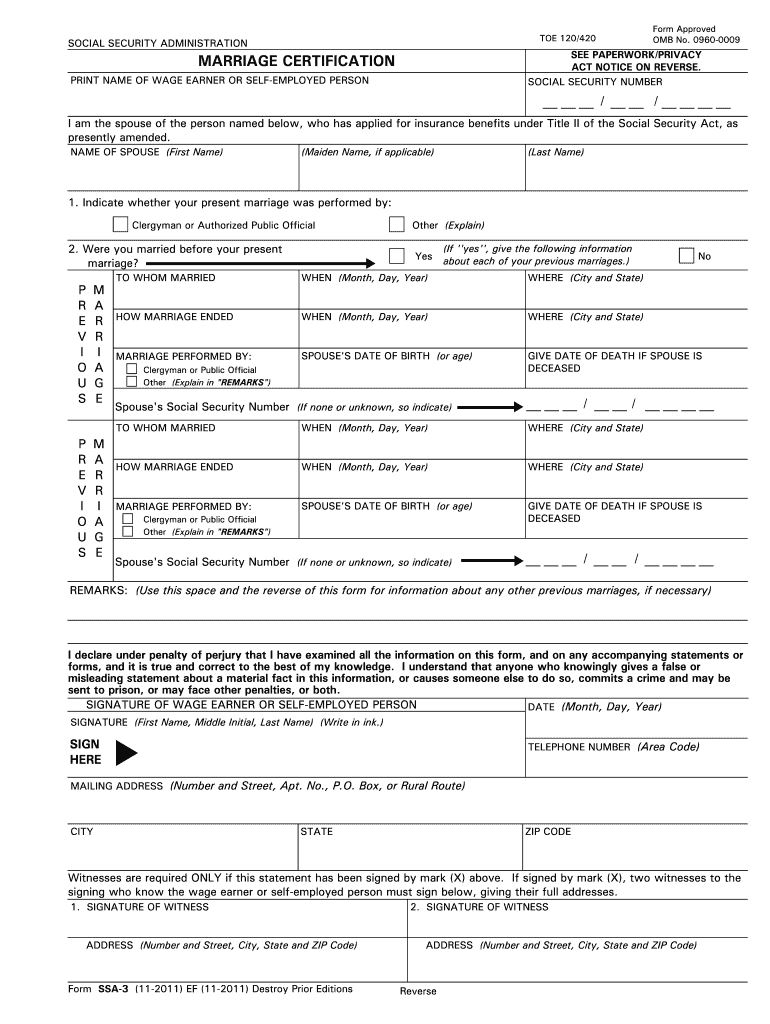
  1. Click ‘Get Form’ to open the SSA 3 document in the editor.
  2. Begin by entering your Social Security Number at the top of the form. This is essential for identification purposes.
  3. In the section labeled 'PRINT NAME OF WAGE EARNER OR SELF-EMPLOYED PERSON', clearly write the full name of the individual applying for benefits.
  4. Next, provide your spouse's name, including maiden name if applicable, in the designated fields.
  5. Indicate whether your current marriage was performed by a clergyman or an authorized public official by checking the appropriate box.
  6. If you have been married before, answer 'Yes' and fill out details regarding previous marriages, including names, dates, and how each marriage ended.
  7. Complete the section regarding your spouse’s date of birth and Social Security Number. If unknown, indicate as such.
  8. Finally, sign and date the form at the bottom. Ensure all information is accurate to avoid delays in processing.

Start filling out your SSA 3 form online for free today using our platform!

be ready to get more

Complete this form in 5 minutes or less

Get form

Got questions?

We have answers to the most popular questions from our customers. If you can't find an answer to your question, please contact us.
Contact us

Yes, a typed name is accepted as a valid electronic signature when you create it on your paperwork utilizing a compliant solution like DocHub. Simply add your ssa 3 instructions to our editor, click Sign in the top tool pane → Create your signature → Type your name in the proper tab, and select how it will appear on your document.

If you want to edit your ssa form filling on the internet quickly, it does not matter what browser you employ. DocHub’s straightforward editing tools are accessible using any internet browser. Just open the appropriate tab within our editor, add your file, and fill it out without stress.

If you and your spouse both get SSI, your benefit amount will change from an individual rate to a couple's rate.
WHEN DO YOU NEED TO REPORT? Report any changes that may affect your SSI as soon as possible and no later than 10 days after the end of the month in which the change occurred.
Program Description. The Social Security Administration (SSA) administers two programs that provide benefits based on disability: the Social Security disability insurance program (title II of the Social Security Act (Act)) and the Supplemental Security Income (SSI) program (title XVI of the Act).

Security and compliance

At DocHub, your data security is our priority. We follow HIPAA, SOC2, GDPR, and other standards, so you can work on your documents with confidence.

Learn more
ccpa2
pci-dss
gdpr-compliance
hipaa
soc-compliance

People also ask

Third Party Adult Function Report is a form that Social Security sometimes send to your contact person. This form is usually sent out two or three months after you first apply. It is also sometimes used during Continuing Disability Reviews, for people who are already on disability.
Social Security Benefits: Retirement, Disability, Dependents, and Survivors (OASDI)
If SSA reaches out to your contacts, they will receive Form SSA-3380-BK or the Third Party Function Form. This does not mean that there is a problem with your application, but it does mean your case was not clear-cut. The form asks your contacts very detailed questions about your ability to function in daily life.
SSA uses Form SSA-3 to determine if a spouse claimant has the necessary relationship to the Social Security number holder (i.e., the worker) to qualify for the worker's OASDI benefits. The respondents are applicants for spouse's OASDI benefits. Type of Request: Revision of an OMB-approved information collection.
Change of Marital Status - Marriage, divorce, and annulment of marriage. You must report marriage even if you believe that an exception applies. You return to work (as an employee or self- employed) regardless of amount of earnings.

what does ssa mean in snapchat