Type text, add images, blackout confidential details, add comments, highlights and more.
02. Sign it in a few clicks
Draw your signature, type it, upload its image, or use your mobile device as a signature pad.
03. Share your form with others
Send restraining order document via email, link, or fax. You can also download it, export it or print it out.
How to use or fill out restraining order with our platform
Ease of Setup
DocHub User Ratings on G2
Ease of Use
DocHub User Ratings on G2
Click ‘Get Form’ to open the restraining order document in the editor.
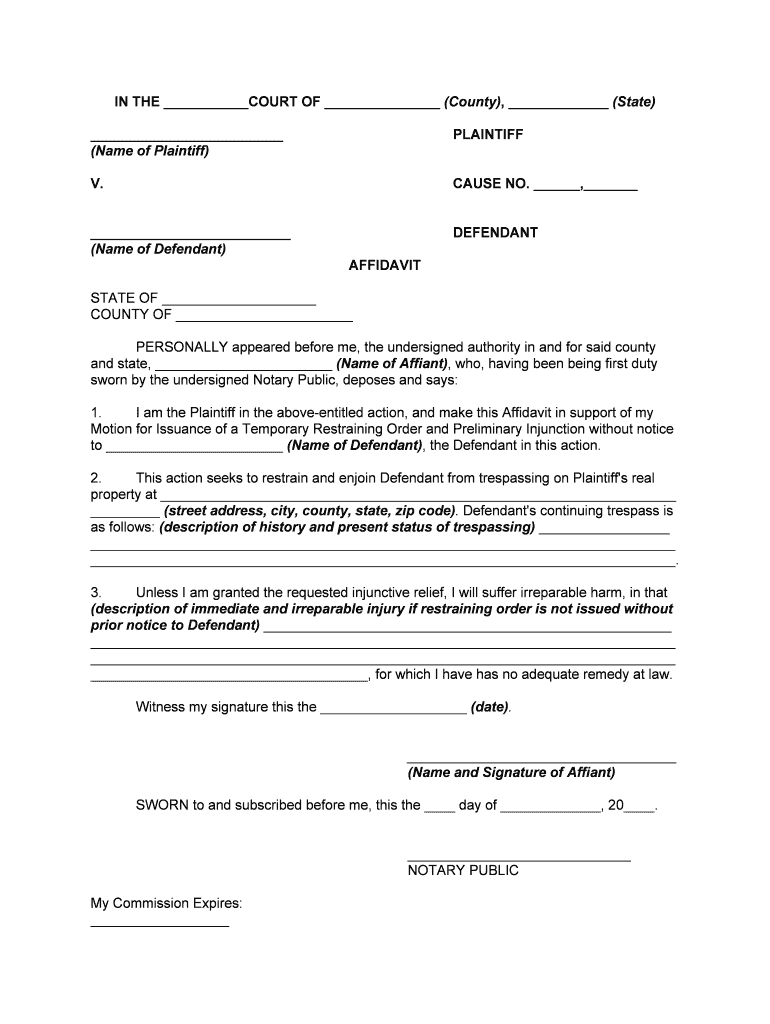
Begin by filling in the court name, county, and state at the top of the form. This information is crucial for identifying the jurisdiction of your case.
Next, enter your name as the Plaintiff and the Defendant's name in the respective fields. Ensure accuracy to avoid any delays in processing.
In the affidavit section, provide a detailed description of the trespassing incidents. Clearly outline when and how these events occurred to support your request for a restraining order.
Describe the immediate harm you may face if the restraining order is not granted. Be specific about potential injuries or damages to strengthen your case.
Finally, sign and date the affidavit at the bottom. If required, have it notarized by a public notary to validate your document.
Start using our platform today for free to complete your restraining order efficiently!
Restraining order in SpanishRestraining order CaliforniaRestraining order in ArabicRestraining order requirementsRestraining order onlineRestraining order where to fileRestraining Order formRestraining order near me
Security and compliance
At DocHub, your data security is our priority. We follow HIPAA, SOC2, GDPR, and other standards, so you can work on your documents with confidence.
Types of restraining orders Which type you can ask for Domestic violence Civil harassment Elder or dependent adult Workplace violence Gun violence.Read more
Cookie consent notice
This site uses cookies to enhance site navigation and personalize your experience.
By using this site you agree to our use of cookies as described in our Privacy Notice.
You can modify your selections by visiting our Cookie and Advertising Notice.