Passport application 2026

Get Form
passport application form Preview on Page 1

Here's how it works

01. Edit your passport application form online
Type text, add images, blackout confidential details, add comments, highlights and more.

02. Sign it in a few clicks
Draw your signature, type it, upload its image, or use your mobile device as a signature pad.

03. Share your form with others
Send passport application via email, link, or fax. You can also download it, export it or print it out.

How to use or fill out passport application with our platform

Form edit decoration
9.5
Ease of Setup
DocHub User Ratings on G2
9.0
Ease of Use
DocHub User Ratings on G2
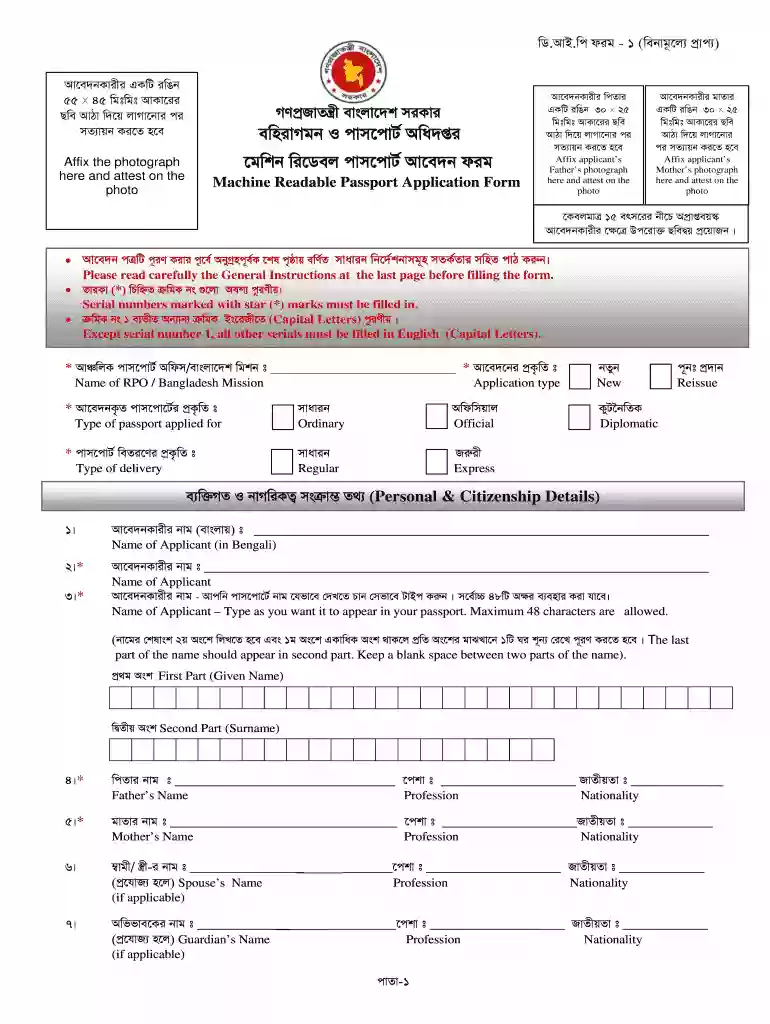
  1. Click ‘Get Form’ to open the passport application in the editor.
  2. Begin by filling in your personal details. Enter your name as you want it to appear on the passport, ensuring it does not exceed 48 characters. Use capital letters for clarity.
  3. Complete the sections for your parents' names and nationalities. Make sure to provide accurate information as this is crucial for verification.
  4. Indicate your marital status by placing a mark in the appropriate box. This helps in categorizing your application correctly.
  5. Fill out your address details, including both present and permanent addresses. If they are the same, simply check the box provided.
  6. Attach required photographs and any additional documents as specified in the instructions at the end of the form.
  7. Review all entered information carefully before submitting to ensure accuracy and completeness.

Start using our platform today to streamline your passport application process for free!

be ready to get more

Complete this form in 5 minutes or less

Get form

Got questions?

We have answers to the most popular questions from our customers. If you can't find an answer to your question, please contact us.
Contact us
1. Gather Required Documentation Form DS-11, completed but not signed. Evidence of U.S. citizenship. Photocopy of evidence of U.S. citizenship. Evidence of parental awareness. Photo ID. Photocopy of photo ID. Passport photo.
During the Submission you will need the following An eCitizen pre-filled passport application form and three receipts. Original birth certificate and photocopy. Original National ID Card copy. Three Current passport size photos. Recommenders ID Card copy. Consent letter for minors. Old passport for replacement.
A completed passport application Form (DHA-73), The original and a copy of your original ID (or birth certificate if youre less than 16 years old), A parental consent form if youre under 18, 2 colour photographs that comply with the passport and ID photograph specifications.

Security and compliance

At DocHub, your data security is our priority. We follow HIPAA, SOC2, GDPR, and other standards, so you can work on your documents with confidence.

Learn more
ccpa2
pci-dss
gdpr-compliance
hipaa
soc-compliance