




Here's how it works

01. Edit your ctc link wvc online
Type text, add images, blackout confidential details, add comments, highlights and more.

02. Sign it in a few clicks
Draw your signature, type it, upload its image, or use your mobile device as a signature pad.

03. Share your form with others
Send ctclink wenatchee valley college via email, link, or fax. You can also download it, export it or print it out.
How to use or fill out wvc transcript with our platform

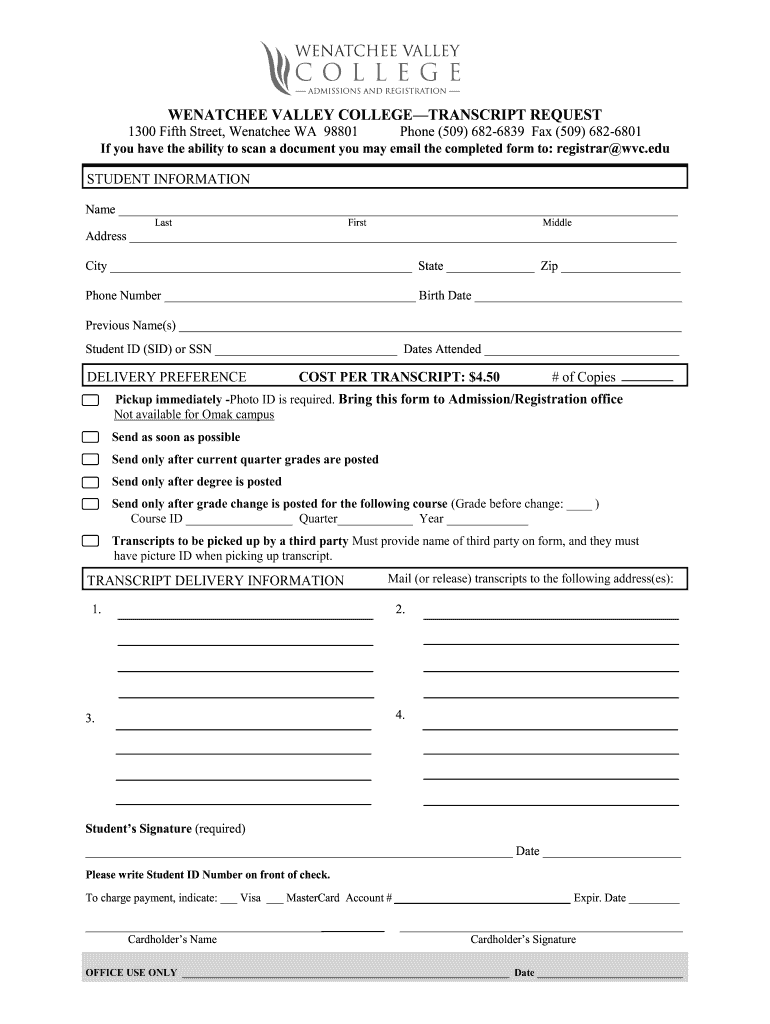
- Click ‘Get Form’ to open the WVC Transcript Request in the editor.
- Begin by filling out your personal information in the 'STUDENT INFORMATION' section. Enter your last name, first name, middle name, address, city, state, zip code, phone number, birth date, previous names (if any), and your Student ID (SID) or SSN along with the dates you attended.
- In the 'DELIVERY PREFERENCE' section, indicate how many copies of the transcript you need and select your preferred delivery option. Options include immediate pickup (with photo ID), sending as soon as possible, or waiting for specific conditions like current grades being posted.
- Fill out the 'TRANSCRIPT DELIVERY INFORMATION' by providing the addresses where you want the transcripts mailed. You can list multiple addresses if needed.
- Sign and date the form in the designated area. If paying by credit card, complete that section with your card details and signature.
Start using our platform today to easily fill out and manage your WVC transcript request for free!
Fill out wvc transcript online
It's free
It's free
Security and compliance
At DocHub, your data security is our priority. We follow HIPAA, SOC2, GDPR, and other standards, so you can work on your documents with confidence.
Learn more


