Ra79 2026

Get Form
ra79 Preview on Page 1

Here's how it works

01. Edit your form online
Type text, add images, blackout confidential details, add comments, highlights and more.
02. Sign it in a few clicks
Draw your signature, type it, upload its image, or use your mobile device as a signature pad.
03. Share your form with others
Send it via email, link, or fax. You can also download it, export it or print it out.

How to use or fill out ra79 with our platform

Form edit decoration
9.5
Ease of Setup
DocHub User Ratings on G2
9.0
Ease of Use
DocHub User Ratings on G2
  1. Click ‘Get Form’ to open the ra79 document in the editor.
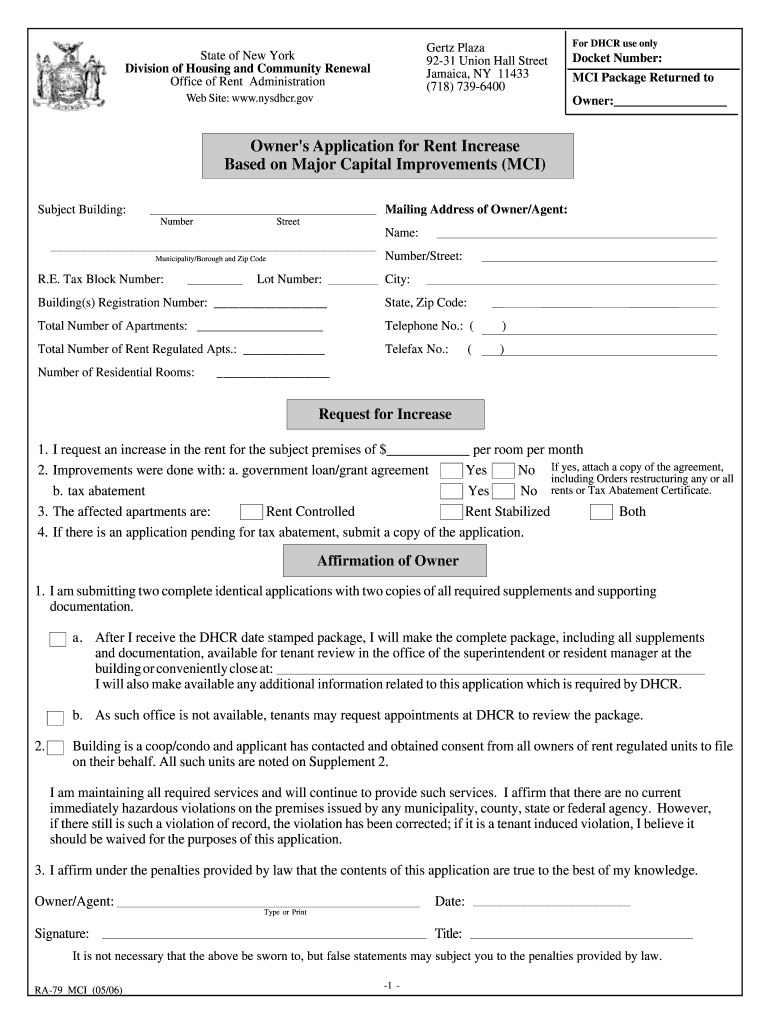
  2. Begin by filling in the Owner's Application for Rent Increase section. Enter your name, mailing address, and contact information accurately.
  3. In the Request for Increase section, specify the amount you are requesting per room per month and indicate whether improvements were made with a government loan or tax abatement.
  4. Complete the Affirmation of Owner section by confirming that you have submitted two identical applications and that all required documentation is available for tenant review.
  5. For each Major Capital Improvement (MCI) item claimed, provide details such as age, reason for replacement, work dates, and claimed costs in the Claimed MCI Costs section.
  6. Finally, ensure all sections are completed accurately before submitting your application through our platform.

Start using our platform today to streamline your ra79 form completion for free!

be ready to get more

Complete this form in 5 minutes or less

Get form

Got questions?

We have answers to the most popular questions from our customers. If you can't find an answer to your question, please contact us.
Contact us

Yes, and it’s really straightforward! DocHub is an online PDF editor with advanced document processing features that allow you rapidly adjust your documents, fill out empty fields and drop new ones for other people to fill out, and create electronic signatures in several ways. Add your ra79, give information as required, and select how you want to eSign your document - by typing your name, drawing your signature, uploading its picture, or utilizing a QR code.

With DocHub, there are several convenient methods to edit your ra79 online. You can drag and drop the form and edit it directly at the DocHub website or use our browser extension to fill out your form right away. Additionally, you can edit your PDF on your smartphone, as DocHub works with all the accessible mobile platforms.

Retevis Speaker Mic Compatible with Baofeng UV-5R 888s Kenwood Retevis RT22 RT21 RT19 H-777 H-777S RT15 RT22S RT68 RT27 RT21V RT18 RT1 RT28 RT-5R Arcshell AR-6 Walkie Talkie (5 Pack)
1, Question: What is the range of Retevis RA79? Answer: RA79 is a 5w Power ham radio, so the range will easy to docHub 1-5km.
The controversial radio had no FCC Part 95 certification in the United States. As a result, it was not authorized for use in the GMRS and FRS, only for amateur radio. Baofeng launched a number of other models based on the UV-5R technology, since 2012.

Security and compliance

At DocHub, your data security is our priority. We follow HIPAA, SOC2, GDPR, and other standards, so you can work on your documents with confidence.

Learn more
ccpa2
pci-dss
gdpr-compliance
hipaa
soc-compliance
be ready to get more

Complete this form in 5 minutes or less

Get form

People also ask

To connect the Retevis Walkie Talkies Earpiece with Mic to your Baofeng radio, simply plug the K plug of the earpiece into the compatible port on your Baofeng radio. Ensure that the plug is securely inserted.

Related links