Type text, add images, blackout confidential details, add comments, highlights and more.
02. Sign it in a few clicks
Draw your signature, type it, upload its image, or use your mobile device as a signature pad.
03. Share your form with others
Send pwc 100 form via email, link, or fax. You can also download it, export it or print it out.
How to use or fill out pwc 100 with our platform
Ease of Setup
DocHub User Ratings on G2
Ease of Use
DocHub User Ratings on G2
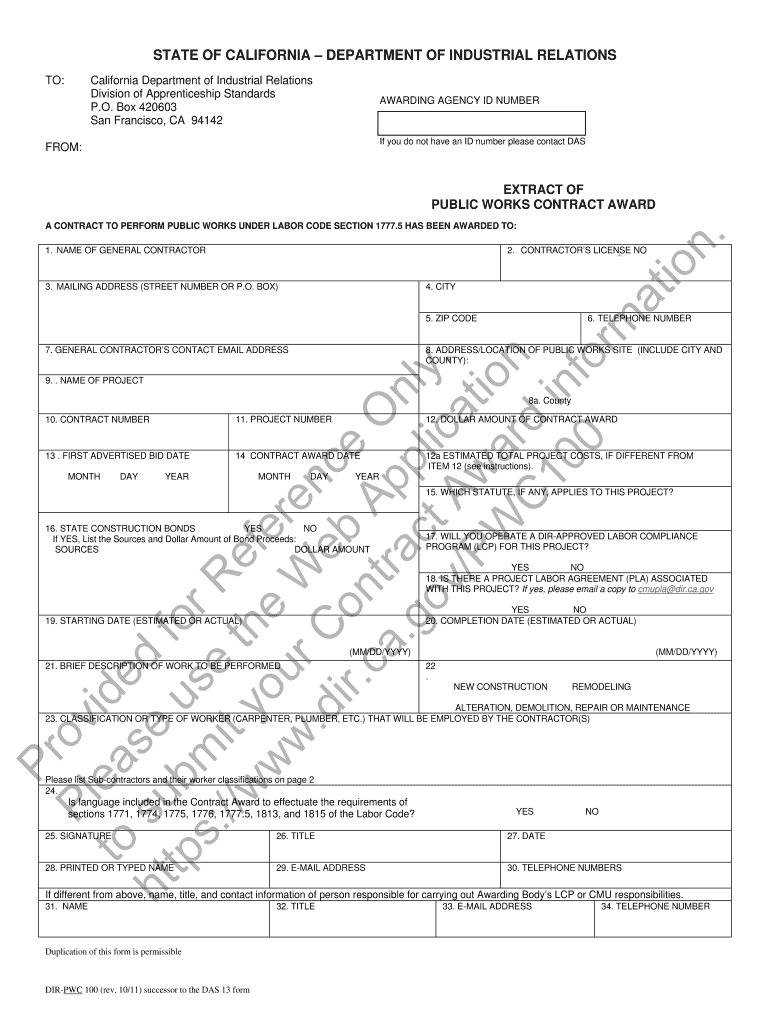
Click ‘Get Form’ to open the pwc 100 in the editor.
Begin by entering the Awarding Agency ID Number at the top of the form. If you do not have an ID number, please contact the Division of Apprenticeship Standards for assistance.
Fill in the name of the General Contractor and their corresponding license number. Ensure that all details are accurate to avoid any processing delays.
Complete the mailing address section, including street number, city, state, and ZIP code. This information is crucial for correspondence.
Provide a valid telephone number and email address for the General Contractor's contact. This ensures effective communication throughout the project.
Continue filling out sections regarding project details such as location, contract number, award date, and estimated costs. Be thorough to ensure compliance with labor regulations.
Finally, review all entries for accuracy before signing and dating the form at the bottom. Make sure to include your printed name and contact information.
Start using our platform today to fill out your pwc 100 form easily and efficiently!
Cookie consent notice
This site uses cookies to enhance site navigation and personalize your experience.
By using this site you agree to our use of cookies as described in our Privacy Notice.
You can modify your selections by visiting our Cookie and Advertising Notice.