Type text, add images, blackout confidential details, add comments, highlights and more.

02. Sign it in a few clicks
Draw your signature, type it, upload its image, or use your mobile device as a signature pad.

03. Share your form with others
Send it via email, link, or fax. You can also download it, export it or print it out.

How to Use or Fill Out Ticket Manifest with Our Platform
Ease of Setup
DocHub User Ratings on G2
Ease of Use
DocHub User Ratings on G2
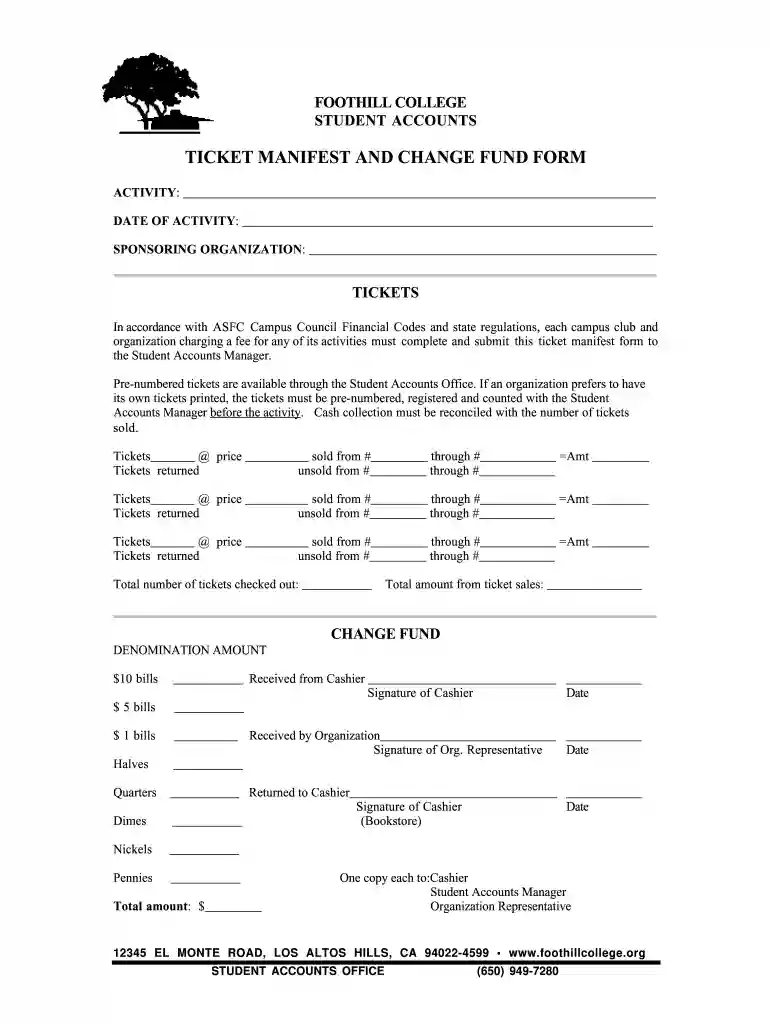
Click ‘Get Form’ to open the ticket manifest in the editor.
Begin by filling in the 'ACTIVITY' section with a brief description of your event. This helps identify the purpose of the ticket sales.
Next, enter the 'DATE OF ACTIVITY' to specify when your event will take place. Accurate dates ensure proper record-keeping.
In the 'SPONSORING ORGANIZATION' field, write down the name of your organization responsible for the event.
For each ticket sale, fill out the corresponding fields under 'TICKETS'. Include details such as quantity sold, price per ticket, and ticket numbers for accurate tracking.
Complete the 'CHANGE FUND' section by detailing denominations and amounts received from and returned to the cashier. Ensure all signatures are included for verification.
Finally, review all entries for accuracy before submitting your completed form to ensure compliance with financial codes.
Start using our platform today to streamline your ticket manifest process for free!
Cookie consent notice
This site uses cookies to enhance site navigation and personalize your experience.
By using this site you agree to our use of cookies as described in our Privacy Notice.
You can modify your selections by visiting our Cookie and Advertising Notice.