01. Edit your how to register with blackfoot indian tribe online
Type text, add images, blackout confidential details, add comments, highlights and more.
02. Sign it in a few clicks
Draw your signature, type it, upload its image, or use your mobile device as a signature pad.
03. Share your form with others
Send blackfeet indian reservation via email, link, or fax. You can also download it, export it or print it out.
How to Fill Out the Blackfoot Indian Tribe Registration Form
Ease of Setup
DocHub User Ratings on G2
Ease of Use
DocHub User Ratings on G2
Click ‘Get Form’ to open it in the editor.
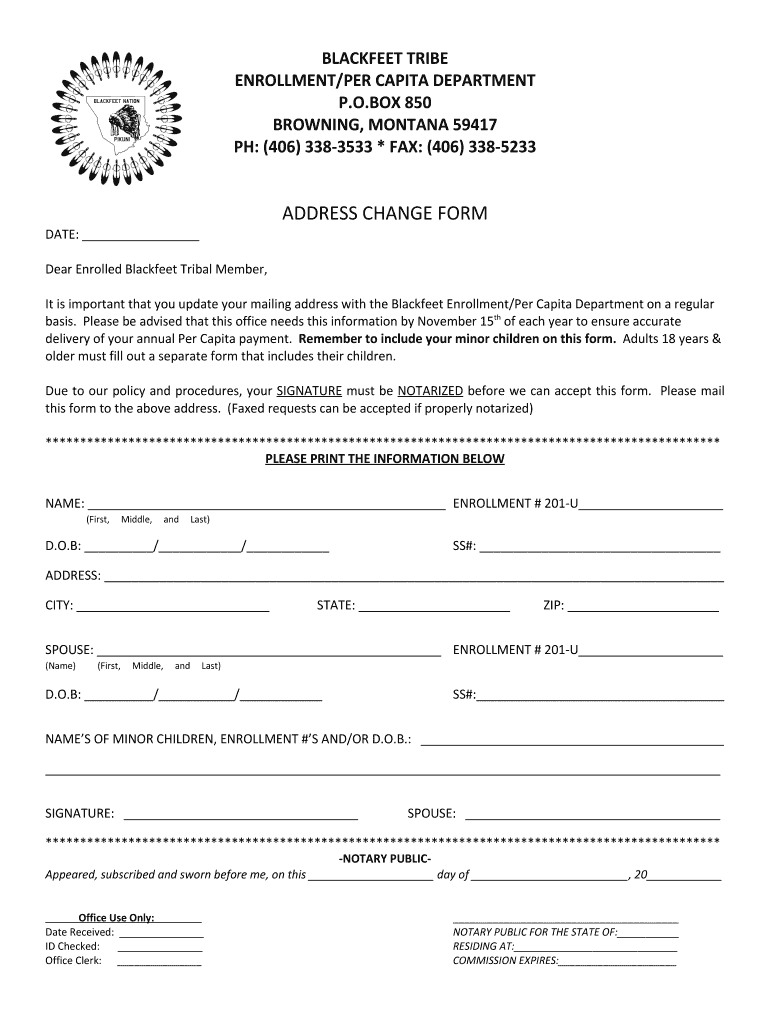
Begin by entering your full name, including first, middle, and last names, along with your enrollment number. Ensure accuracy as this information is crucial for your registration.
Fill in your date of birth and Social Security number. This information helps verify your identity and eligibility.
Provide your current mailing address, including city, state, and ZIP code. Remember to keep this updated annually by November 15th.
If applicable, include your spouse's name and enrollment number, along with their date of birth and Social Security number.
List the names of any minor children along with their enrollment numbers or dates of birth. Each adult must fill out a separate form for their children.
Sign the form at the designated area. Note that your signature must be notarized before submission.
Finally, mail the completed form to the Enrollment/Per Capita Department or fax it if properly notarized.
Start using our platform today to easily complete your registration form for free!
Fill out how to register with blackfoot indian tribe online It's free
Now, anyone born after Aug. 30, 1962, looking to enroll as a member of the Blackfeet tribe must prove they are one-quarter Blackfeet by lineage. This means anRead more
The reservation is home to the Blackfeet tribe. Of the approximately 15,560 enrolled tribal members, there are about 7,000 living on or near the reservationRead more
Cookie consent notice
This site uses cookies to enhance site navigation and personalize your experience.
By using this site you agree to our use of cookies as described in our Privacy Notice.
You can modify your selections by visiting our Cookie and Advertising Notice.