Type text, add images, blackout confidential details, add comments, highlights and more.
02. Sign it in a few clicks
Draw your signature, type it, upload its image, or use your mobile device as a signature pad.
03. Share your form with others
Send it via email, link, or fax. You can also download it, export it or print it out.
How to use or fill out form pdla 2011 with our platform
Ease of Setup
DocHub User Ratings on G2
Ease of Use
DocHub User Ratings on G2
Click ‘Get Form’ to open it in the editor.
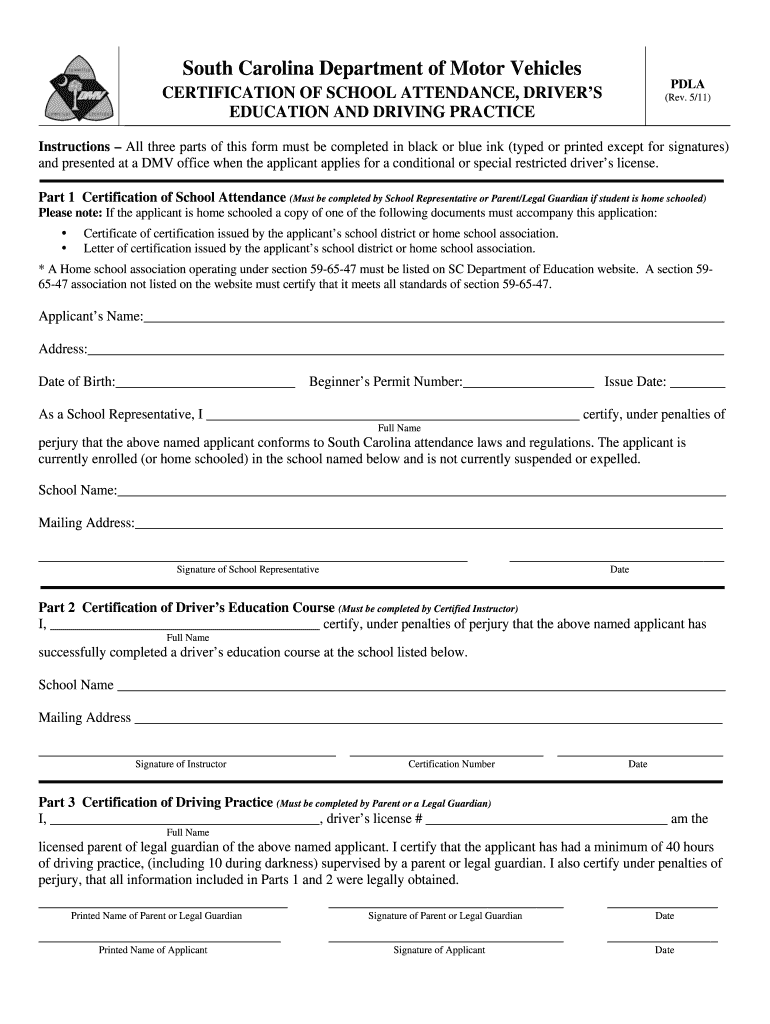
Begin with Part 1, Certification of School Attendance. Fill in the applicant’s name, address, and date of birth. If the applicant is home schooled, ensure to attach the required certification documents.
As a School Representative or Parent/Legal Guardian, provide your full name and sign to certify that the applicant meets attendance laws. Include the school name and mailing address.
Move to Part 2 for Certification of Driver’s Education Course. A certified instructor must complete this section by providing their full name, signature, and certification number along with the school details.
In Part 3, Certification of Driving Practice, a licensed parent or legal guardian must confirm that the applicant has completed at least 40 hours of driving practice. Fill in all required fields including signatures and dates.
Start using our platform today for free to streamline your form completion process!
by JS Goldberg 2011 Cited by 9 It is proposed that select oligomers of polymer d-lactic acid (PDLA) will form a stereocomplex with l-lactate in vivo, producing lactate
Stereocomplexes Formed From Select Oligomers of Polymer d
by JS Goldberg 2011 Cited by 9 It is proposed that select oligomers of polymer d-lactic acid (PDLA) will form a stereocomplex with l-lactate in vivo, producing lactate deficiency in tumor
Cookie consent notice
This site uses cookies to enhance site navigation and personalize your experience.
By using this site you agree to our use of cookies as described in our Privacy Notice.
You can modify your selections by visiting our Cookie and Advertising Notice.