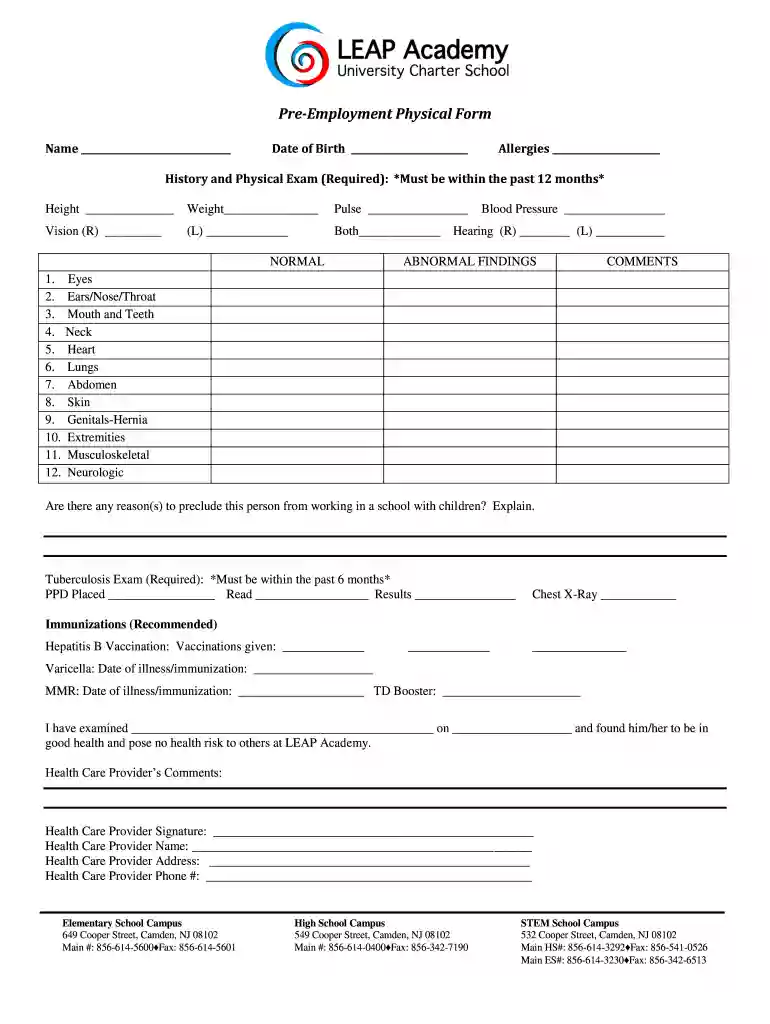
physical form for work Preview on Page 1

Employment physical forms 2026

Here's how it works

  • 01. Edit your physical form for work online

    Type text, add images, blackout confidential details, add comments, highlights and more.

  • 02. Sign it in a few clicks

    Draw your signature, type it, upload its image, or use your mobile device as a signature pad.

  • 03. Share your form with others

    Send employment physical forms via email, link, or fax. You can also download it, export it or print it out.

How to use or fill out employment physical forms with our platform

Form edit decoration
9.5
Ease of Setup
DocHub User Ratings on G2
9.0
Ease of Use
DocHub User Ratings on G2
  1. Click ‘Get Form’ to open the employment physical form in the editor.
  2. Begin by entering your name and date of birth at the top of the form. This information is essential for identification purposes.
  3. List any allergies you may have in the designated field to ensure your health needs are noted.
  4. Complete the History and Physical Exam section, including your height, weight, pulse, and vision details. Ensure this information is accurate as it must be within the past 12 months.
  5. Fill in your blood pressure readings and hearing capabilities for both ears. This data is crucial for assessing your overall health.
  6. In the Abnormal Findings section, provide comments on various health aspects such as eyes, ears/nose/throat, and more. Be thorough to avoid any issues later.
  7. Complete the Tuberculosis Exam section with PPD placement dates and results. This is a required component of your health assessment.
  8. Finally, have a healthcare provider complete their comments and signature at the bottom of the form to validate your health status.

Start using our platform today to easily fill out your employment physical forms online for free!

be ready to get more

Complete this form in 5 minutes or less

Got questions?

We have answers to the most popular questions from our customers. If you can't find an answer to your question, please contact us.

Documents that Establish Both Identity and Employment Authorization U.S. Passport or U.S. Passport Card. Permanent Resident Card or Alien Registration Receipt Card (Form I-551) Foreign passport that contains a temporary I-551 stamp or temporary I-551 printed notation on a machine-readable immigrant visa.
Form I-766, Employment Authorization Document (EAD) that contains a photograph. However, in certain circumstances, an EAD past its Card Expires date qualifies as an unexpired EAD.
Documents you need Examples: Primary document: Drivers license, passport, or other government-issued photo. Secondary document: Social Security card, utility bill, or vehicle registration.
Pre-employment physical exams, also known as pre-employment medical screenings, are comprehensive health assessments conducted by healthcare professionals to evaluate a candidates physical fitness for a specific job.

Security and compliance

At DocHub, your data security is our priority. We follow HIPAA, SOC2, GDPR, and other standards, so you can work on your documents with confidence.

standard physical form for employment

Printable Pre Employment Physical Form

Employers can use this printable physical form to evaluate an applicants health and abilities before they start a job. Do you require a respirator, face mask,Read more

Learn more
Practical resources

This page aims to gather practical resources that may be useful to nonbinary people and others who do not fit the gender binary. It is not expected that all

Learn more
Certificate of Medical Examination (2012 Version)

This form is used to collect medical information about individuals who are incumbents of positions in the Federal Government which require physical fitnessRead more

Learn more
If you believe that this page should be taken down, please follow our DMCA take down process here