Type text, add images, blackout confidential details, add comments, highlights and more.

02. Sign it in a few clicks
Draw your signature, type it, upload its image, or use your mobile device as a signature pad.

03. Share your form with others
Send hsbc change name via email, link, or fax. You can also download it, export it or print it out.

How to use or fill out hsbc change name with our platform
Ease of Setup
DocHub User Ratings on G2
Ease of Use
DocHub User Ratings on G2
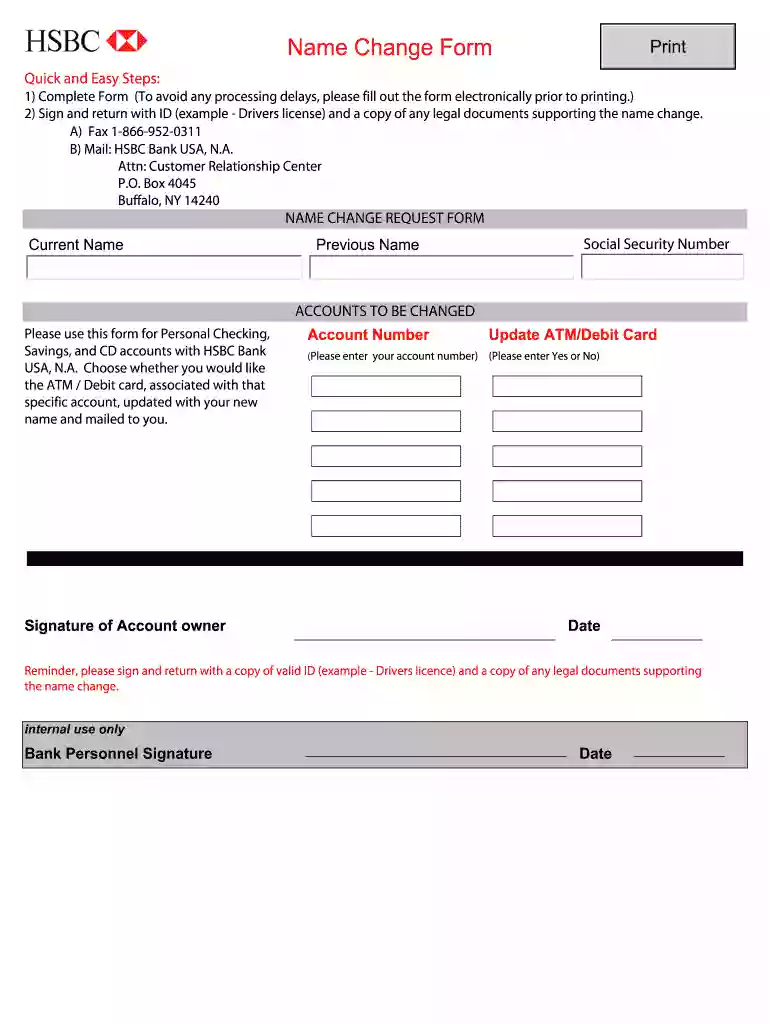
Click ‘Get Form’ to open the hsbc change name form in the editor.
Begin by entering your current name and previous name in the designated fields. Ensure accuracy to avoid processing delays.
Input your Social Security Number in the appropriate section, as this is necessary for identity verification.
List the accounts you wish to change under 'ACCOUNTS TO BE CHANGED'. Indicate whether you want your ATM/Debit card updated with your new name by selecting 'Yes' or 'No'.
Sign the form where indicated, and include your account number. Remember to date the form as well.
Prepare to submit your form by gathering a valid ID (like a driver's license) and any legal documents supporting your name change.
Choose to fax it to 1-866-952-0311 or mail it to HSBC Bank USA, N.A., Attn: Customer Relationship Center, P.O. Box 4045, Buffalo, NY 14240.
Start using our platform today for free and streamline your document editing experience!
Hsbc change name onlineHSBC address change formHSBC HK change addressHSBC change phone number without appHsbc change address business accountHSBC change address contact numberHow to change name on bank account after marriageHSBC update my details
Security and compliance
At DocHub, your data security is our priority. We follow HIPAA, SOC2, GDPR, and other standards, so you can work on your documents with confidence.
Dec 17, 2025 The Office of the Comptroller of the Currency (OCC) grants preliminary conditional approval of the application by HSBC Bank plc, London,Read more
Thank you for helping us stay up-to-date with our alumni records. First Name*. Middle Name. Last Name*. Suffix. Maiden Name. Spouse Name (if applicable).Read more
Cookie consent notice
This site uses cookies to enhance site navigation and personalize your experience.
By using this site you agree to our use of cookies as described in our Privacy Notice.
You can modify your selections by visiting our Cookie and Advertising Notice.