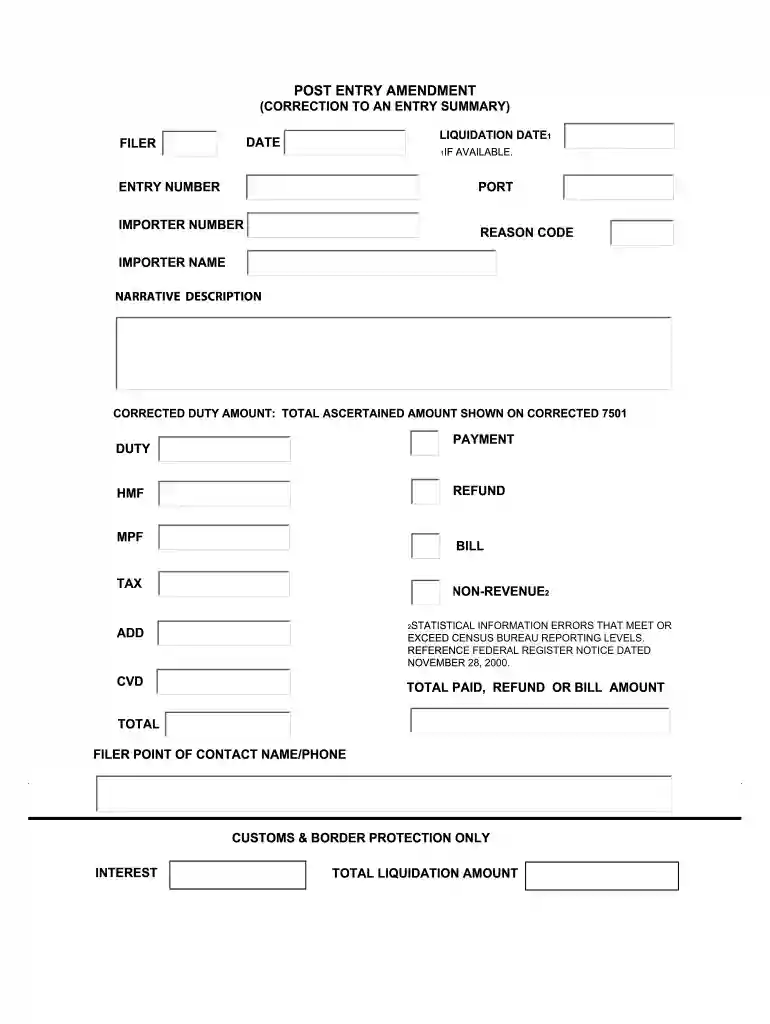
Post entry amendment form 2026

Get Form
post entry amendment form Preview on Page 1

Here's how it works

01. Edit your post entry amendment form online
Type text, add images, blackout confidential details, add comments, highlights and more.

02. Sign it in a few clicks
Draw your signature, type it, upload its image, or use your mobile device as a signature pad.

03. Share your form with others
Send it via email, link, or fax. You can also download it, export it or print it out.

How to use or fill out post entry amendment form with our platform

Form edit decoration
9.5
Ease of Setup
DocHub User Ratings on G2
9.0
Ease of Use
DocHub User Ratings on G2
  1. Click ‘Get Form’ to open the post entry amendment form in the editor.
  2. Begin by entering the Liquidation Date and ensure it is accurate. This date is crucial for processing your amendment.
  3. Fill in the Filer information, including the Port and Entry Number. These details help identify your submission.
  4. Provide your Importer Number and Name, ensuring that all information matches official records for accuracy.
  5. Select a Reason Code from the provided list that best describes your amendment. This helps clarify the nature of your request.
  6. In the Narrative Description field, briefly explain the reason for your amendment to provide context.
  7. Enter the Corrected Duty Amount as shown on the corrected CBP Form 7501, ensuring it reflects accurate figures.
  8. Complete any additional fields related to payment, refunds, or bills as necessary based on your specific situation.
  9. Finally, review all entries for accuracy before submitting. Use our platform’s features to save or share your completed form easily.

Start using our platform today to fill out your post entry amendment form online for free!

be ready to get more

Complete this form in 5 minutes or less

Get form

Got questions?

We have answers to the most popular questions from our customers. If you can't find an answer to your question, please contact us.
Contact us
CBP Form 7501, also known as Entry Summary, is a mandatory document used by CBP to evaluate and confirm the accuracy of information related to imported goods. This form captures essential details such as: Appraisement (the valuation of goods) Origin of the goods.
CBP Declaration Form 6059B provides us with basic information about who you are and what you are bringing into the United States, such as agricultural and wildlife products and whether or not you have visited a farm prior to traveling to the United States.
A PSC allows the trade to electronically correct entry summary data presented to and accepted by U.S. Customs and Border Protection through ACE.
In doing so, CBP adopted a revised data set for cargo release processing, often referred to as Simplified Entry. This entry serves as the foundation of a totally paperless entry environment, effectively discontinuing the CBP Form 3461.
All cancellation and deletion requests must include, at minimum, the following supporting documentation: a detailed explanation of the reason for the request (in the Page 2 form of a letter on company letterhead or using a standardized form); the CBP Form 7501 (original or copy); the replacement CBP form 7501; the CBP

Security and compliance

At DocHub, your data security is our priority. We follow HIPAA, SOC2, GDPR, and other standards, so you can work on your documents with confidence.

Learn more
ccpa2
pci-dss
gdpr-compliance
hipaa
soc-compliance
be ready to get more

Complete this form in 5 minutes or less

Get form