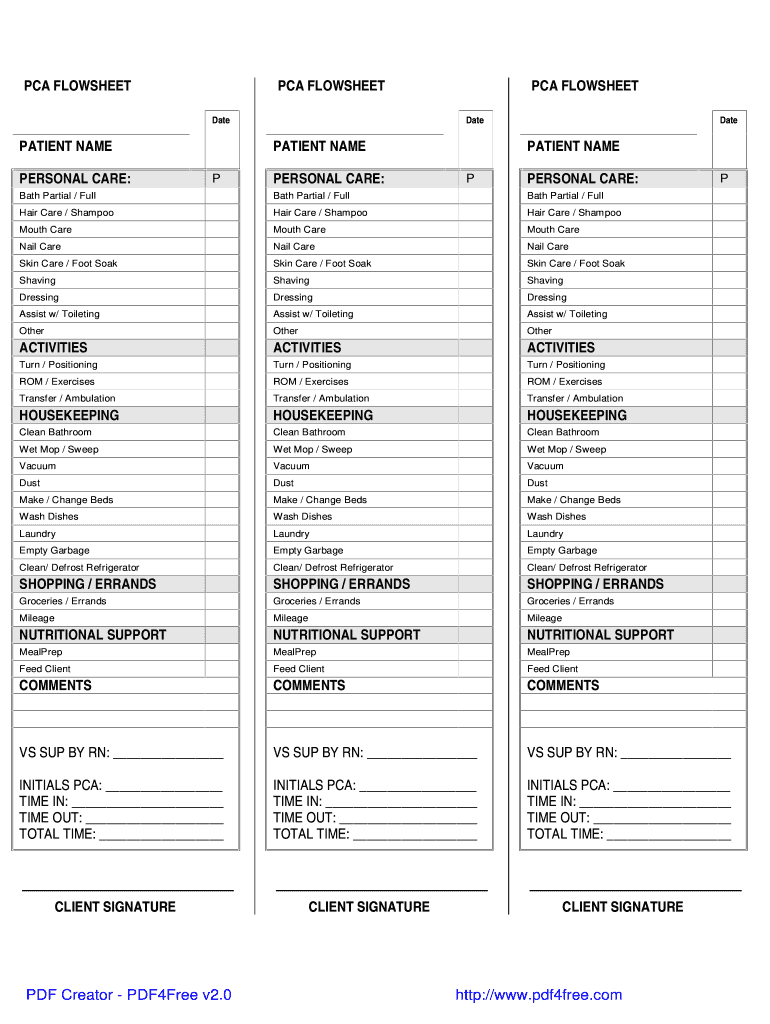
PCA FLOWSHEET - Northeast Kingdom Homecare 2026

Get Form
PCA FLOWSHEET - Northeast Kingdom Homecare Preview on Page 1

Here's how it works

01. Edit your form online
Type text, add images, blackout confidential details, add comments, highlights and more.
02. Sign it in a few clicks
Draw your signature, type it, upload its image, or use your mobile device as a signature pad.
03. Share your form with others
Send it via email, link, or fax. You can also download it, export it or print it out.

How to use or fill out PCA FLOWSHEET - Northeast Kingdom Homecare with Our Platform

Form edit decoration
9.5
Ease of Setup
DocHub User Ratings on G2
9.0
Ease of Use
DocHub User Ratings on G2
  1. Click ‘Get Form’ to open the PCA FLOWSHEET in our editor.
  2. Begin by entering the 'Date' at the top of the form. This helps track when services were provided.
  3. Fill in the 'PATIENT NAME' field to identify the individual receiving care.
  4. In the 'PERSONAL CARE' section, mark each service provided, such as 'Bath Partial / Full', 'Hair Care', and others. Use checkboxes for clarity.
  5. Proceed to the 'ACTIVITIES' section and document any activities performed, like 'Turn / Positioning' or 'Transfer / Ambulation'.
  6. Complete the 'HOUSEKEEPING' section by indicating tasks done, such as cleaning or laundry.
  7. In the 'SHOPPING / ERRANDS' area, note any errands completed and mileage if applicable.
  8. Fill out the 'NUTRITIONAL SUPPORT' section detailing meal preparation and feeding assistance.
  9. Add any additional comments in the designated area for further notes on patient care.
  10. Finally, ensure all initials, times in/out, total time, and client signatures are completed at the bottom of the form.

Start using our platform today to easily fill out your PCA FLOWSHEET for free!

be ready to get more

Complete this form in 5 minutes or less

Get form

Got questions?

We have answers to the most popular questions from our customers. If you can't find an answer to your question, please contact us.
Contact us

Yes, it is possible with DocHub. This reliable and compliant online service features a phone-based signing option. Once you log in to your DocHub account and import your PCA FLOWSHEET - Northeast Kingdom Homecare to our editor, complete all necessary areas and use the Sign tool on the top barf. Click on Create your signature and choose Phone from the available choices. Here, you scan a QR code using your smartphone and draw your signature on your phone display, as you usually do when signing hard copies. If you access DocHub right from your mobile device, you can eSign your form by drawing your eSignature, adding its image, or simply with a typed name.

You can complete and eSign your PCA FLOWSHEET - Northeast Kingdom Homecare online, even on a tight deadline. All you need to access high quality editing tools on any device is a DocHub account, that you can register in a couple of moments. Once you sign up, add your file or find what you are looking for in our catalog, complete it utilizing the editing tools you want, and put your electronic signature on it at the end.

Security and compliance

At DocHub, your data security is our priority. We follow HIPAA, SOC2, GDPR, and other standards, so you can work on your documents with confidence.

Learn more
ccpa2
pci-dss
gdpr-compliance
hipaa
soc-compliance
be ready to get more

Complete this form in 5 minutes or less

Get form