Patients & Visitors - Patient Administrations - McDonald Army Health ... 2026

Get Form
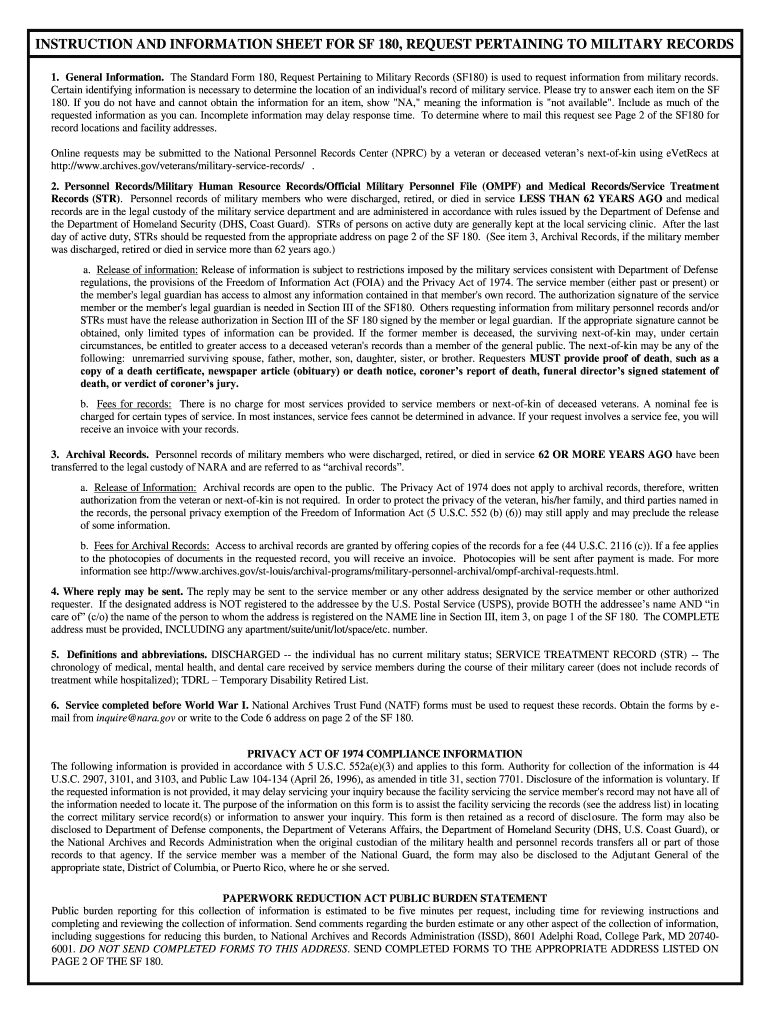
Patients & Visitors - Patient Administrations - McDonald Army Health ... Preview on Page 1

Here's how it works

01. Edit your form online
Type text, add images, blackout confidential details, add comments, highlights and more.
02. Sign it in a few clicks
Draw your signature, type it, upload its image, or use your mobile device as a signature pad.
03. Share your form with others
Send it via email, link, or fax. You can also download it, export it or print it out.

How to use or fill out Patients & Visitors - Patient Administrations - McDonald Army Health ... with our platform

Form edit decoration
9.5
Ease of Setup
DocHub User Ratings on G2
9.0
Ease of Use
DocHub User Ratings on G2
  1. Click ‘Get Form’ to open it in the editor.
  2. Begin by filling out Section I, providing your name used during service, social security number, date of birth, and place of birth. Ensure all information is accurate to facilitate record retrieval.
  3. In Section I, detail your military service history including branch of service, dates entered and released, and whether you are currently active or retired. If unknown, simply write 'unknown'.
  4. Proceed to Section II where you will check the items you are requesting such as DD Form 214 or medical records. Be specific about the years for which these forms were issued.
  5. In Section III, provide your return address and signature. Make sure to indicate your relationship to the veteran if applicable and include any necessary documentation like proof of death if requesting on behalf of a deceased veteran.

Start using our platform today for free to streamline your document editing and submission process!

be ready to get more

Complete this form in 5 minutes or less

Get form

Got questions?

We have answers to the most popular questions from our customers. If you can't find an answer to your question, please contact us.
Contact us

If you often deal with documents stored in your Google Drive, DocHub is an excellent solution for you to easily and quickly fill out, edit, and sign them. This editor integrates well with Google services, so you can export your Patients & Visitors - Patient Administrations - McDonald Army Health ... from your Google Drive to the editor without downloading and re-uploading it. Right-click on your file, select Open With → DocHub PDF Sign and Edit. In our editor, add and assign Signature Fields for all parties involved, then click on the Menu button above → Send → decide on how you want to share your form.

With a swift editing platform like DocHub, you do not need anything but a browser and internet connection to modify your Patients & Visitors - Patient Administrations - McDonald Army Health ... online swiftly. Upload your document or get the appropriate form in DocHub’s catalog, open our editor with one click, and complete it digitally. To edit your forms at any time, register a free profile with DocHub.

On 26 March 1941, A Station Hospital was established at Fort Eustis with COL William Bordon as its first commanding officer. Declared surplus property by the war department in 1944, the hospital was transferred to the Navy Department to be utilized as a Naval Hospital.
Health Services Primary Care. Active Duty. Family Advocacy (FAP) Internal Behavioral Consultant (IBC) Fort Eustis Resource Finder.
Provides health assessments, exercise prescription, nutrition counseling, weight management, stress management, and anthropometric testing for active-duty soldiers, spouses, retirees, family members, and DoD civilians.

Security and compliance

At DocHub, your data security is our priority. We follow HIPAA, SOC2, GDPR, and other standards, so you can work on your documents with confidence.

Learn more
ccpa2
pci-dss
gdpr-compliance
hipaa
soc-compliance
be ready to get more

Complete this form in 5 minutes or less

Get form