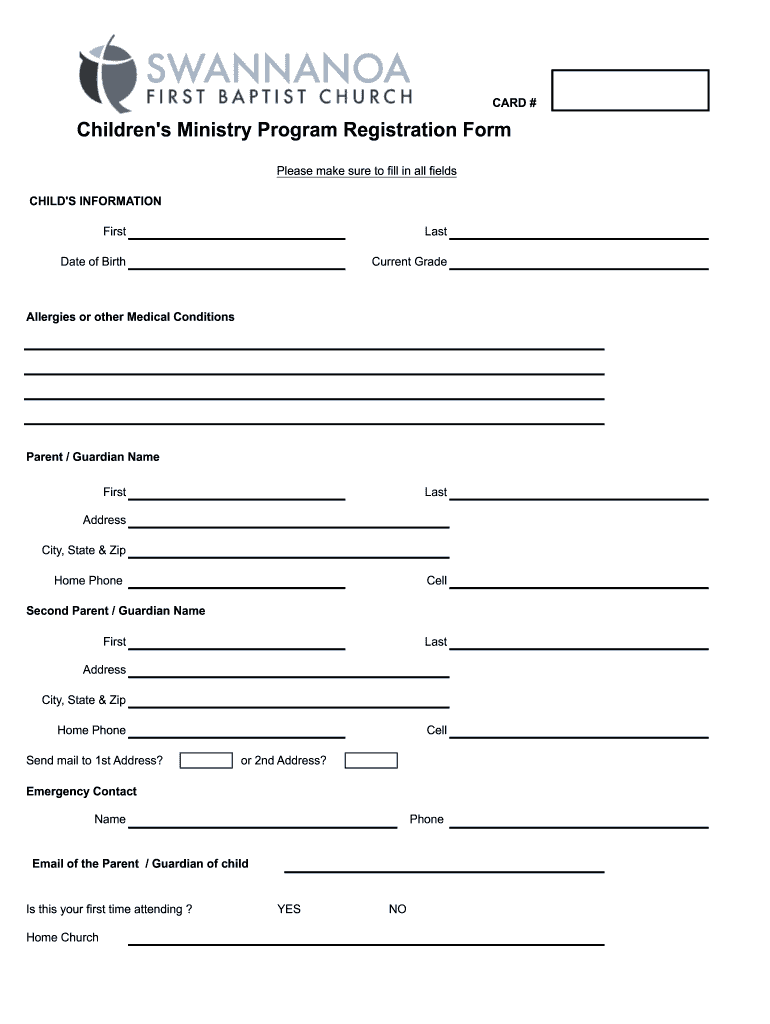
CARD # Children 's Ministry Program Registration Form - fbcswan 2026

Get Form
child home Preview on Page 1

Here's how it works

01. Edit your child home online
Type text, add images, blackout confidential details, add comments, highlights and more.
02. Sign it in a few clicks
Draw your signature, type it, upload its image, or use your mobile device as a signature pad.
03. Share your form with others
Send it via email, link, or fax. You can also download it, export it or print it out.

How to use or fill out CARD # Children 's Ministry Program Registration Form - fbcswan

Form edit decoration
9.5
Ease of Setup
DocHub User Ratings on G2
9.0
Ease of Use
DocHub User Ratings on G2
  1. Click ‘Get Form’ to open it in the editor.
  2. Begin by filling out the CHILD'S INFORMATION section. Enter your child's first and last name, date of birth, current grade, and any allergies or medical conditions.
  3. Next, provide details for the Parent/Guardian. Fill in the first and last names, address, home phone, and cell number for both parents/guardians.
  4. Complete the Emergency Contact section with a name, phone number, and email of the parent/guardian.
  5. Indicate if this is your child's first time attending by selecting 'YES' or 'NO'.
  6. In the additional information section, share anything that would help make your child's experience enjoyable.
  7. List authorized individuals who can pick up your child after events by providing their names and relationships.
  8. Review the AUTHORIZATION FOR MEDIA RELEASE section and select your preference regarding photo publication.
  9. Finally, print your full name, your child's full name, sign the form, and date it before submission.

Start using our platform today to easily complete the CARD # Children 's Ministry Program Registration Form - fbcswan for free!

be ready to get more

Complete this form in 5 minutes or less

Get form

Got questions?

We have answers to the most popular questions from our customers. If you can't find an answer to your question, please contact us.
Contact us

With DocHub, it’s quite simple. The service offers users an add-on called DocHub for Gmail, which you can find in the Google Workspace Marketplace without being charged. Set it up and grant it access to your Google account. Open your email with your CARD # Children 's Ministry Program Registration Form - fbcswan attached and click on the add-on button in the right-side panel. Sign in to your DocHub account, and upload the file to our editor, where you can fill it out and sign.

You can easily edit fill out your CARD # Children 's Ministry Program Registration Form - fbcswan on any iOS device. Open an internet browser of your liking, go to the DocHub website, authorize or create a new account, upload your file for editing, and make your desired changes. Our service is mobile-friendly, so using its functions on your smartphone will be a no-brainer, even on the first try.

Normal Pack. The normal pack has 52 cards in it. These are split into four types, known as suits, called hearts, clubs, diamonds and spades. There are numbers on the cards, and there is one card of each number in each suit.
Visa Debit cards: Visa debit cards are regarded as the most globally accepted debit cards for all kinds of online and electronic transactions. ... MasterCard debit cards: MasterCard debit card fall within the popular types of debit cards. ... RuPay Debit cards: RuPay debit card was introduced in India.
Running a debit card as \u201ccredit\u201d is not the same thing as using a credit card. Your debit card is attached to your checking account. A credit card is a line of credit, meaning that TwinStar is actually lending you the money for the purchase and billing you for it later.

Security and compliance

At DocHub, your data security is our priority. We follow HIPAA, SOC2, GDPR, and other standards, so you can work on your documents with confidence.

Learn more
ccpa2
pci-dss
gdpr-compliance
hipaa
soc-compliance
be ready to get more

Complete this form in 5 minutes or less

Get form

People also ask

Combining form denoting heart.
CARDS AcronymDefinitionCARDSCentral Archive for Reusable Defense SoftwareCARDSCollaborative Diabetes StudyCARDSComputerized Automated Reminder Diabetes SystemCARDSComprehensive Aerological Reference Data Set12 more rows
CARD means "A Flamboyant Person."
A debit card, also known as a check card or bank card is a payment card that can be used in place of cash to make purchases.
Computer Aided Research And Development. Business. CARD.

Related links