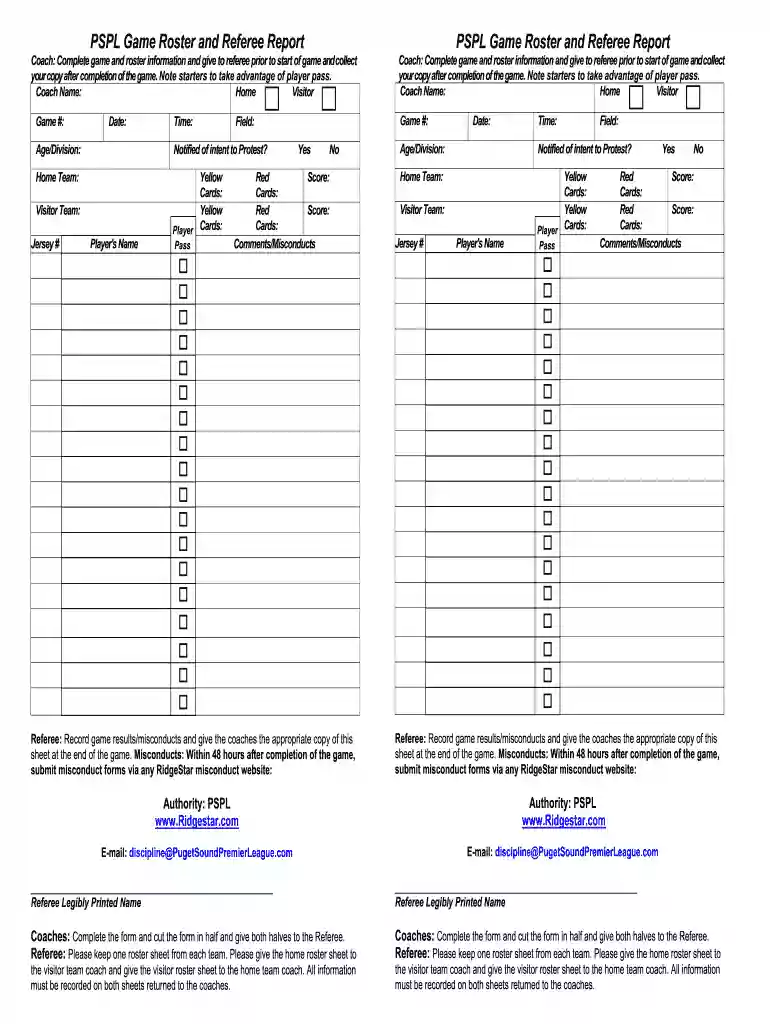
pspl 2022 Preview on Page 1

Pspl game 2026

Here's how it works

  • 01. Edit your pspl 2022 online

    Type text, add images, blackout confidential details, add comments, highlights and more.

  • 02. Sign it in a few clicks

    Draw your signature, type it, upload its image, or use your mobile device as a signature pad.

  • 03. Share your form with others

    Send it via email, link, or fax. You can also download it, export it or print it out.

How to use or fill out pspl game with our platform

Form edit decoration
9.5
Ease of Setup
DocHub User Ratings on G2
9.0
Ease of Use
DocHub User Ratings on G2
  1. Click ‘Get Form’ to open the PSPL Game Roster and Referee Report in the editor.
  2. Begin by entering the game details, including the date, time, and game number. Ensure accuracy as this information is crucial for record-keeping.
  3. Fill in the home and visitor team names along with their respective coaches' names. This section helps identify each team's representatives.
  4. List each player's name and jersey number under their respective teams. Make sure to note any players who have passes for easy identification.
  5. Record any yellow or red cards issued during the game in the designated fields. This is important for tracking player conduct.
  6. After completing the form, ensure both halves are cut and distributed to the referee as instructed. Retain a copy for your records.

Start using our platform today to streamline your PSPL game documentation process for free!

be ready to get more

Complete this form in 5 minutes or less

Security and compliance

At DocHub, your data security is our priority. We follow HIPAA, SOC2, GDPR, and other standards, so you can work on your documents with confidence.

If you believe that this page should be taken down, please follow our DMCA take down process here