PRENATAL VISIT RECORD FORM - One by One Ministries - onebyoneusa 2026

Get Form
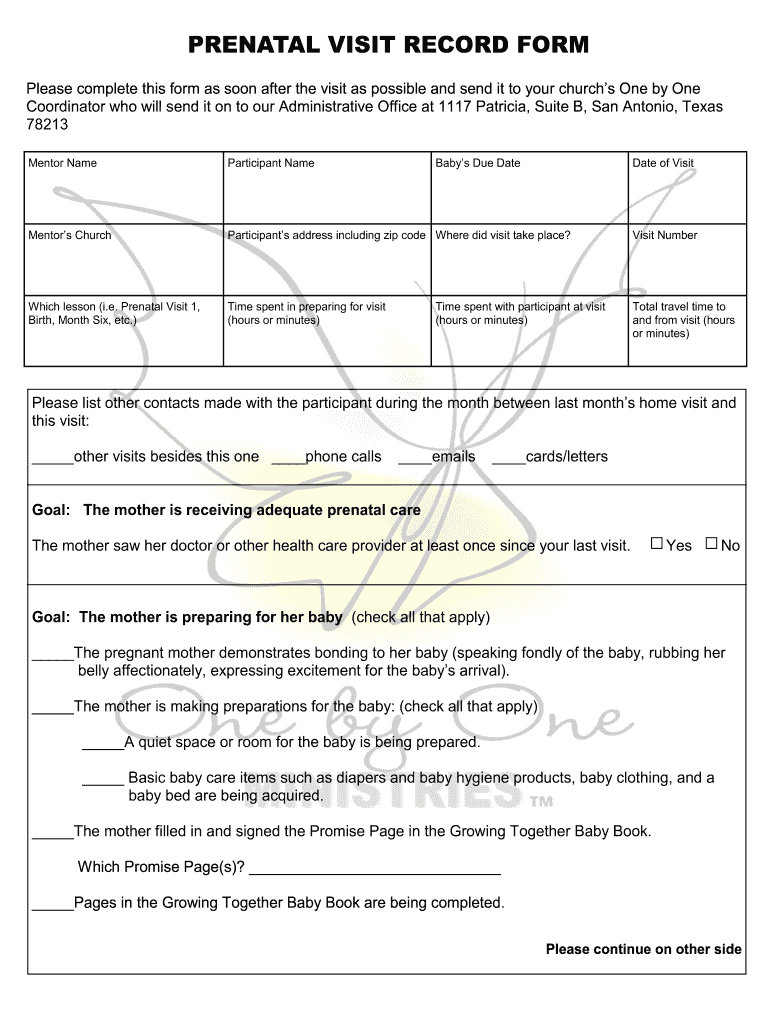
PRENATAL VISIT RECORD FORM - One by One Ministries - onebyoneusa Preview on Page 1

Here's how it works

01. Edit your form online
Type text, add images, blackout confidential details, add comments, highlights and more.
02. Sign it in a few clicks
Draw your signature, type it, upload its image, or use your mobile device as a signature pad.
03. Share your form with others
Send it via email, link, or fax. You can also download it, export it or print it out.

How to use or fill out PRENATAL VISIT RECORD FORM - One by One Ministries - onebyoneusa with our platform

Form edit decoration
9.5
Ease of Setup
DocHub User Ratings on G2
9.0
Ease of Use
DocHub User Ratings on G2
  1. Click ‘Get Form’ to open it in the editor.
  2. Begin by entering the Mentor Name and Participant Name at the top of the form. This identifies who is involved in the visit.
  3. Fill in the Baby’s Due Date and Date of Visit to keep track of important timelines.
  4. Provide the Mentor’s Church and Participant’s address, including zip code, ensuring accurate contact information.
  5. Indicate where the visit took place and record the Visit Number for reference.
  6. Select which lesson was covered during this visit, such as 'Prenatal Visit 1' or 'Birth'.
  7. Document time spent preparing for the visit, total travel time, and time spent with the participant using hours or minutes.
  8. List any other contacts made with the participant since your last visit, including visits, phone calls, emails, or letters.
  9. Complete sections regarding goals for prenatal care, support systems, and spiritual progress by checking applicable boxes.
  10. Finally, note your next visit date at the bottom of the form to maintain continuity in care.

Start filling out your PRENATAL VISIT RECORD FORM today for free on our platform!

be ready to get more

Complete this form in 5 minutes or less

Get form

Got questions?

We have answers to the most popular questions from our customers. If you can't find an answer to your question, please contact us.
Contact us

Most eSignature services require users to have a paid subscription. With DocHub, there are two options for you to add an electronic signature to your PRENATAL VISIT RECORD FORM - One by One Ministries - onebyoneusa without being charged:

  • You can do it during a 7-day trial period;
  • You can sign up for a free plan.

The second option, however, has limitations on the number of signatures, sign requests, emails, and forms for editing available per month. You can check for full information here.

Having a swift editing system like DocHub, you do not require anything but a browser and internet connection to modify your PRENATAL VISIT RECORD FORM - One by One Ministries - onebyoneusa on the internet swiftly. Upload your file or get the relevant form in DocHub’s catalog, open our editor with one click, and finish it digitally. To revise your forms at any time, sign up a free profile with DocHub.

Security and compliance

At DocHub, your data security is our priority. We follow HIPAA, SOC2, GDPR, and other standards, so you can work on your documents with confidence.

Learn more
ccpa2
pci-dss
gdpr-compliance
hipaa
soc-compliance
be ready to get more

Complete this form in 5 minutes or less

Get form