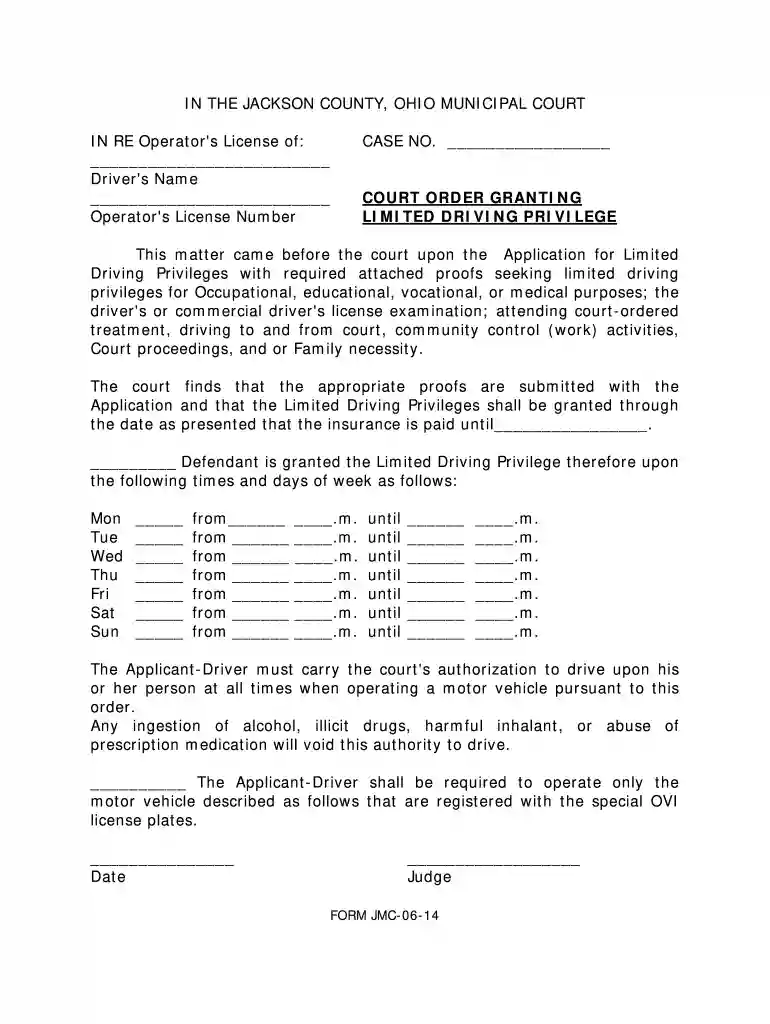
Court Order Granting Limited Drivingdocx 2026

Get Form
motion 10 days Preview on Page 1

Here's how it works

01. Edit your motion 10 days online
Type text, add images, blackout confidential details, add comments, highlights and more.

02. Sign it in a few clicks
Draw your signature, type it, upload its image, or use your mobile device as a signature pad.

03. Share your form with others
Send it via email, link, or fax. You can also download it, export it or print it out.

How to use or fill out Court Order Granting Limited Drivingdocx with our platform

Form edit decoration
9.5
Ease of Setup
DocHub User Ratings on G2
9.0
Ease of Use
DocHub User Ratings on G2
  1. Click ‘Get Form’ to open the Court Order Granting Limited Drivingdocx in the editor.
  2. Begin by entering the driver's name and operator's license number in the designated fields at the top of the document.
  3. Fill in the case number where indicated, ensuring accuracy for proper identification.
  4. In the section regarding limited driving privileges, specify the reasons for requesting these privileges, such as occupational or medical purposes.
  5. Indicate the dates until which the limited driving privileges are granted, ensuring that insurance is paid up to that date.
  6. Complete the days of the week and corresponding times when driving is permitted. Be sure to fill in both start and end times for each day.
  7. Review all entries for accuracy before finalizing your document. Ensure that all required information is complete.

Start using our platform today to easily fill out your Court Order Granting Limited Drivingdocx for free!

be ready to get more

Complete this form in 5 minutes or less

Get form

Got questions?

We have answers to the most popular questions from our customers. If you can't find an answer to your question, please contact us.
Contact us

Sure, a typed name is accepted as a valid electronic signature when you add it to your paperwork utilizing a compliant solution like DocHub. Simply add your Court Order Granting Limited Drivingdocx to our editor, click Sign in the top tool pane → Create your signature → Type your name in the proper tab, and choose how it will appear on your document.

You can complete and sign your Court Order Granting Limited Drivingdocx online, even on a tight deadline. All you need to access high quality editing tools on any device is a DocHub account, which you can register within a couple of moments. After you register, add your document or find what you are looking for in our catalog, complete it using the editing tools you need, and put your electronic signature on it at the end.

Driving with either alcohol or drugs in your system is one of the most common reasons for a suspended license. DUI laws vary across states, but most impose harsh penalties, including immediate suspension. In many cases, even a first offense can lead to a suspension lasting several months.
Common reasons for license suspensions/revocation in California include: DUI (which can trigger a suspension of up to four years) Refusing to submit to evidentiary breath or blood testing following a DUI arrest. underage drinking (which will trigger a delay in being able to get a license)
In the United States, drivers licenses are issued by each individual state, territory, and the District of Columbia (a practical aspect of federalism). Drivers are normally required to obtain a license from their state of residence.

Security and compliance

At DocHub, your data security is our priority. We follow HIPAA, SOC2, GDPR, and other standards, so you can work on your documents with confidence.

Learn more
ccpa2
pci-dss
gdpr-compliance
hipaa
soc-compliance
be ready to get more

Complete this form in 5 minutes or less

Get form