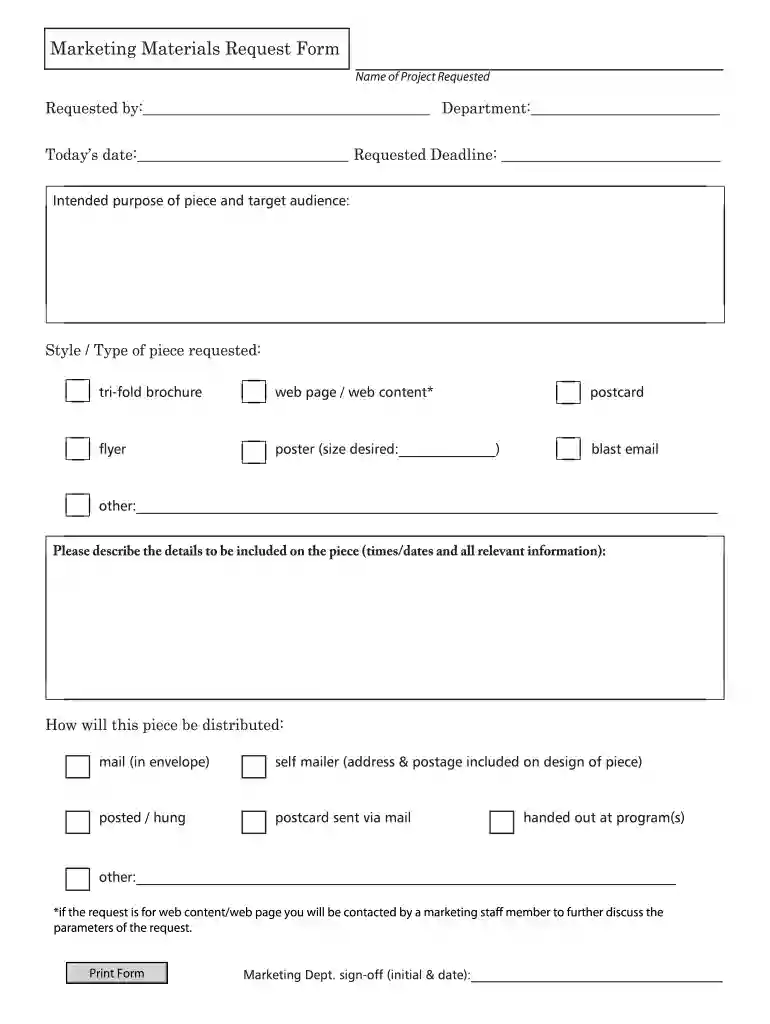
Marketing Materials Request Form - geaugaparkdistrictorg 2026

Get Form
marketing material request form Preview on Page 1

Here's how it works

01. Edit your marketing material request form online
Type text, add images, blackout confidential details, add comments, highlights and more.

02. Sign it in a few clicks
Draw your signature, type it, upload its image, or use your mobile device as a signature pad.

03. Share your form with others
Send marketing materials request form via email, link, or fax. You can also download it, export it or print it out.

How to use or fill out Marketing Materials Request Form - geaugaparkdistrictorg with DocHub

Form edit decoration
9.5
Ease of Setup
DocHub User Ratings on G2
9.0
Ease of Use
DocHub User Ratings on G2
  1. Click ‘Get Form’ to open the Marketing Materials Request Form in our editor.
  2. Begin by entering the 'Name of Project Requested' at the top of the form. This helps identify your request clearly.
  3. Fill in your name and department in the 'Requested by' section, along with today's date and the requested deadline for your materials.
  4. In the 'Intended purpose of piece and target audience' section, describe what you aim to achieve with this marketing material and who it is intended for.
  5. Select the style or type of piece you are requesting from options like tri-fold brochure, flyer, or web content. Be sure to specify any additional details if necessary.
  6. Provide a detailed description of all relevant information that should be included on the piece, such as times and dates.
  7. Indicate how you plan to distribute this piece in the distribution section. Options include mail, self-mailer, or handed out at programs.
  8. If your request involves web content, note that a marketing staff member will reach out to discuss further parameters.
  9. Finally, ensure that there is a space for Marketing Department sign-off by including initials and date before submitting your form.

Start using our platform today to streamline your document requests for free!

be ready to get more

Complete this form in 5 minutes or less

Get form

Got questions?

We have answers to the most popular questions from our customers. If you can't find an answer to your question, please contact us.
Contact us

Log in to your DocHub account and add your material request form to our editor using one of its upload methods - from your device, cloud storage, secure URL, or your DocHub folders if you have already processed your form before. Open our editor, click the Sign button in the top toolbar, and choose your signing method. You can use a picture of your handwritten signature, draw it, type in your name, or utilize a QR code as an alternative.

You need only a web connection and a web browser to complete your Marketing Materials Request Form - geaugaparkdistrictorg on an iOS phone. Open the DocHub website and authenticate. Then, add your document or select it from the list in your dashboard. Then use our editing tools to complete your form and save all your adjustments. You can also send it to a specified recipient immediately.

Security and compliance

At DocHub, your data security is our priority. We follow HIPAA, SOC2, GDPR, and other standards, so you can work on your documents with confidence.

Learn more
ccpa2
pci-dss
gdpr-compliance
hipaa
soc-compliance
be ready to get more

Complete this form in 5 minutes or less

Get form