Valle inspection form printable 2026

Get Form
valle inspection form printable Preview on Page 1

Here's how it works

01. Edit your form online
Type text, add images, blackout confidential details, add comments, highlights and more.

02. Sign it in a few clicks
Draw your signature, type it, upload its image, or use your mobile device as a signature pad.

03. Share your form with others
Send it via email, link, or fax. You can also download it, export it or print it out.

How to use or fill out valle inspection form printable with our platform

Form edit decoration
9.5
Ease of Setup
DocHub User Ratings on G2
9.0
Ease of Use
DocHub User Ratings on G2
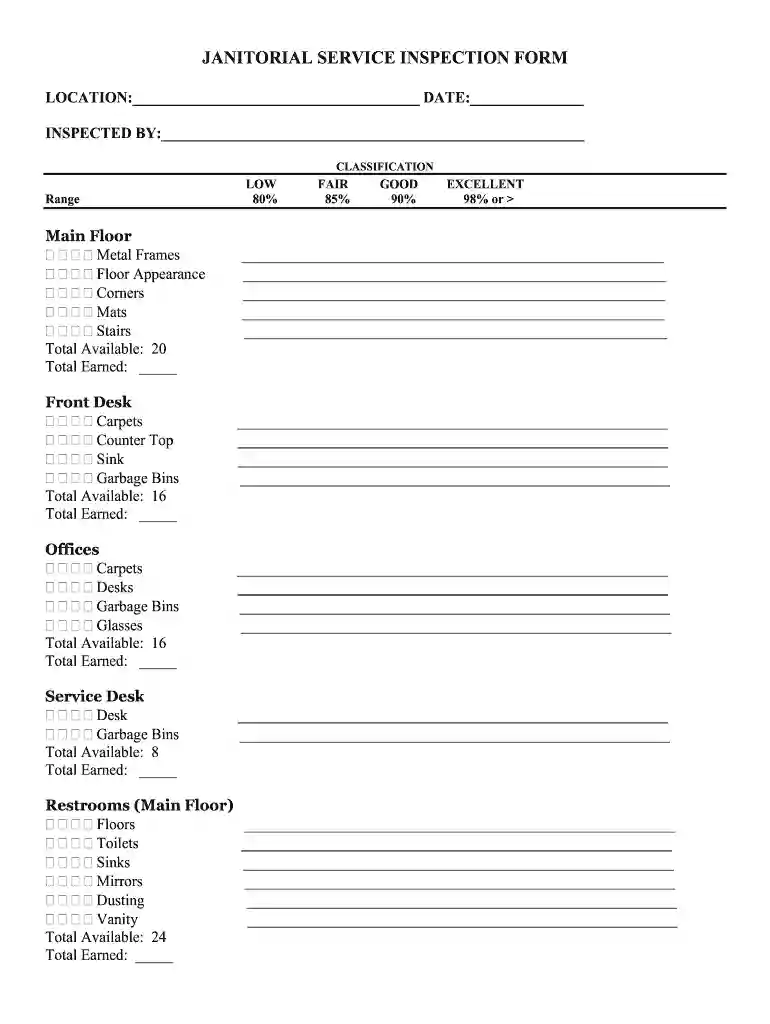
  1. Click ‘Get Form’ to open the valle inspection form in the editor.
  2. Begin by entering the location and date at the top of the form. This information is crucial for record-keeping.
  3. In the 'Inspected By' section, fill in your name to identify who conducted the inspection.
  4. Proceed to each classification section (Main Floor, Front Desk, Offices, etc.). For each area, assess and enter scores in the 'Total Earned' fields based on your observations.
  5. Utilize the comments sections provided throughout the form to note any specific issues or observations that require attention.
  6. After completing all sections, calculate your total score and percentage rating using the provided formulas at the end of the form.

Start filling out your valle inspection form for free today and streamline your documentation process!

be ready to get more

Complete this form in 5 minutes or less

Get form

Got questions?

We have answers to the most popular questions from our customers. If you can't find an answer to your question, please contact us.
Contact us

With DocHub, it’s pretty simple. The service offers users an add-on called DocHub for Gmail, which you can find in the Google Workspace Marketplace free of charge. Install it and grant it access to your Google account. Open your email with your valle inspection form printable attached and click on the add-on button in the right-side panel. Sign in to your DocHub account, and upload the file to our editor, where you can fill it out and sign.

With DocHub, you have several convenient methods to edit your valle inspection form printable online. You can drag and drop the form and edit it directly at the DocHub site or use our browser extension to fill out your form right away. On top of that, you can edit your PDF on your phone, as DocHub works with all the accessible mobile platforms.

For a field inspection report specifically, start by gathering all the data you need: take pictures to document physical conditions, collect notes on abnormalities and follow existing checklists or protocols that are relevant to your industry or project.
Headlights, brake lights, turn signals, reverse lights, side marker lights and even the little license plate bulbs are some of the most common reasons cars fail inspection.
STEP 6: Check Signal Lights Turn off all lights. Turn on stop lights (apply trailer hand brake or have a helper put on the brake pedal). Turn on left turn signal lights.

Security and compliance

At DocHub, your data security is our priority. We follow HIPAA, SOC2, GDPR, and other standards, so you can work on your documents with confidence.

Learn more
ccpa2
pci-dss
gdpr-compliance
hipaa
soc-compliance
be ready to get more

Complete this form in 5 minutes or less

Get form

People also ask

A 7 Point Inspection is a thorough examination of a vehicles key components to ensure they are in good working order. This inspection typically includes checking the vehicles tires, brakes, lights, fluids, belts, battery, and windshield wipers.
Examine the internal components for signs of wear, distortion, or damage. Leakage test: Reintroduce pressure to the system to test for leakage. Apply a soapy, non-corrosive leak-detecting solution to the valve and watch for bubbles that indicate a leak.
They include: Vehicle overview. Under the hood/bonnet inspection. In-cab inspection. Walkaround inspection. Brake system inspection. Functional controls check. Final system check.
Inspection forms are specialized documents used to systematically evaluate, record, and report the condition, compliance, or quality of assets, environments, or processes.
Here are the steps you can take to streamline your process. Create an Inspection Strategy. Before conducting a safety inspection, its imperative to plan for it. Conduct the Safety Inspection. Review the Data. Implement Corrective Actions. Follow Up on Your Findings.

Related links