Type text, add images, blackout confidential details, add comments, highlights and more.
02. Sign it in a few clicks
Draw your signature, type it, upload its image, or use your mobile device as a signature pad.
03. Share your form with others
Send it via email, link, or fax. You can also download it, export it or print it out.
How to use or fill out chemoilenergy biz for application with our platform
Ease of Setup
DocHub User Ratings on G2
Ease of Use
DocHub User Ratings on G2
Click ‘Get Form’ to open the chemoilenergy biz for application in the editor.
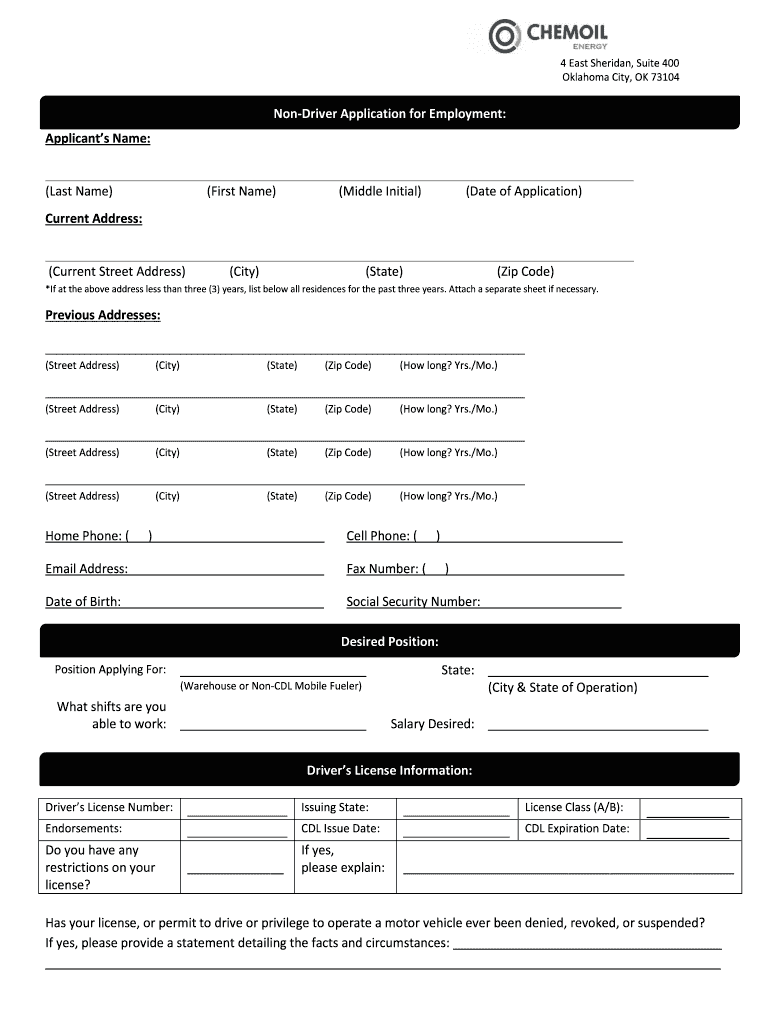
Begin by entering your personal information. Fill in your name, current address, and contact details accurately. Ensure that all fields are completed, especially the date of application.
List your previous addresses for the past three years if applicable. Use a separate sheet if necessary to provide complete information.
Provide your driver’s license information, including number, issuing state, and any restrictions. Be honest about any past issues with your driving record.
Complete the personal information section by answering questions regarding citizenship, education, military service, and previous employment with Chemoil.
In the work history section, list your last ten years of employment. Include job titles, reasons for leaving, and major duties performed.
Finally, review all entries for accuracy before signing and dating the application at the bottom of the form.
Start filling out your application today using our platform for free!
Fill out chemoilenergy biz for application online It's free
Chemoil energy biz for application loginChemoil energy biz for application phone numberChemoil energy locationsChemoil productsChemoil CorporationChemoil GlencoreChemoil energy midland tx phone numberChem oil
Security and compliance
At DocHub, your data security is our priority. We follow HIPAA, SOC2, GDPR, and other standards, so you can work on your documents with confidence.
Cookie consent notice
This site uses cookies to enhance site navigation and personalize your experience.
By using this site you agree to our use of cookies as described in our Privacy Notice.
You can modify your selections by visiting our Cookie and Advertising Notice.