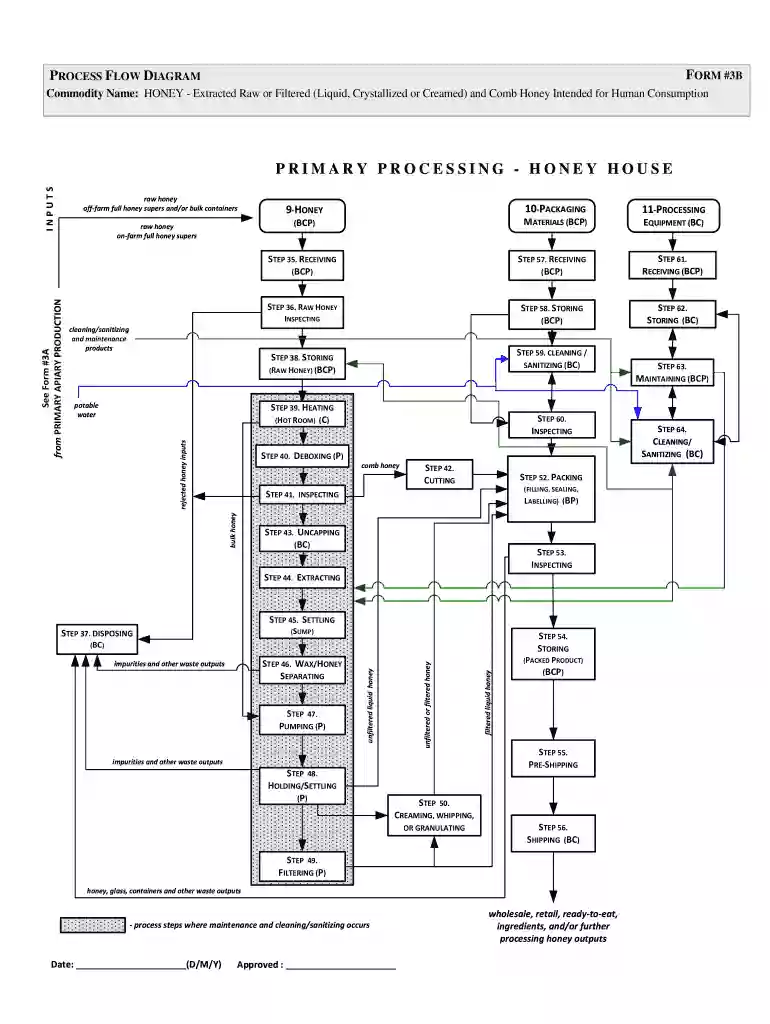
Visio-Honey process flow diagramform 324honeyhouse10JULY2014vsd 2026

Get Form
flow chart of honey Preview on Page 1

Here's how it works

01. Edit your flow chart of honey online
Type text, add images, blackout confidential details, add comments, highlights and more.

02. Sign it in a few clicks
Draw your signature, type it, upload its image, or use your mobile device as a signature pad.

03. Share your form with others
Send honey processing flow chart via email, link, or fax. You can also download it, export it or print it out.

How to use or fill out Visio-Honey process flow diagramform 324honeyhouse10JULY2014vsd with our platform

Form edit decoration
9.5
Ease of Setup
DocHub User Ratings on G2
9.0
Ease of Use
DocHub User Ratings on G2
  1. Click ‘Get Form’ to open it in the editor.
  2. Begin by entering the commodity name at the top of the form. Ensure it accurately reflects 'HONEY - Extracted Raw or Filtered' as this is crucial for processing.
  3. Proceed to fill in the date field with the appropriate date format (D/M/Y) to maintain proper documentation.
  4. Review each step of the process flow diagram, starting from receiving raw honey inputs. Use checkboxes or text fields to indicate completion of each step, such as cleaning/sanitizing and maintenance products.
  5. For each processing step, like heating and filtering, ensure you document any observations or results in the designated areas provided in the form.
  6. Finally, make sure to sign off on the approval section once all steps are completed and verified for accuracy.

Start using our platform today for free to streamline your document editing and form completion!

be ready to get more

Complete this form in 5 minutes or less

Get form

Got questions?

We have answers to the most popular questions from our customers. If you can't find an answer to your question, please contact us.
Contact us
You can quickly draw PIDs and PFDs by dragging process engineering equipment shapes onto your drawing page, connecting them with smart pipelines, and then dragging components, such as valves and instruments, onto the pipelines. To identify components in your diagram, you can create intelligent tags.
Bring your ideas to life with Visios powerful flowchart features. Use the vast library of shapes, stencils, and templates to turn numbers and information into impactful stories.
Visio is a specialised application that allows individuals to improve brainstorming activities and outline process designs in a clear, understandable way. Process mapping in Visio is useful to showcase processes and find ways to improve them.
What Are the Steps to Create a Chemical Process Flow Diagram in Visio? Gather Information and Identify Process Steps. Open Visio and Create a New Drawing. Add Shapes to Represent Equipment and Process Steps. Connect Shapes with Arrows to Show Flow. Add Text and Labels to the Diagram. Customize the Look of the Diagram.
How to Create a Process Flow Diagram in Visio? Open the Software. Choose a Template. Add Connect Shapes: Once youve selected a template, youll be presented with a blank canvas. Label and Format Shapes: Add Text and Annotations. Arrange and Align Shapes. Save Your Diagram. Export or Share (Optional)

Security and compliance

At DocHub, your data security is our priority. We follow HIPAA, SOC2, GDPR, and other standards, so you can work on your documents with confidence.

Learn more
ccpa2
pci-dss
gdpr-compliance
hipaa
soc-compliance

People also ask

A Visio SIPOC (Suppliers, Inputs, Process, Outputs, Customers) template offers a visual tool for process improvement. It provides a clear, intuitive overview of complex workflows, enhancing understanding and communication.