



Here's how it works



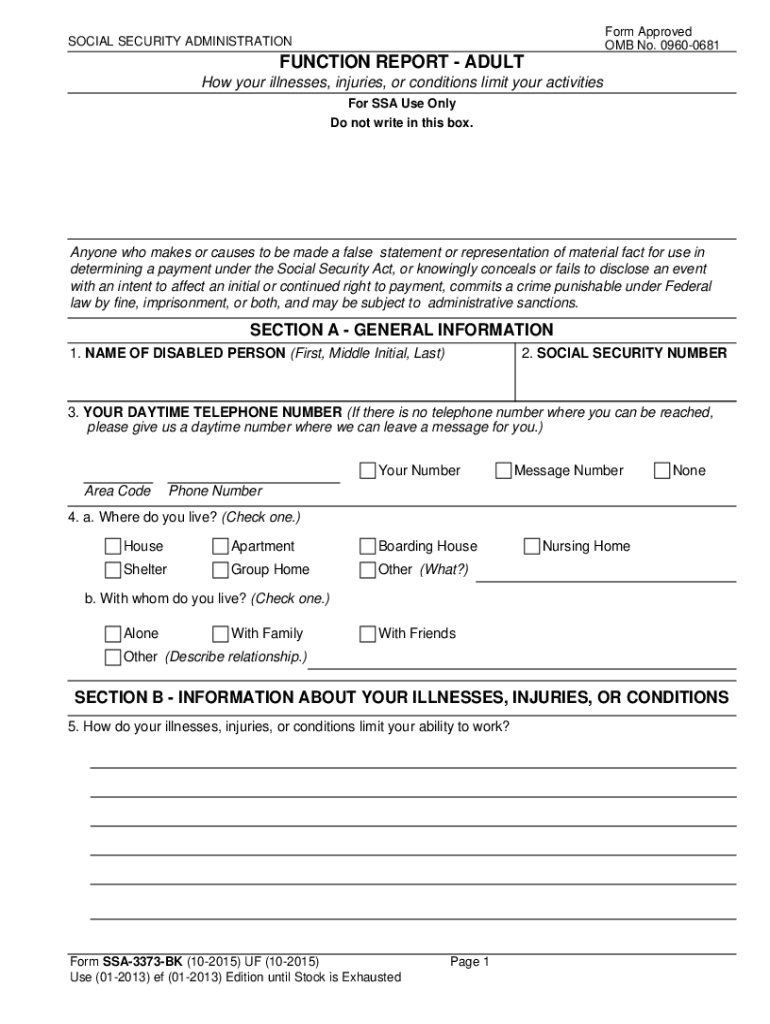
How to use or fill out SSA-3373-BK Function Report - Adult

- Click ‘Get Form’ to open it in the editor.
- Begin with Section A, providing your name, Social Security number, and contact information. Ensure all fields are filled; if a question does not apply, write 'none' or 'does not apply'.
- Move to Section B and describe how your conditions limit your ability to work. Be specific about the impact on daily activities.
- In Section C, detail your daily activities from waking up to going to bed. Include any caregiving responsibilities and how they affect you.
- Proceed to Section D where you will check items that your conditions affect, such as lifting or walking. Provide explanations for each checked item.
- Finally, use the Remarks section for any additional information that may help clarify your situation before submitting the form.
Start filling out your SSA-3373-BK Function Report today using our platform for free!
It's free
Got questions?
How can I sign my ssa 3373 pdf on iOS?
With DocHub, you can easily sign your ssa 3373 pdf or any other document on iOS, even without setting up extra programs. You can access your DocHub account from any internet-connected browser and complete and sign your document in any preferred method with just a few clicks.
Can I sign my what happens after function report is sent into ssdi dept while I edit it?
If you edit your what happens after function report is sent into ssdi dept with DocHub, you will not need to look for other applications or solutions to eSign it. An electronic signature is part of DocHub’s substantial editing toolset, which allows you to apply changes in your form without switching between websites. Simply complete your form, double-check the correctness of the information and put your electronic signature at the end to make it submission-ready in minutes.
What is a function Report Third Party?
Why did Social Security send me a function report?
How do you answer Question 6 on a function report?
Security and compliance
At DocHub, your data security is our priority. We follow HIPAA, SOC2, GDPR, and other standards, so you can work on your documents with confidence.
Learn more