Type text, add images, blackout confidential details, add comments, highlights and more.
02. Sign it in a few clicks
Draw your signature, type it, upload its image, or use your mobile device as a signature pad.
03. Share your form with others
Send pupil id via email, link, or fax. You can also download it, export it or print it out.
How to use or fill out casual admission with our platform
Ease of Setup
DocHub User Ratings on G2
Ease of Use
DocHub User Ratings on G2
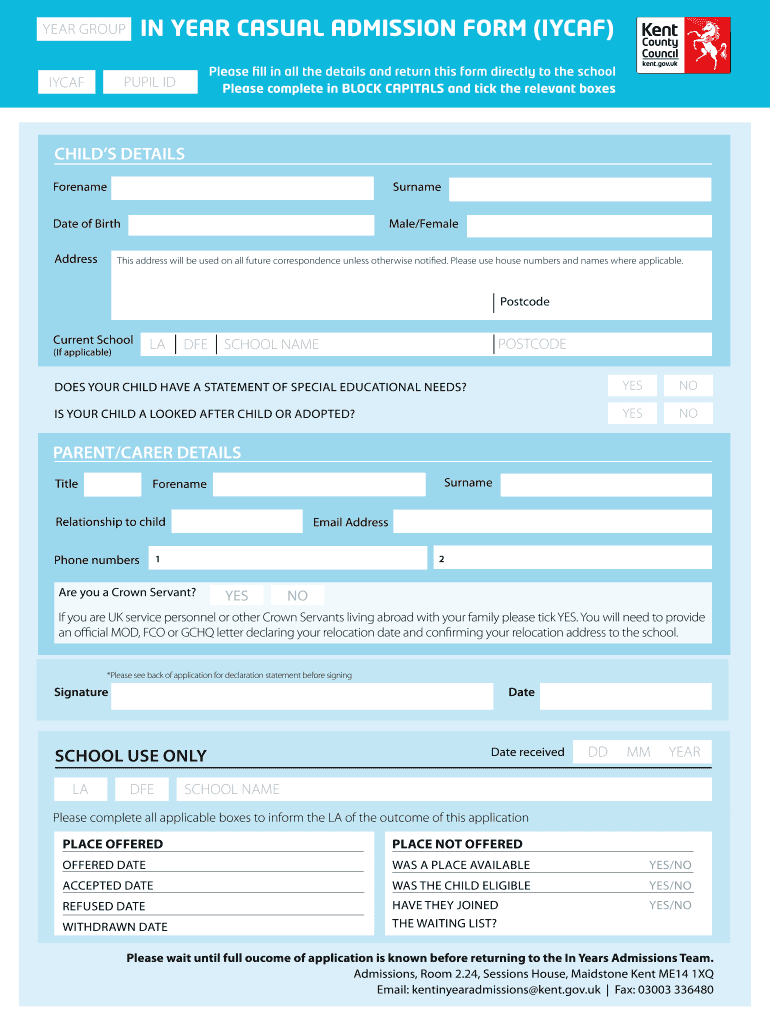
Click ‘Get Form’ to open the casual admission form in the editor.
Begin by filling in your child's details. Enter their forename, surname, date of birth, and select their gender. Ensure all information is in BLOCK CAPITALS.
Provide your child's current school information if applicable, including the Local Authority (LA) and Department for Education (DFE) numbers.
Indicate whether your child has a statement of special educational needs and if they are a looked after child or adopted by ticking the relevant boxes.
Next, complete the parent/carer details section. Fill in your title, surname, forename, relationship to the child, phone numbers, and email address.
If applicable, indicate if you are a Crown Servant and provide any necessary documentation as instructed.
Finally, review all entered information for accuracy before signing and dating the form at the bottom.
Start using our platform today to streamline your casual admission process effortlessly!
Casual admission templateCasual admission californiaCal State Apply loginCasual admission meaning in collegeCal State LA Admissions phone numberCal State loginAdmissions Office ELACCal State LA Admissions Office hours
Security and compliance
At DocHub, your data security is our priority. We follow HIPAA, SOC2, GDPR, and other standards, so you can work on your documents with confidence.
An alien defined in section (101)(a)(15)(A)(iii) of the Act is to be admitted for an initial period of not more than three years, and may be granted extensionsRead more
Take one or a few courses for personal interest, rather than completing a full certificate or bachelors program. Casual Classes are a great option.Read more
Admission ticket to regularly scheduled concerts in Kivotos. From classical to the latest popular music. The perfect gift for anyone who loves a variety ofRead more
Cookie consent notice
This site uses cookies to enhance site navigation and personalize your experience.
By using this site you agree to our use of cookies as described in our Privacy Notice.
You can modify your selections by visiting our Cookie and Advertising Notice.