Type text, add images, blackout confidential details, add comments, highlights and more.
02. Sign it in a few clicks
Draw your signature, type it, upload its image, or use your mobile device as a signature pad.
03. Share your form with others
Send it via email, link, or fax. You can also download it, export it or print it out.
How to use or fill out the Customs Declaration with our platform
Ease of Setup
DocHub User Ratings on G2
Ease of Use
DocHub User Ratings on G2
Click ‘Get Form’ to open it in the editor.
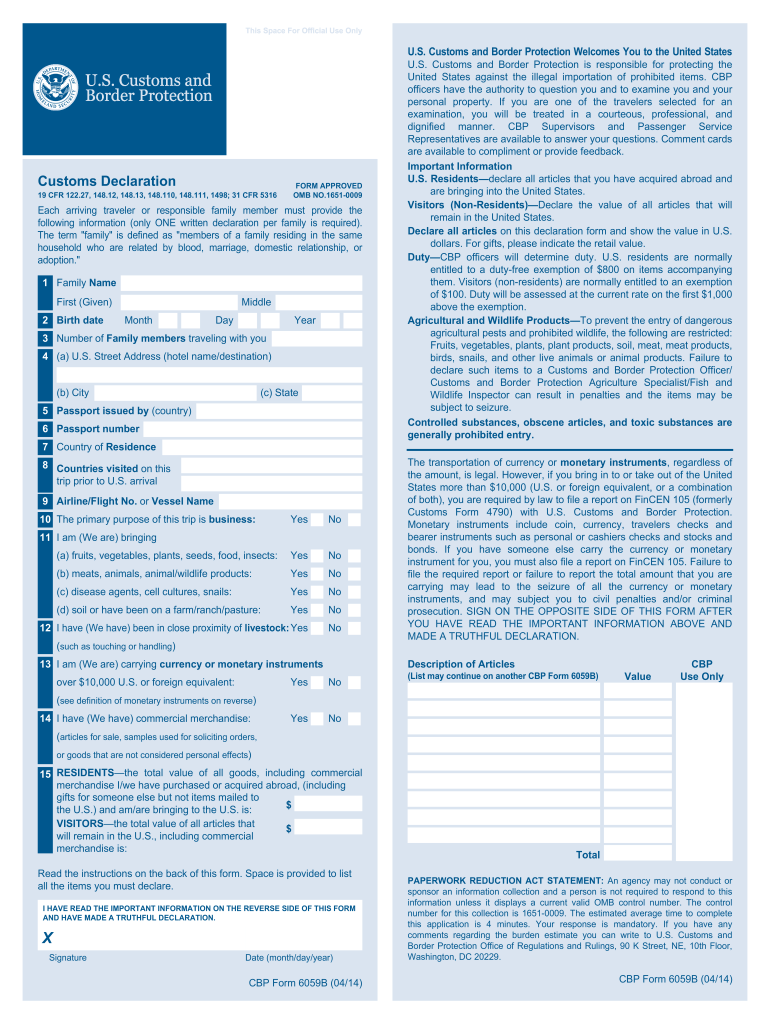
Begin by entering your family name, middle name, and first (given) name in the designated fields. Ensure accuracy as this information is crucial for identification.
Next, input your birth date by selecting the month, day, and year from the dropdown menus provided.
Indicate the number of family members traveling with you. This helps customs officials understand your group size.
Fill in your U.S. street address, including hotel name or destination, city, and state. This information is essential for tracking purposes.
Provide details about your passport: the issuing country and passport number. Double-check these entries for accuracy.
List your country of residence and any countries visited prior to arriving in the U.S. This section helps customs assess travel history.
Select your airline/flight number or vessel name to assist in identifying your travel route.
Answer questions regarding the purpose of your trip and any items you are bringing that may require declaration. Be honest to avoid penalties.
Finally, review all entered information for accuracy before signing on the opposite side of the form and dating it appropriately.
Start using our platform today to streamline your document completion process for free!
Fill out following information (only ONE written declaration per family is required) online It's free
U.S. Customs allowance per personDo I have to declare souvenirs at customsU.S. Customs Declaration Form sampleU.S. Customs Declaration Form PDFCustoms Baggage Declaration FormElectronic Customs DeclarationDeclaration formsImport declaration form
Security and compliance
At DocHub, your data security is our priority. We follow HIPAA, SOC2, GDPR, and other standards, so you can work on your documents with confidence.
Each arriving traveler or responsible family member must provide the following information (only ONE written declaration per family is required). The termRead more
Application for Extension of Time To File U.S. Income Tax
Use Form 2350 to ask for an extension of time to file your tax return only if you expect to file Form 2555 or 2555-EZ and you need the time to meet either theRead more
The Dean of Enrollment Services will review the submission, conduct any inquiries, and respond with a written decision to the student within 15 working days.Read more
Cookie consent notice
This site uses cookies to enhance site navigation and personalize your experience.
By using this site you agree to our use of cookies as described in our Privacy Notice.
You can modify your selections by visiting our Cookie and Advertising Notice.