Type text, add images, blackout confidential details, add comments, highlights and more.
02. Sign it in a few clicks
Draw your signature, type it, upload its image, or use your mobile device as a signature pad.
03. Share your form with others
Send it via email, link, or fax. You can also download it, export it or print it out.
How to use or fill out FM-050, Child Sup Affidavit, Rev. 04.14.doc with Our Platform
Ease of Setup
DocHub User Ratings on G2
Ease of Use
DocHub User Ratings on G2
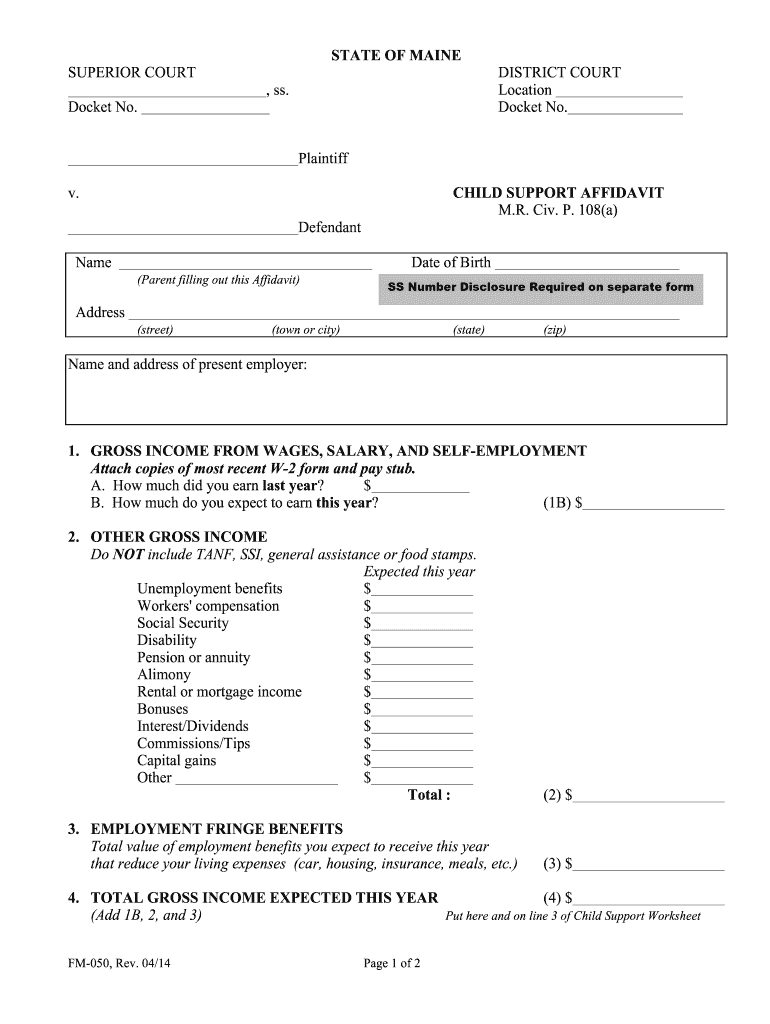
Click ‘Get Form’ to open the FM-050, Child Support Affidavit in the editor.
Begin by entering your name and date of birth at the top of the form. Ensure accuracy as this information is crucial for identification.
Fill in your address details including street, town or city, state, and zip code. This helps establish your residency.
Provide the name and address of your current employer. This section is essential for verifying income sources.
In Section 1, report your gross income from wages and self-employment. Attach recent W-2 forms and pay stubs for verification.
Complete Section 2 by detailing other sources of income such as unemployment benefits or alimony. Be thorough to ensure all income is accounted for.
Continue filling out Sections 3 through 11 regarding employment benefits, child support for other children, health insurance costs, and any additional relevant facts.
Review all entries for accuracy before signing at the bottom of the form to affirm that all information provided is complete and truthful.
Start using our platform today to fill out your FM-050 form easily and efficiently!
Fill out FM-050, Child Sup Affidavit, Rev. 04.14.doc online It's free
52-73-0206-K, Internal Revenue Service, Baltimore, Maryland. Exempt From THIS AFFIDAVIT IS TO BE COMPLETED ONLY BY THOSE WHO ARE REGISTERED TO CONDUCTRead more
Cookie consent notice
This site uses cookies to enhance site navigation and personalize your experience.
By using this site you agree to our use of cookies as described in our Privacy Notice.
You can modify your selections by visiting our Cookie and Advertising Notice.